
SaaS Pricing Page Design That Drives Decisions
 By
By Share

Share
Get a quick blog summary with



SaaS pricing pages are one of the highest traffic pages on most product websites. No matter which pages you bring traffic to through SEO, ads, or content, users usually reach the pricing page before they take the next step. This is where interest turns into a real decision.
Yet most SaaS teams treat pricing pages as an afterthought. They either copy what competitors are doing or keep a basic table just for the sake of having a pricing page. The result is confusion, hesitation, and users leaving without taking action.
Pricing pages are emotional decision points. This is where users worry about choosing the wrong plan, paying more than needed, or getting locked into something unclear. Based on our work reviewing and redesigning over 500 pricing pages, we have seen what helps users move forward and what pushes them away.
In this guide, we break down what actually makes a SaaS pricing page work and how we at Tenet design pricing pages that guide decisions instead of slowing them down.
We also reference some of the world’s most conversion-friendly pricing pages to show what good looks like in practice.
What a Pricing Page Should Actually Do (Not What Most Teams Think)
While most teams think pricing pages exist only to share what the prices are, that is not their real job. Pricing pages exist because most buying decisions in SaaS happen here. This is where users pause, compare, and decide whether your product feels safe to try. If the pricing page creates doubt, users leave even if they liked the product before. A good pricing page guides decisions.
Here is what it should actually do.
Reduce anxiety around commitment
Most users hesitate to sign up because they fear making the wrong choice or getting stuck in a plan that does not fit their needs. Even if they like your product, the moment money is involved, doubt increases. This hesitation is not about price alone. It is about risk.
If you have a free plan or a free trial, make it clear and easy to spot. Simple pointers like No credit card required, Cancel anytime, or Upgrade only when you are ready help users feel safer about taking the first step. These small details reduce the mental barrier to entry.
Even when you do not offer a free plan, you can still reduce anxiety by clearly explaining what happens after signup, how billing works, and how easy it is to change or cancel plans. These cues may seem minor, but they directly impact whether users move forward or leave.
Help users self qualify quickly
A pricing page should help users know if the product and the plan are right for them within seconds. When users land here, they are doing quick mental checks like Is this for someone like me and Will this work for my use case. If they cannot answer these questions fast, they leave.
Each plan should be positioned clearly for a specific type of user or stage of growth. Instead of only listing features, explain who the plan is meant for and what kind of problem it solves. This helps users quickly place themselves into the right bucket without overthinking.
When users can self qualify in a few seconds, they feel more confident about moving forward. It reduces back and forth, lowers friction for sales teams, and leads to better quality signups.
Make the next step feel low risk
If the next step feels heavy, users delay or leave. Even small friction points can stop action at this stage. Long forms, forced account creation, or unclear signup steps make the decision feel bigger than it needs to be.
You should always make the next step simple and predictable. Let users know what will happen after they click the button. Tell them if they will land on a signup form, a trial setup, or a short onboarding flow. This reduces uncertainty and makes the action feel easier to take.
Answer buying questions before sales gets involved
Pricing pages should handle basic buying questions so sales does not need to repeat the same explanations on every call. When users reach out to sales with simple questions about pricing, limits, or plan differences, it usually means the pricing page did not do its job well.
A strong pricing page clears common doubts upfront and prepares users for a more meaningful sales conversation. This saves time for both users and your sales team, and leads to better quality leads.
You can do this by:
- Add an FAQ section
- Share a short demo video
- Show clear plan limits and usage rules
- Add short explanations for who each plan is for
- Highlight testimonials that show how similar users solved real problems
Tenet’s Process for Designing High Converting SaaS Pricing Pages
We at Tenet follow a very simple and practical approach when designing SaaS pricing pages. We do not start with layouts or visual styles. We first make sure the pricing page is clear, honest, and easy for users to decide on.
Below is a step by step view of how we design high converting pricing pages for SaaS products. We will also walk through a practical example of an HR platform focused on the UK market, so you can see how this approach works in a real pricing page setup.
Step 1: Understand How the Product Is Bought
The first thing we focus on is how the product is actually bought. No two SaaS products sell the same way, even if they operate in the same category. The way users reach the pricing page, the level of intent they have, and who makes the final decision all change how the pricing page should be designed.
We first map out the buying motion so the pricing page matches real user behavior, not internal assumptions:
- Self serve vs sales assisted
- Single buyer vs buying committee
- Monthly vs annual decision drivers
Depending on the audience, your SaaS offering, and the needs of your users, we shape the pricing page to support that buying flow. This keeps the page aligned with how users actually make decisions, instead of forcing them into a generic pricing layout.
In the HR SaaS example we are using, the buying motion is different. It involves a buying committee, the sales team plays a key role, and decisions are mostly annual. So we design the pricing page to support longer consideration, clearer plan framing for different roles, and strong cues that guide users toward speaking with sales instead of pushing for instant signup.
Step 2: Map Pricing Friction Points
Every pricing page has friction points. These are the moments where users pause, feel unsure, or decide to leave. The job of the pricing page is not just to show options, but to remove as many of these friction points as possible.
Based on our experience, friction usually comes from unclear plan differences, hidden limits, pricing that feels hard to justify, or not knowing what happens after signup. If users cannot quickly understand what they get and what they are committing to, they hesitate.
For the HR SaaS pricing page in our example, we would map friction points around common concerns like data security, compliance, onboarding effort, and how the platform fits into existing HR systems. Once we identify these doubts, we design the pricing page to address them upfront so users feel more confident taking the next step.
Step 3: Define the Pricing Story
When users land on your pricing page, they come from different stages of growth and different use cases. Your pricing page should speak to these segments clearly instead of treating all users the same. This is what we mean by defining the pricing story.
Depending on your industry and your exact SaaS use case, segmentation will change. For an HR tool, one of the biggest and most natural segments is company size, usually based on number of employees. A 20 person startup and a 1,000 person company do not look for the same outcomes, even if they use the same product.
So instead of only listing plans by features, we frame pricing around who the plan is for. For example, plans can be positioned for small teams, growing companies, and large enterprises. Each plan should clearly state what stage it fits, what kind of HR problems it solves best, and what success looks like at that level.
Step 4: Design the Decision Path
This step needs close input from your product and sales teams. They help us understand how users usually move from interest to purchase and where they get stuck. Without this context, it is easy to design a pricing page that looks good but does not match how decisions are actually made.
We define a clear default plan strategy so users are not forced to overthink their first choice. We also decide how different plans should be compared so users can quickly see what changes as they move up, without feeling overwhelmed. The goal is to guide users toward the right next step based on their stage and intent, not to push them into the most expensive option.
At this stage, we also design how upgrades and expansion are framed. Users should feel that choosing a plan is a safe starting point and that moving to a higher plan later will be simple and expected as their needs grow.
Now, after all these steps and the process, our first draft of the SaaS pricing page is ready. By this stage, the structure, plan framing, and decision flow are already defined.
Before we show you how this pricing page looks in our HR SaaS example, let us first walk through the key elements we always focus on when designing any SaaS pricing page.
Checklist for Elements We Focus On at Tenet When Designing Pricing Pages
Here is a simple checklist of the core elements we focus on at Tenet when designing SaaS pricing pages. These are the fundamentals we validate on every pricing page before moving into detailed design or layout decisions.
- Clear positioning of who each plan is for
- Value based plan naming instead of feature based naming
- Feature grouping by outcome, not modules
- Visible upgrade paths without pressure
- Transparent limits and fair usage explanations
- Friction reducing microcopy near CTAs
- Smart defaults that guide choice without forcing it
- Annual vs monthly pricing framed as savings, not upsell
- Social proof near pricing decisions
- Risk reversal with trials, refunds, or easy cancellation
Example HR SaaS Pricing Page
Let us start with the hero section of the pricing page. This is the first point of contact when users arrive here, so it should set clear expectations right away. The hero should briefly state what the pricing is for, who the product is meant for, and what value users can expect before they scroll further.
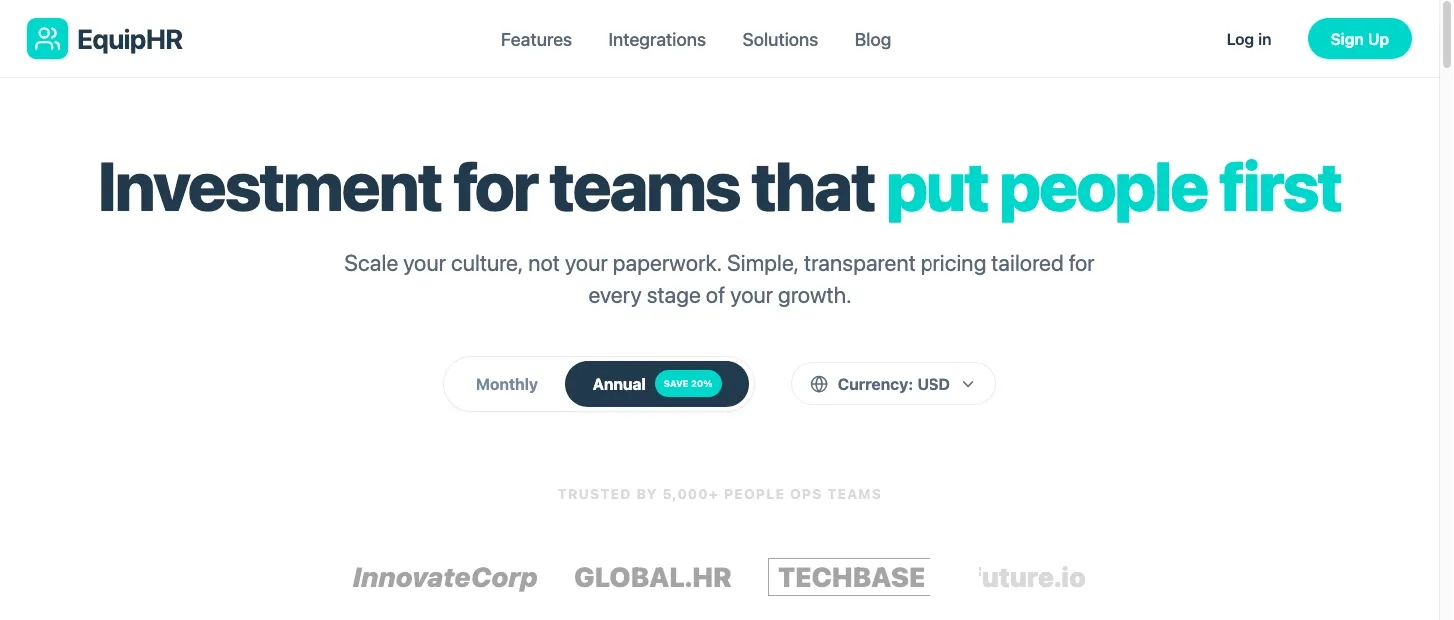
Pricing tables showcasing the most important features of the platform:
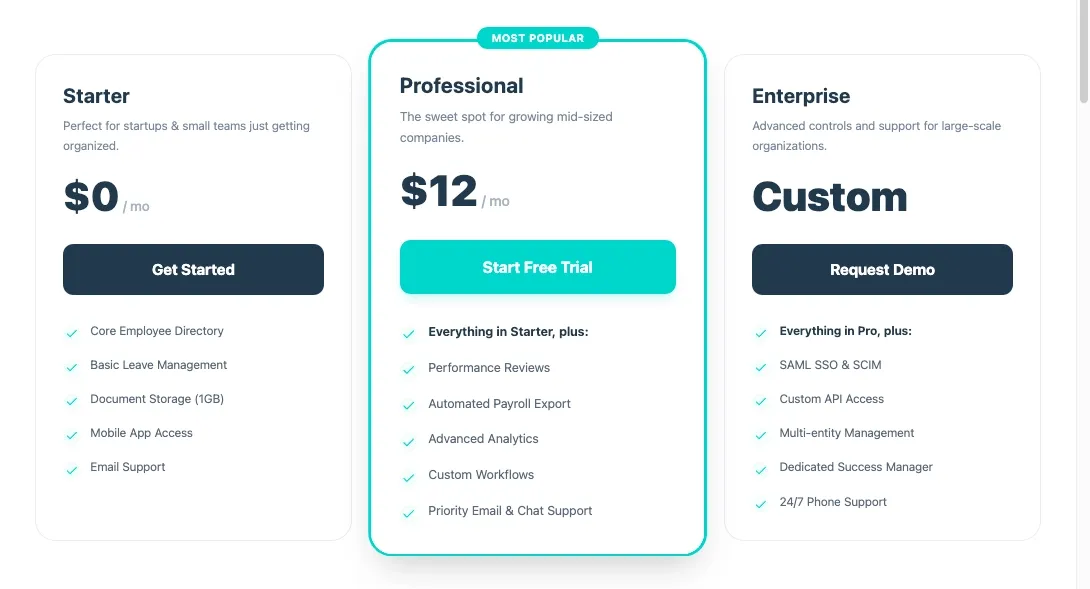
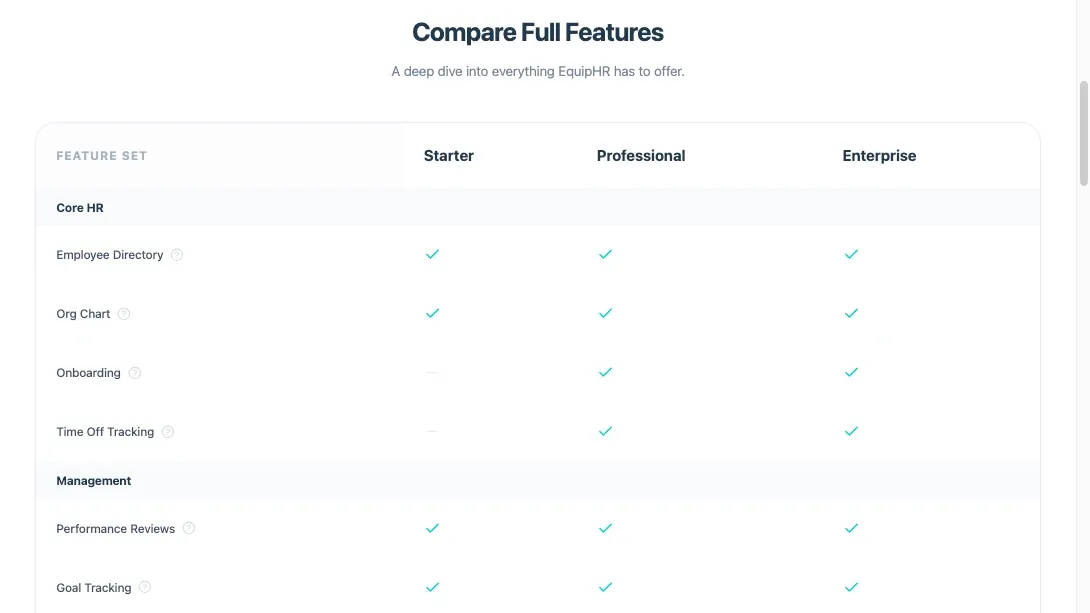
We also include a section that compares the features across all plans to help users confirm their choice.
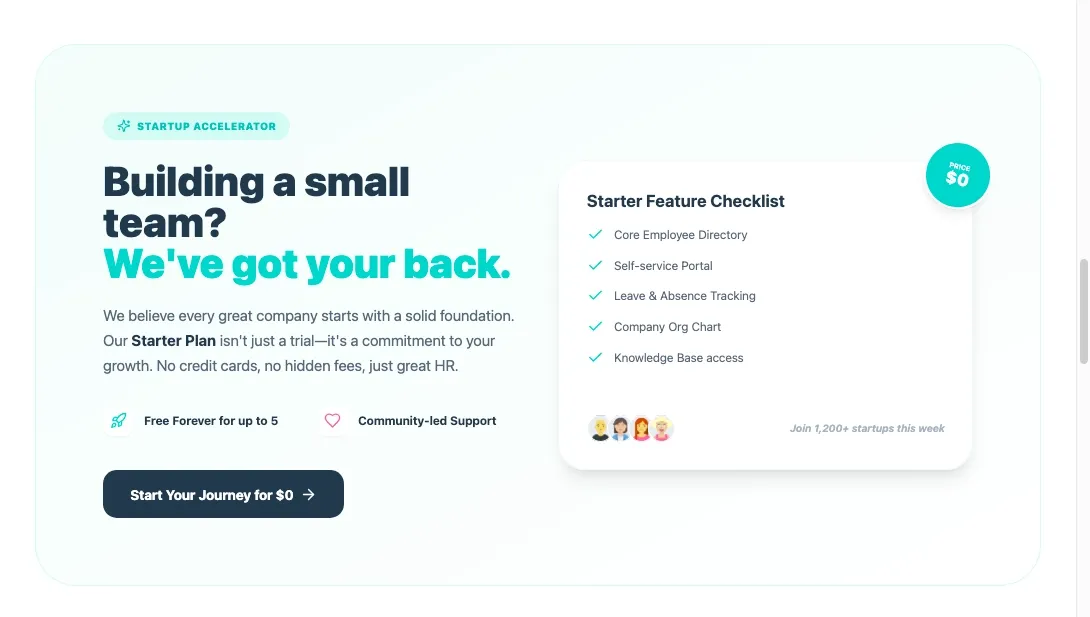
To help users take their first step without feeling locked in, we have also included a free starter plan.
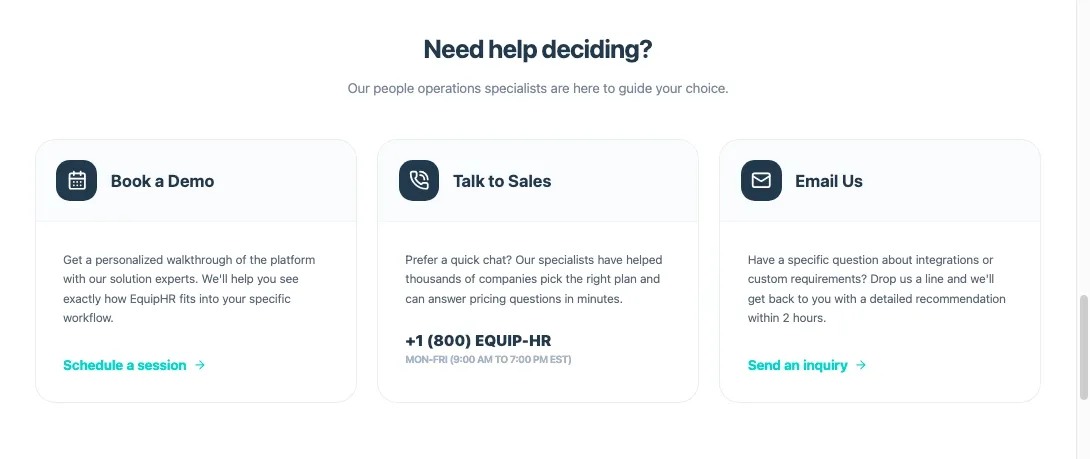
To support users in their decision journey, it is also important to offer clear and easy ways to connect with the team.
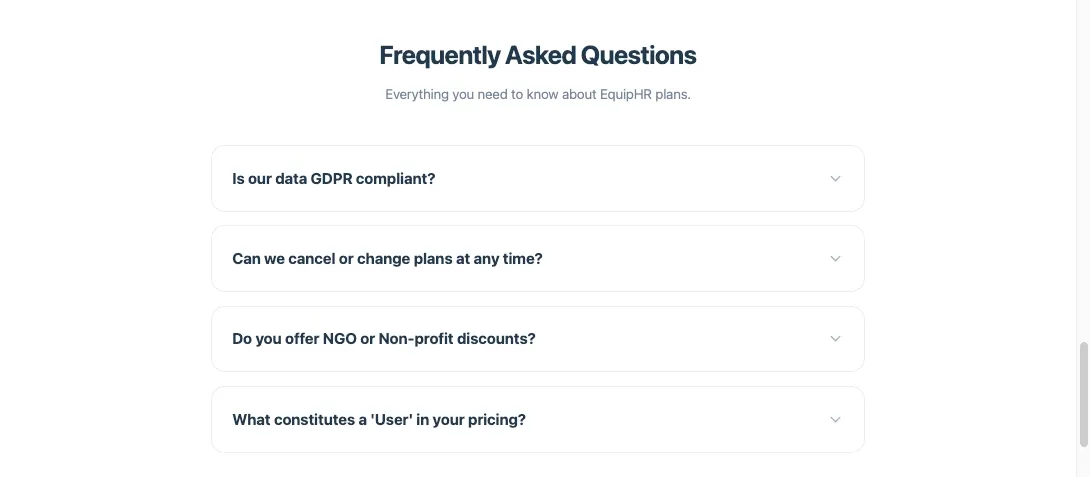
We have also included a dedicated section to answer the most common questions users have before making a decision.
To help users take the next step, we have included a clear final CTA section.
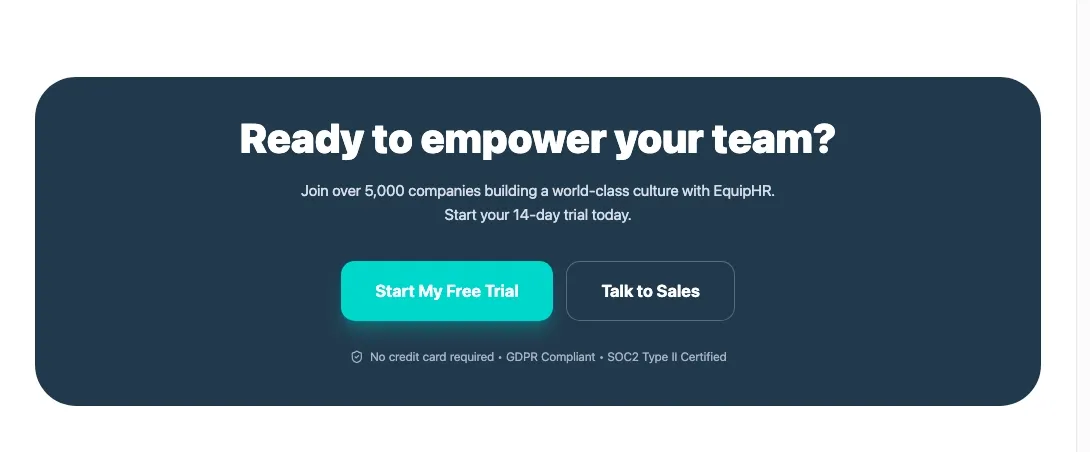
There can be many more sections added beyond what you see here, but based on the goals and user needs, we have included only the most important ones for this pricing page.
Real World Examples of SaaS Pricing Pages That Get It Right (And Why)
That was just one example of how we would structure a SaaS pricing page. In real projects, this is only the first draft. The final version evolves based on user behavior, feedback from sales teams, and ongoing testing.
To understand what works at scale, it also helps to look at pricing pages from SaaS products that handle millions in revenue and serve large user bases. These companies have refined their pricing pages over time based on real conversion data and buyer behavior. Let us look at a few real world examples and break down what they get right and why their pricing pages work so well.
1. Notion’s Pricing Page
Notion’s pricing page is a good example of how simplicity improves decision making. The page is clean and easy to scan, which helps users understand their options without feeling overwhelmed.
The pricing tiers include Free, Plus, Business, and Enterprise. Each plan is presented with clear headings, short bullet point highlights, and practical wording. There is no clutter or unnecessary explanation.
Even the AI add on and the comparison table are placed naturally within the scroll, so users can explore more details only if they need them. This keeps the main decision flow simple while still giving access to deeper information.
2. Miro’s Pricing Page
Miro’s pricing page is a strong example of how to handle complexity without confusing users. As a collaborative online workspace for distributed teams, Miro serves a wide range of users, from individuals to large enterprises, and the pricing page reflects this clearly.
Each plan is positioned for different team sizes and levels of usage, which helps users quickly see where they fit. The structure makes it easy to move from a basic plan to more advanced options as team needs grow.
Miro also does a good job of highlighting compliance and security features in the context of higher plans. This builds trust for larger teams and enterprises that care about data protection and governance before making a buying decision.
3. Finofo’s Pricing page
Finofo’s pricing page is a strong example of transparent and trust led pricing. They position their product around making global finance simple, and the pricing reflects that promise.
They clearly showcase their free pay as you go plan, which includes full platform access with no setup or subscription fees. The only cost is a simple 0.5 percent FX markup, which removes surprise charges and builds confidence early.
Finofo also stands out by allowing users to compare their pricing with banks and FX brokers. This helps users see the real value in context and makes the decision easier. It is one of the best SaaS pricing pages you will find when it comes to clarity and fairness.
Want to explore more examples like these?
Check out our curated list of SaaS pricing page examples for ideas and inspiration. We have covered pricing pages from some of the world’s leading SaaS products so you can see how top teams design pricing that converts.
Turn Your Pricing Page Into a Growth Lever
With that, we have shared how to think about SaaS pricing pages, why most of them fail, and how we at Tenet design pricing pages that guide users instead of confusing them.
A pricing page is not just a place to show numbers. It is where most buying decisions happen, and small design choices here can have a direct impact on signups, conversions, and revenue quality.
If you are a SaaS business looking to improve how users move from interest to paid plans, your pricing page is a good place to start. We are a global experience design agency with years of experience working with Fortune 500 brands and leading SaaS companies.
Check out our case studies to see how we solve real product and conversion challenges, or get in touch with our team to discuss how we can help you design a pricing page that actually converts.
Expertise Delivered Straight to Your Inbox
Expertise Delivered Straight to Your Inbox




Got an idea on your mind?
We’d love to hear about your brand, your visions, current challenges, even if you’re not sure what your next step is.
Let’s talk


