
Canva’s New Creative Operating System For Content Creation
 By
By Share

Share
Get a quick blog summary with



If you work in the design or content industry, you already know how fast creative pipelines are changing.
Tools, speed, and collaboration matter more than ever. Canva has been one of the most important platforms in this change and is helping people and teams create faster without losing structure.
Canva has always pushed the boundaries of accessible design, be it brand kits or bulk creation of content. Now they have introduced something bigger, a complete Creative Operating System that aims to change how brands plan, create, and manage content in different formats.
During their recent announcement, Canva highlighted this as the next step in modern creative work. Our design team at Tenet took a close look to understand what it means for professional designers, brand teams, and fast-growing businesses.
And we definitely know that this update is not limited to a feature rollout. It shows how design systems, AI, and collaboration are merging into one single workflow.
What Is Canva’s Creative Operating System
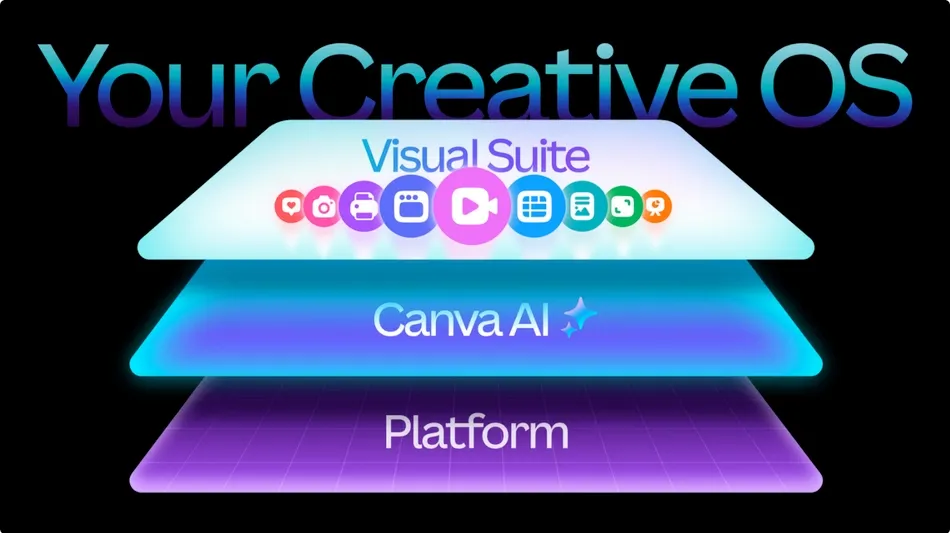
Canva calls this their biggest launch to date. The Creative Operating System is a complete workspace where teams can create, manage, collaborate, and publish content across formats. It is an upgrade to the existing Visual Suite, built to go beyond design templates and move into full brand and content management.
While there are platforms like Figma that serve product design and complex UX needs, Canva has always focused on democratizing design for marketing and everyday creative work. With this update, Canva is doubling down on that mission by bringing the entire creative pipeline into one place. Planning, design, approvals, brand control, asset storage, and publishing now sit in a single ecosystem.
AI plays a central role, handling repetitive tasks, resizing, and smart layout decisions so teams can move from idea to execution faster. Social content, videos, presentations, and documents can be created and aligned with brand guidelines in one space. For busy marketing teams and fast growing businesses, this means fewer tools to juggle, faster approvals, and smoother collaboration. For designers who use Canva, it frees time to focus on creative direction while everyday production becomes easier and more automated.
Key Updates Powering Canva’s Next Phase
There are many small improvements across the platform, from interface refinements to smarter asset controls. The real shift sits in three core areas that define this Creative Operating System. Here is a quick look at the major updates that shape how teams will design, collaborate, and publish moving forward.
Visual Suite
The Visual Suite has been a major pillar in Canva’s journey to build an end-to-end creative workflow. It was introduced to help users move beyond static design and work across documents, presentations, websites, sheets, and now code and email.
With this release, Canva has upgraded several core experiences inside the Visual Suite to support more complex creation and real business use cases. The aim is simple. Keep everything creative in one place, cut tool switching, and let teams plan, design, and publish inside a single system. Below are the most important updates that mark this next phase.
Video 2.0
Canva has rebuilt its video editing experience to support creators who want speed without sacrificing quality. Video 2.0 delivers a faster interface, improved performance, and a more intuitive timeline that makes trimming, layering, syncing, and refining clips simpler. It brings professional controls into a format that feels friendly even for non-editors.
Users get access to short-form templates inspired by TikTok, Reels, and Shorts so content never starts from zero. AI features assist with edits, effects, and timing, helping creators keep momentum instead of jumping between software. The entire process stays inside Canva, so every clip remains brand aligned and ready to publish without watermarks or extra exports.
Canva Forms
Canva Forms allow you to add interactive forms directly inside your designs and websites, making data collection easy without switching to external tools. You can drag and drop fields, match the form style to your brand, and publish instantly.
Whether it is sign-ups, surveys, feedback, or event RSVPs, the experience stays clean, simple, and fully integrated. Every response flows directly into Canva Sheets, where you can sort, filter, and review inputs in one place. This turns static designs into actionable experiences and keeps marketing and design teams aligned without moving between multiple apps or platforms.
Data In Canva Code
Canva Code and Canva Sheets now work together to bring interactive, data-driven content to life inside the editor. This makes it possible to build elements that react to user inputs, form submissions, or live data and then style them with the same creative controls used for regular designs. When form entries or other data come in, they go straight into Canva Sheets, keeping everything organized and accessible.
Canva Email Design
Email design has been one of the most requested capabilities, and Canva has now made it native inside the Visual Suite. You can start with industry-ready templates or generate layouts through AI, then customize every element to fit your brand style.
Buttons, banners, product blocks, and calls to action can be arranged easily with drag-and-drop simplicity. The idea is to help teams ship polished campaigns without relying on separate design tools or complicated HTML editing.
Canva AI
Canva has made some major changes on the AI front. Canva has been building AI features for the past few years, but this update shifts them into a true design intelligence platform.
The highlight is the Canva Design Model, the world’s first AI model trained to understand the full complexity of design. Unlike tools that only generate flat images, this model understands structure, layout, hierarchy, branding, and visual logic. It creates fully editable designs in seconds, so you are not rebuilding anything from scratch. This model powers the next wave of Canva AI features and is also available inside platforms like ChatGPT, Claude, and soon Gemini, which means AI design will reach users wherever they work.
With this update, you can now generate complete, editable designs directly inside the Canva editor. If you need a social post, deck slide, product mockup, website layout, or video frame, AI can give you a polished base that matches your intent.
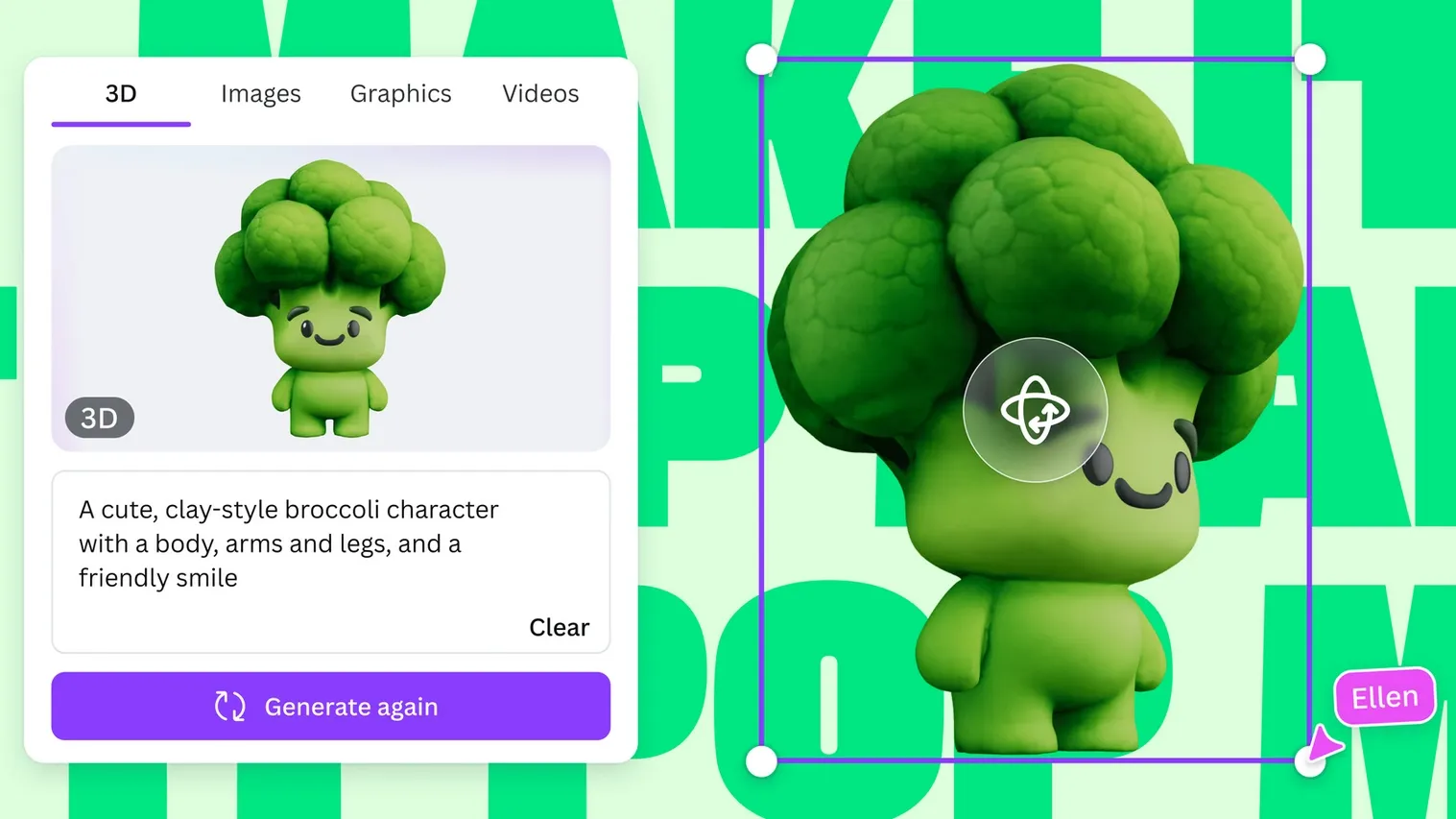
AI Powered Elements also expands what creators can produce by generating photos, icons, shapes, textures, videos, and even 3D objects inside the elements panel. Everything stays editable and on brand, giving you speed without losing creative control.
To make the creative flow even smoother, Canva has introduced Ask Canva. It helps you work smarter inside the design workspace. You can ask questions, request edits, search Canva content, learn how to do something, or get layout suggestions without leaving the screen. It feels like having a design assistant sitting right beside you. Here is a short video below that shows how Ask Canva works in real time and how it supports on-the-fly decision-making for creative teams.
Platform
Along with upgrades to creation and AI, Canva has updated the platform layer that supports how teams plan, execute, and scale brand activity. Two important additions in this release are Canva Grow and the improved Brand Systems. They both are focused on helping fast moving teams stay consistent and data driven as they create and launch campaigns.
Canva Grow
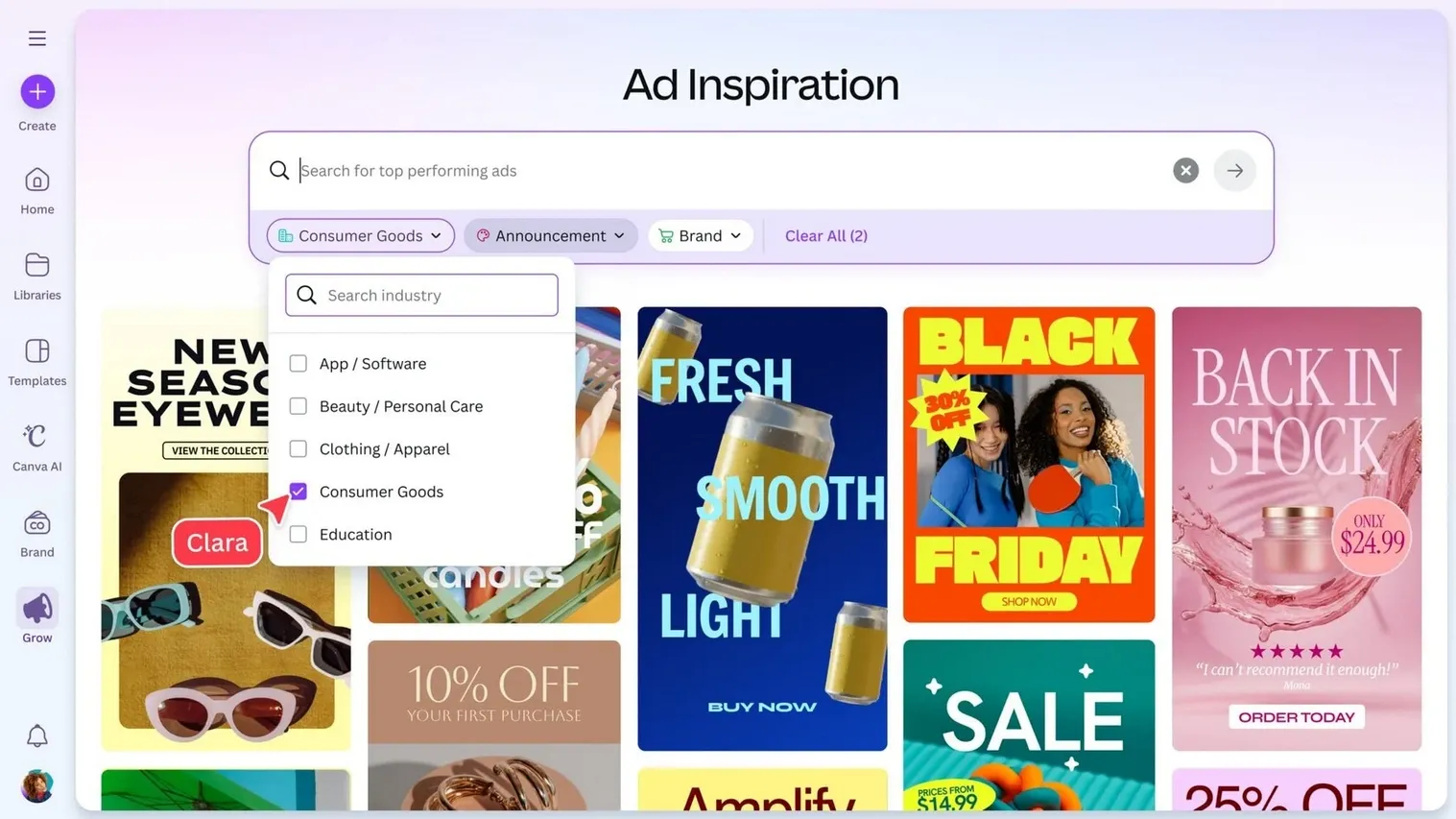
Canva Grow is built to simplify how marketing teams ideate, create, launch, and learn from campaigns. It gives you a starting point by showing real ads and winning creative examples from across industries so you can spot patterns and spark ideas.
It understands your brand by scanning your website and then generates multiple ad concepts aligned with your style and messaging.
You can publish directly to platforms like Meta and review performance without leaving Canva. Real time insights and AI suggestions help teams refine creative direction faster and scale what works.
Brand Systems
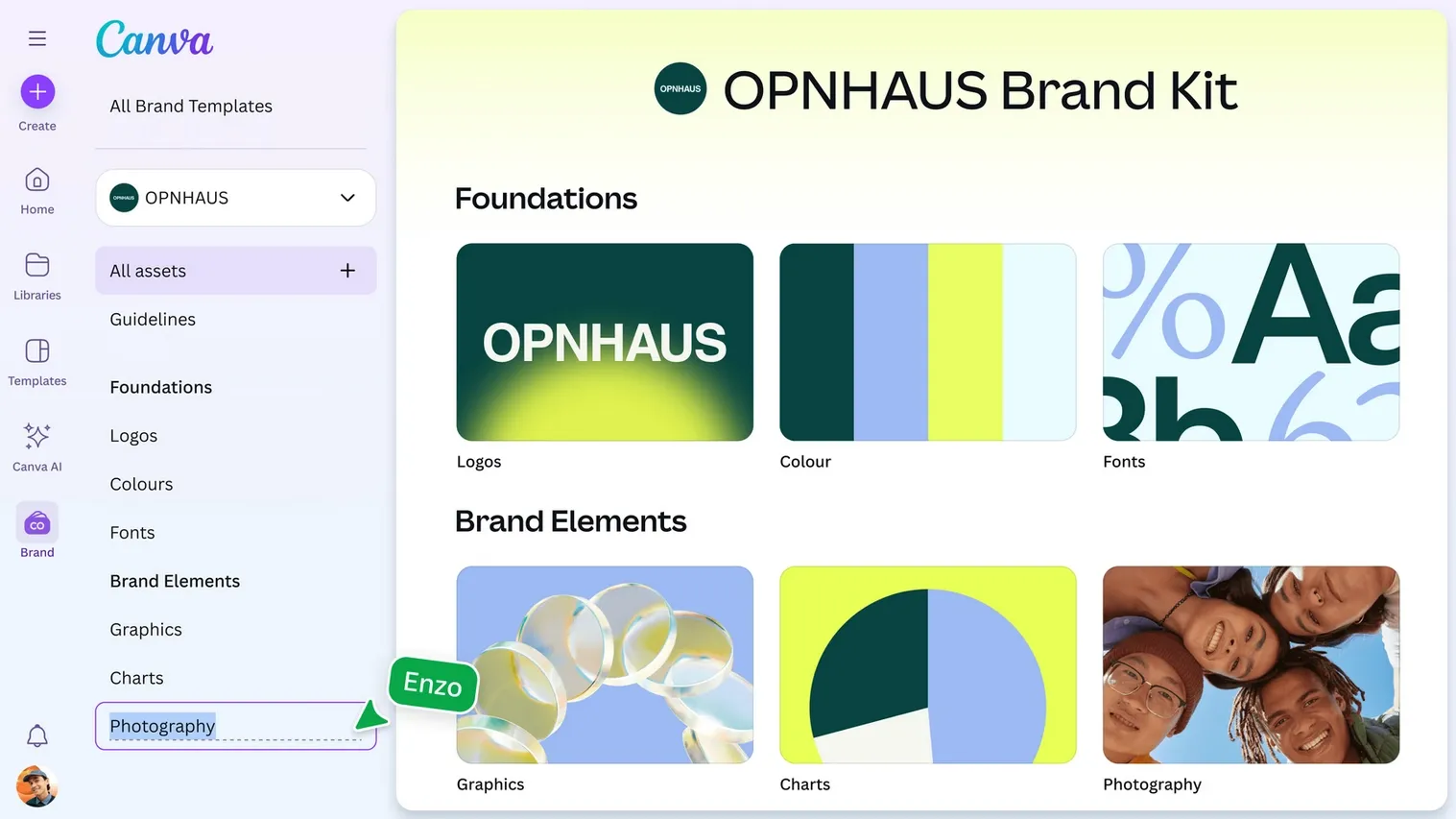
The new Brand System helps teams maintain consistency without slowing down creativity. It centralizes all brand assets, templates, and guidelines in one clean hub that designers and non designers can use confidently.
The system makes brand rules easy to follow by bringing guidance into the editor at the right moment, so teammates always see approved fonts, colors, imagery, and tone cues while working. As businesses grow or launch in new markets, this setup keeps every design aligned, protects brand identity, and allows creative teams to move quickly while staying in control.
How Creative Teams Benefit From These Updates
Canva has always focused on making design faster and more accessible. They started by solving everyday design needs and have now moved toward supporting full brand workflows. While we at Tenet do not rely on Canva for core design and product work, we understand the impact these upgrades will have across the industry.
As creation becomes more integrated and AI powered, the teams that adopt the right mix of tools and processes will move faster. The big shift here sits in how designers and marketers collaborate, test ideas, and scale content without losing control.
For Designers
For designers who already use Canva as part of their workflow, this update raises the ceiling. Editable AI designs, improved video tools, and brand gated controls mean less manual resizing, asset hunting, and format switching.
Designers can focus on concept, layout, and storytelling while repetitive tasks get automated. It also positions Canva as a better companion tool alongside platforms like Figma and Adobe. For seasoned designers, the value is not in replacing craft but in freeing time to work on strategy, systems, and high value creative decisions. Design remains human, Canva simply becomes a stronger execution layer.
For Marketers
For marketers, this release is a game changer. Content planning, creative production, campaign publishing, and performance insights now sit in one place. Instead of waiting on design teams for every small asset or testing a dozen variations manually, marketers can ideate, create variations, run ads, and learn inside the same system.
With AI driven brand learning and multi variant output, campaign testing becomes faster and more scalable. Growth Marketers can launch ideas quickly, analyze results in real time, and double down on what works without moving between platforms. Speed increases, iteration cycles shrink, and creative output stays consistent across channels.
Expertise Delivered Straight to Your Inbox
Expertise Delivered Straight to Your Inbox




Got an idea on your mind?
We’d love to hear about your brand, your visions, current challenges, even if you’re not sure what your next step is.
Let’s talk


