
GenUI Elements in AI Chatbots: Moving Beyond Text Conversations
 By
By Share

Share
Get a quick blog summary with



When AI chatbots like ChatGPT first became popular, most people interacted with them through simple text interfaces. Early versions were often used inside playground-style environments where users typed a prompt and received a text response. The interaction was mostly a back and forth conversation with no visual elements beyond plain text.
Recently, AI chatbots have started evolving beyond these text-only interfaces. Instead of responding with long paragraphs, many systems can now generate interactive UI elements in real time based on the user’s query. These may include tables, cards, forms, charts, comparison layouts, or other structured components that make information easier to explore and act on.
This shift is often referred to as Generative UI, or GenUI. The idea is that the interface itself can be created dynamically by the AI during the conversation, depending on what the user is trying to do.
Many people across the internet are now discussing how GenUI could change the way users interact with AI products.
So in this article, let us take a closer look at what GenUI elements in AI chatbots actually mean, the types of UI components being used today, and what might come next.
What Are GenUI Elements in AI Chatbots?
GenUI elements are user interface components that are generated dynamically during a conversation with a generative AI chatbot. Instead of showing the same static interface to every user, the system creates UI elements based on the user’s query and the context of the conversation. These elements appear only when they are relevant to what the user is trying to do.
The goal is to make the interaction more structured and easier to navigate. Instead of relying only on text responses, the chatbot can present information using visual or interactive components such as tables, cards, filters, check boxes, or charts.
For example, if you search for “best hotels in London” in an AI search mode, the chatbot may show a list of hotels along with check boxes next to each option.
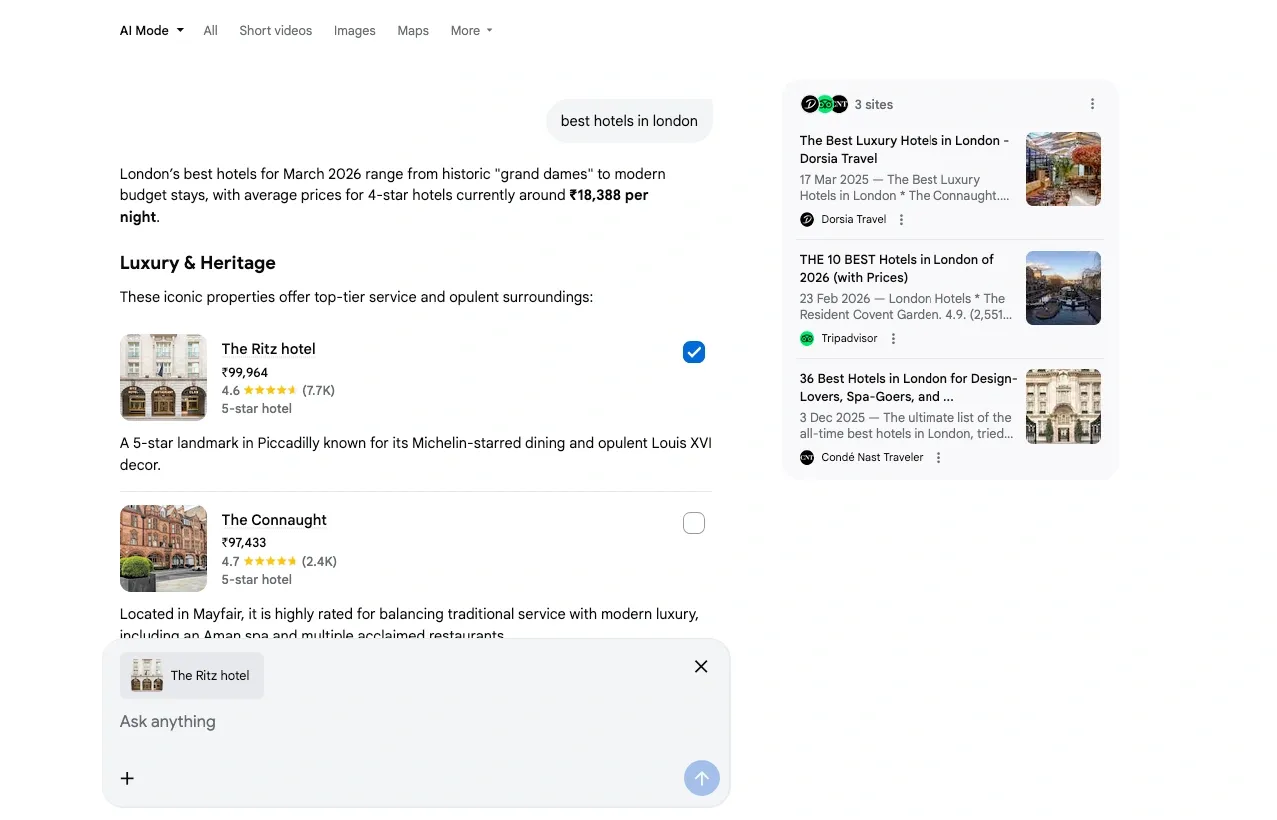
You can select multiple hotels and then ask questions about them. This allows you to compare prices, check amenities, or explore reviews without typing all the hotel names again in your next prompt.
This type of interaction reduces repetitive typing and makes the conversation more efficient. As AI interfaces continue to evolve, we will likely see more situations where chatbots generate UI elements that help users explore information, compare options, and complete tasks directly inside the conversation.
Common Types of GenUI Elements in AI Chatbots
Different AI chat tools are now capable of generating interactive UI elements during conversations. Many platforms are still experimenting with these features, so some of them may appear only in certain tools, regions, or early testing environments. In some cases, users may not see these elements yet because they are being rolled out gradually.
Even though the implementations may vary, the idea remains the same. The AI generates interface components that help users explore information, compare options, or complete tasks more easily within the chat.
Here are some common types of GenUI elements that are starting to appear in modern AI chatbots.
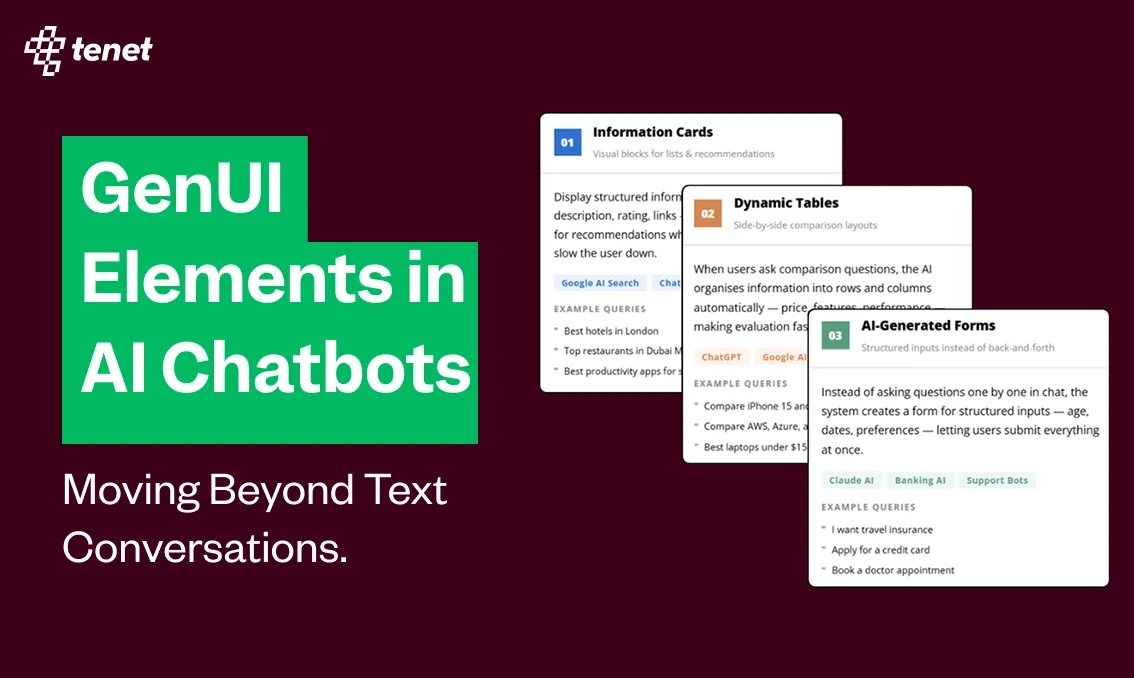
1. Information Cards
Information cards are one of the most common GenUI elements. They display structured information in small visual blocks that are easy to scan. Each card usually contains a title, short description, image, and sometimes actions like links or buttons.
These are useful when the user asks for lists of items or recommendations. Instead of reading a long paragraph, users can quickly browse multiple options.
Tools where this appears
- Google AI Search results
- ChatGPT
- travel assistants and booking chatbots
- some AI copilots and product recommendation tools
Example queries
- “Best hotels in London”
- “Top restaurants in Dubai Marina”
- “Best productivity apps for startups”
The chatbot may generate multiple cards showing each option, including ratings, images, prices, and links.

2. Dynamic Tables and Comparison Layouts
When users ask comparison questions, AI chatbots may generate tables or comparison layouts automatically. These help users evaluate multiple options side by side.
Instead of explaining everything in text, the AI organizes the information into rows and columns.
Tools where this appears
- ChatGPT, Ai Mode, and other AI copilots when comparing products
- AI-powered shopping assistants
- enterprise AI analytics tools
Example queries
- “Compare iPhone 15 and Samsung S24”
- “Compare AWS, Azure, and Google Cloud pricing”
- “Best laptops under $1500”
The chatbot may generate a table showing price, features, performance, and ratings, which makes the comparison much easier to understand.
Here is an example from Google AI Mode:

3. AI-Generated Forms
Another important GenUI element is dynamic forms generated by AI. Instead of asking multiple questions in chat, the system creates a form where users can enter the required information.
These are commonly used when the task requires structured inputs.
Tools where this appears
- Claude AI chatbot
- Banking AI assistants
- customer support chatbots
- enterprise AI copilots
Example queries
- “I want travel insurance”
- “Apply for a credit card”
- “Book a doctor appointment”
The chatbot may generate a form asking for details such as age, travel dates, location, or preferences, allowing users to submit information quickly without answering multiple prompts.
Here is an example from Claude from when we asked it about travel insurance:

4. Action Buttons and Prompt Controls
Some GenUI elements are designed to help users continue the conversation without typing everything manually. These appear as buttons, toggles, or quick actions inside the chat interface.
These controls guide users toward the next step in the interaction.
Tools where this appears
- ChatGPT quick prompts
- Customer support AI bots
- productivity copilots
Example queries
- “Write a LinkedIn post about AI”
- “Help me plan a marketing campaign”
- “Summarize this document”
These buttons help users refine results quickly and reduce repetitive typing. Prompt controls and similar UI components are commonly used in chatbot interfaces to guide interactions.
One example we saw earlier from Google AI mode is also a relevant example here.
The Future of GenUI in AI Interfaces
While the examples discussed above cover some of the common GenUI elements being used today, the possibilities are much broader. Many AI companies are still experimenting with how interfaces can be generated dynamically based on user intent.
In fact, companies like Google have already explored ideas around AI generating entire web page layouts based on a user’s query. The concept is that instead of showing traditional search results, the system could create a custom interface that organizes information in the most useful way for that specific task. It is still unclear when or if such systems will be widely released, but the direction shows how AI interfaces may continue evolving.
As adoption grows, the way these interfaces develop will likely depend on how users interact with them. If people find value in dynamic UI components that simplify complex tasks, we will likely see more AI products moving in this direction.
As a user design experience agency, we find this shift particularly exciting. The goal of good design has always been to help users complete tasks faster and understand information more clearly. Generative UI has the potential to support that goal by combining AI intelligence with thoughtful interface design.
So if you are building AI-powered products or exploring how conversational interfaces can improve your digital platforms, this is a space worth paying attention to. And if you are looking for support in UX research, UI UX design, branding, or digital product development, feel free to get in touch with our team. We would be happy to help you design the next generation of digital experiences.
Expertise Delivered Straight to Your Inbox
Expertise Delivered Straight to Your Inbox





Got an idea on your mind?
We’d love to hear about your brand, your visions, current challenges, even if you’re not sure what your next step is.
Let’s talk


