
A Definitive List Web Design Services and Deliverables
 By
By Share

Share
Get a quick blog summary with



When evaluating a web design agency, one of the most common questions businesses ask is: What exactly is included in the project? The answer usually involves a combination of services and deliverables.
Services are the activities performed throughout the engagement, such as research, UX design, content planning, visual design, and testing. In contrast, deliverables are the tangible outputs produced from that work, including wireframes, design mockups, design systems, prototypes, and development-ready assets.
Having worked on 450+ projects across SaaS, healthcare, eCommerce, real estate, education, and enterprise sectors, our team has seen how project scope can vary significantly from one website to another.
In this guide, we'll break down the most common web design services and deliverables agencies provide, and what businesses can expect from each.
What do web design services include?
The term web design services is often used to describe everything that happens between project kickoff and development handoff.
For example, if a company hires an agency to redesign a healthcare website, the agency may need to review existing user journeys, reorganize hundreds of pages of content, simplify navigation, design appointment-booking flows, create mobile layouts, establish accessibility standards, and prepare assets for developers.
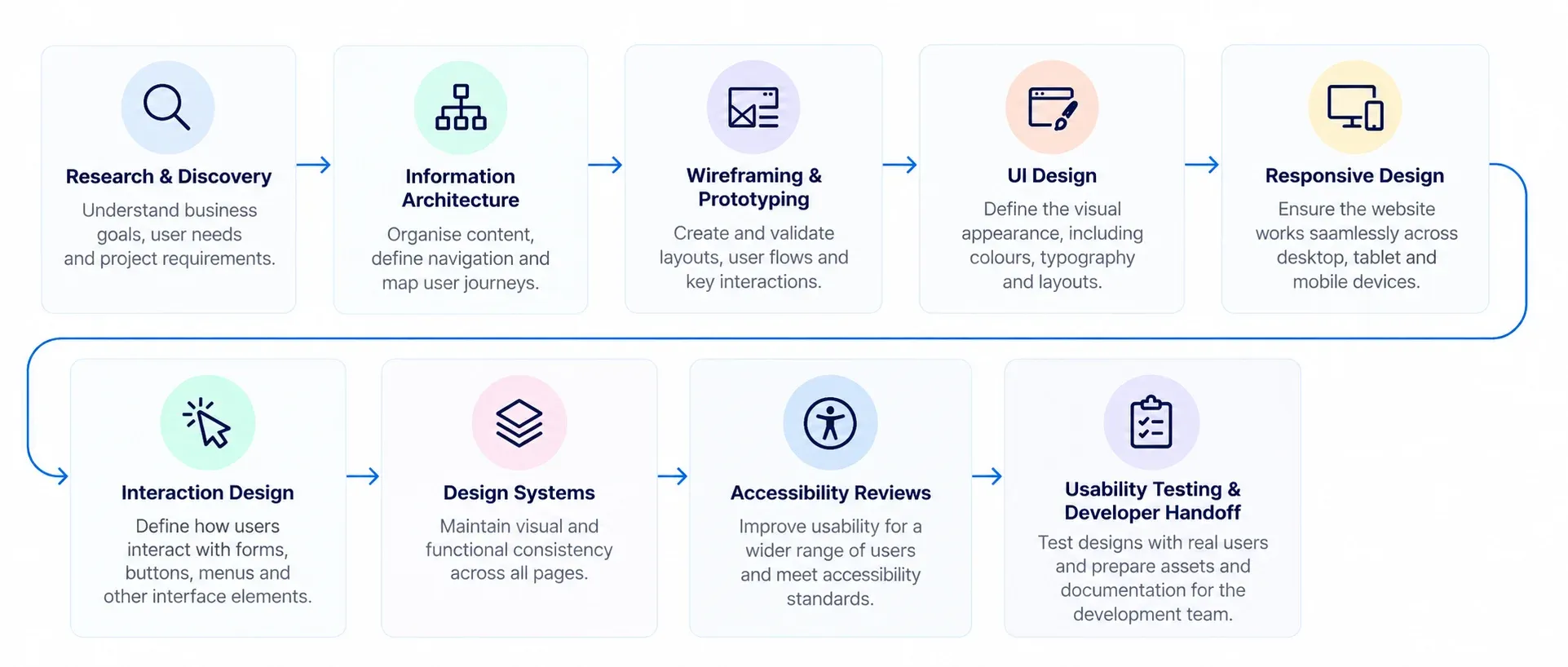
Modern web design extends far beyond choosing colours, fonts, and page layouts. A typical web design project may include:
- User Experience (UX) Design to improve usability and user flows.
- User Interface (UI) Design to define the visual appearance of the website.
- Information Architecture to organise content and navigation.
- Responsive Design to ensure the website works across desktop, tablet, and mobile devices.
- Interaction Design to define how users interact with forms, buttons, menus, and other interface elements.
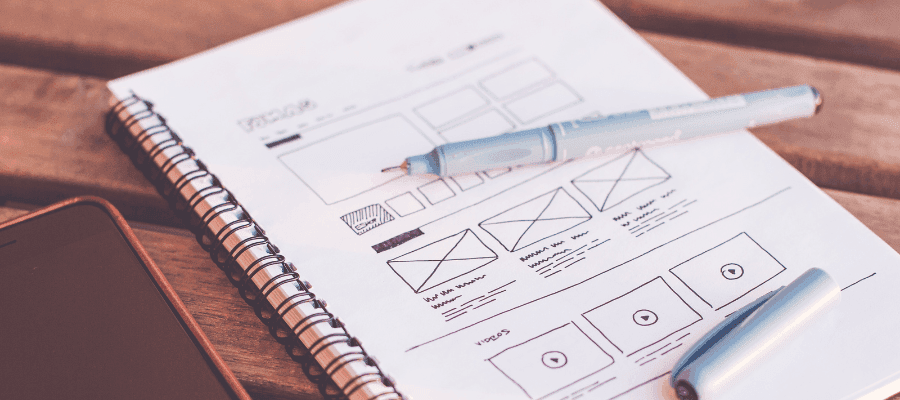
- Wireframing and Prototyping to validate layouts and user journeys before development begins.
- Design Systems to maintain visual and functional consistency across pages.
- Accessibility Reviews to improve usability for a wider range of users.
- Usability Testing and Developer Handoff to ensure designs perform as intended during implementation.
👉 Need a website that converts your visitors into customers? Learn more about our website design services
Types of web design services
1. Website Strategy and Discovery
Website strategy and discovery is the planning phase that defines business goals, user requirements, content needs, technical requirements, and project constraints before design begins. It helps agencies understand what the website needs to achieve and provides the foundation for UX, content, design, and development decisions.
This service is typically required for new website builds, website redesigns, CMS migrations, ecommerce projects, and enterprise website initiatives.
Deliverables
- Requirements Specification Document (RSD) outlining business objectives, user requirements, functional requirements, and project constraints.
- Stakeholder Workshop Documentation capturing goals, success metrics, approval workflows, project assumptions, and decision-making processes.
- Competitor Benchmarking Analysis evaluating navigation structures, conversion journeys, content models, feature sets, and positioning approaches.
- Current-State Website Audit identifying UX issues, content gaps, SEO limitations, accessibility concerns, and technical debt.
- Audience Personas and User Journey Maps documenting user goals, behaviours, decision points, tasks, and conversion pathways.
- Content Inventory and Gap Analysis identifying content to retain, consolidate, migrate, rewrite, redirect, or archive.
- Sitemap and Navigation Architecture defining page hierarchy, navigation patterns, content relationships, and URL structures.
2. UX Design and Information Architecture
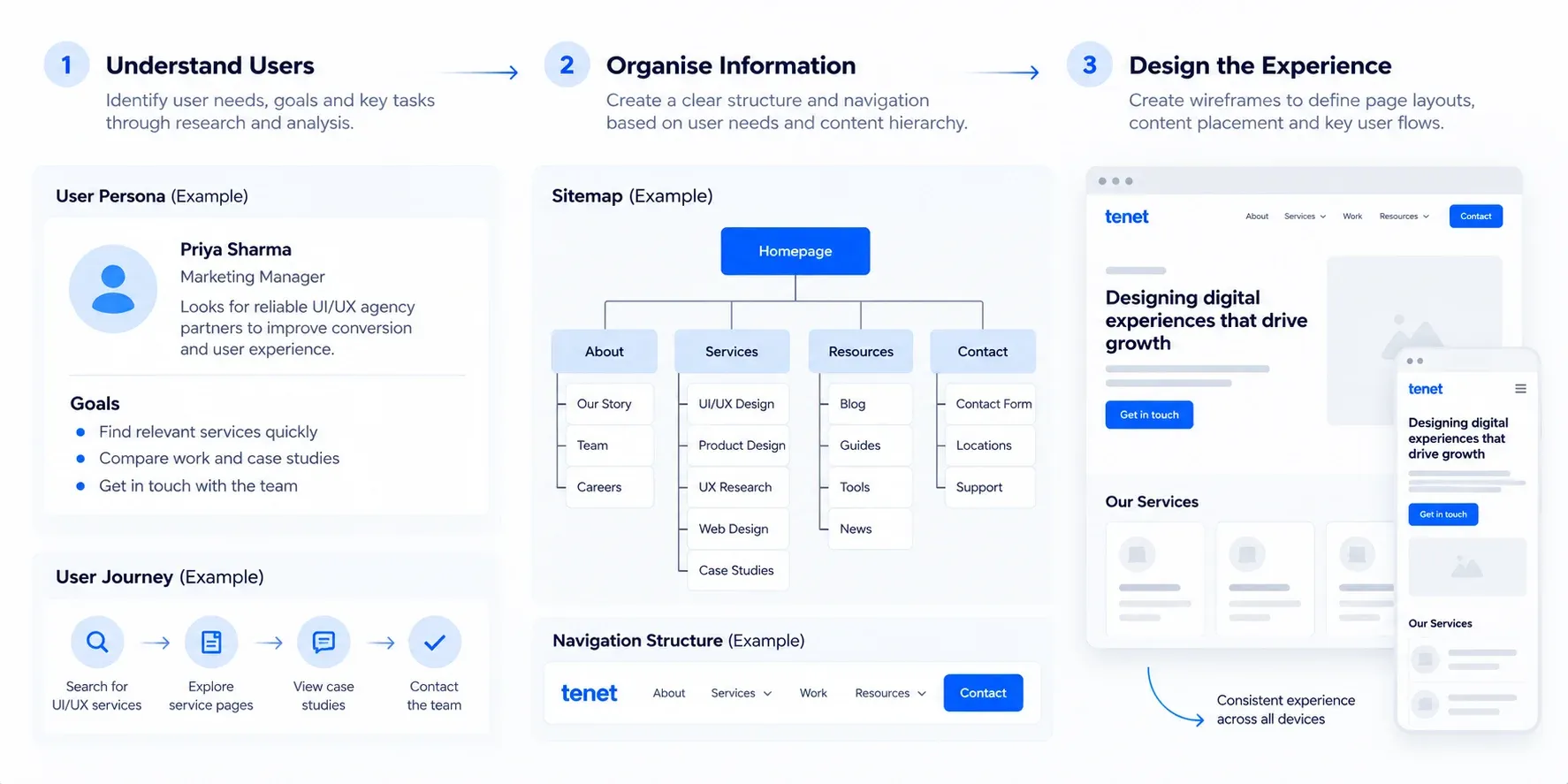
UX design and information architecture focus on how users navigate the website, find information, and complete key tasks. This service helps improve usability by organising content, defining user journeys, and creating intuitive navigation structures.
It is commonly required for new websites, redesigns, e-commerce websites, SaaS platforms, and content-heavy websites.
Deliverables
- User Journey Maps documenting user goals, decision points, task flows, and conversion paths across the website.
- Information Architecture (IA) Documentation defining content hierarchy, content relationships, navigation models, and page groupings.
- Sitemap Architecture mapping primary pages, secondary pages, navigation levels, and content categories.
- Navigation Structure Recommendations defining global navigation, secondary navigation, breadcrumbs, and menu behaviour.
- User Flow Diagrams illustrating how users move between pages to complete key actions such as enquiries, purchases, bookings, or registrations.
- Wireframes showing page layouts, content placement, functional elements, and interaction priorities before visual design begins.
- Content Mapping Documentation aligning content requirements with page templates, user needs, and business objectives.
3. Content Strategy and Content Design
Content strategy and content design define how information is planned, structured, and presented across the website. The process involves evaluating existing content, identifying gaps, and creating a framework that supports user needs and business objectives.
It is commonly included in redesign projects, content migrations, rebranding initiatives, and large-scale websites.
Deliverables
- Content Audit Report evaluating existing website content for relevance, quality, accuracy, performance, and duplication issues.
- Content Inventory Documentation cataloguing website pages, content assets, media files, and supporting resources.
- Content Gap Analysis identifying missing content required to support user journeys, business goals, and conversion objectives.
- Content Migration Plan documenting content to retain, update, consolidate, rewrite, redirect, archive, or migrate.
- Page-Level Content Requirements defining required content sections, messaging priorities, and content objectives for each page type.
- Content Hierarchy Framework establishing content priorities, page structure, heading hierarchy, and information flow.
4. UI and Visual Web Design
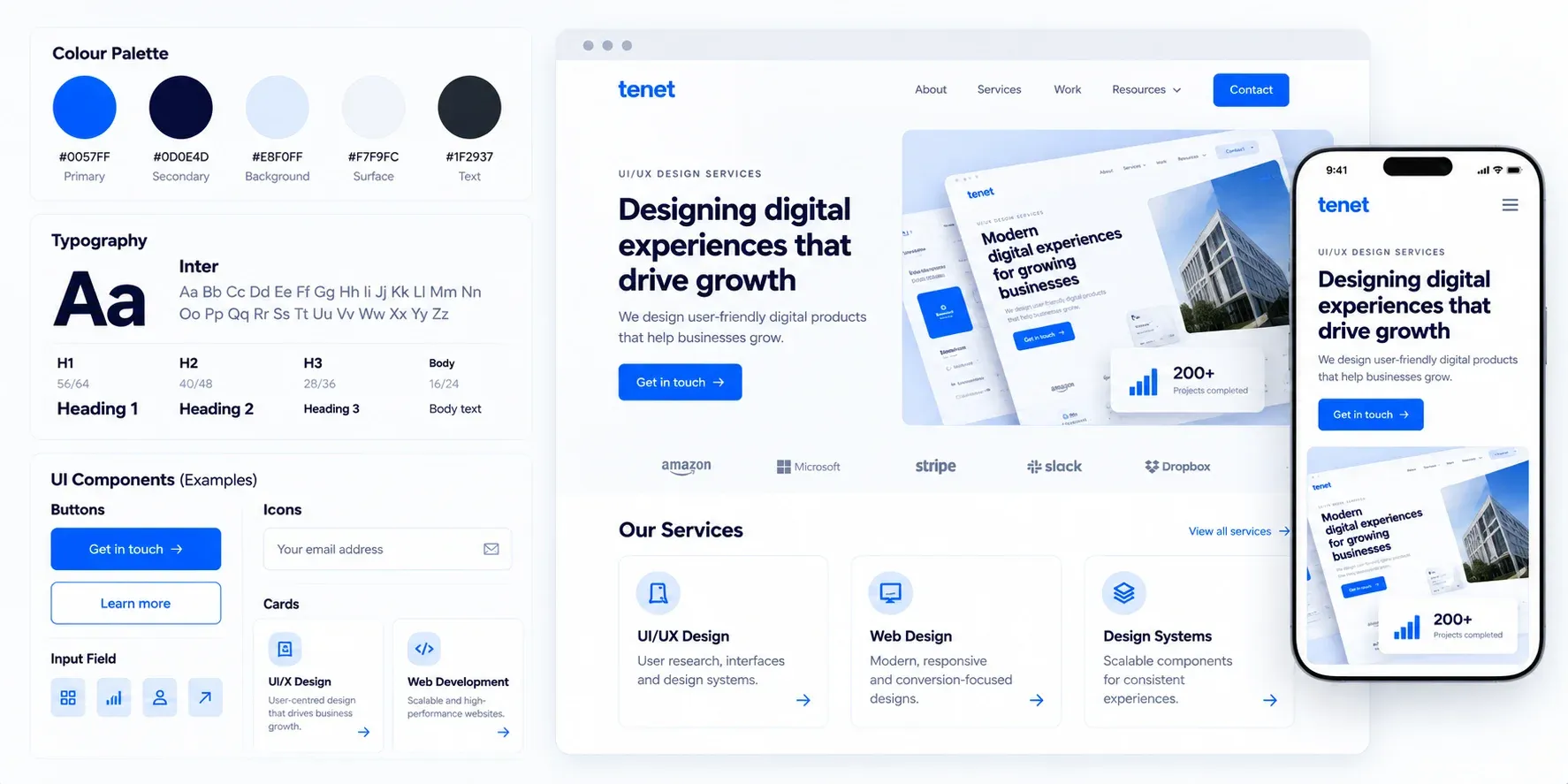
UI and visual web design shape the look and feel of a website through layouts, typography, colour systems, imagery, and interface components. The outcome is a branded visual experience that supports usability while reinforcing the organisation's identity.
This phase is required for new websites, redesigns, and projects involving a brand refresh.
Deliverables
- High-Fidelity Page Designs showing the final visual appearance of key website pages before development.
- UI Component Library documenting buttons, forms, cards, navigation elements, tables, alerts, and other reusable interface components.
- Visual Design System defining typography scales, colour palettes, spacing rules, iconography, and visual styling standards.
- Page Template Designs for homepage, service pages, landing pages, blog pages, category pages, and other key templates.
- Responsive Layout Designs showing how interfaces adapt across desktop, tablet, and mobile breakpoints.
- Component States Documentation defining hover states, active states, disabled states, validation states, and interaction behaviours.
- Brand Application Guidelines explaining how brand elements are applied across digital interfaces.
- Asset Export Package containing icons, illustrations, graphics, images, and design assets required for development.
5. Responsive Web Design
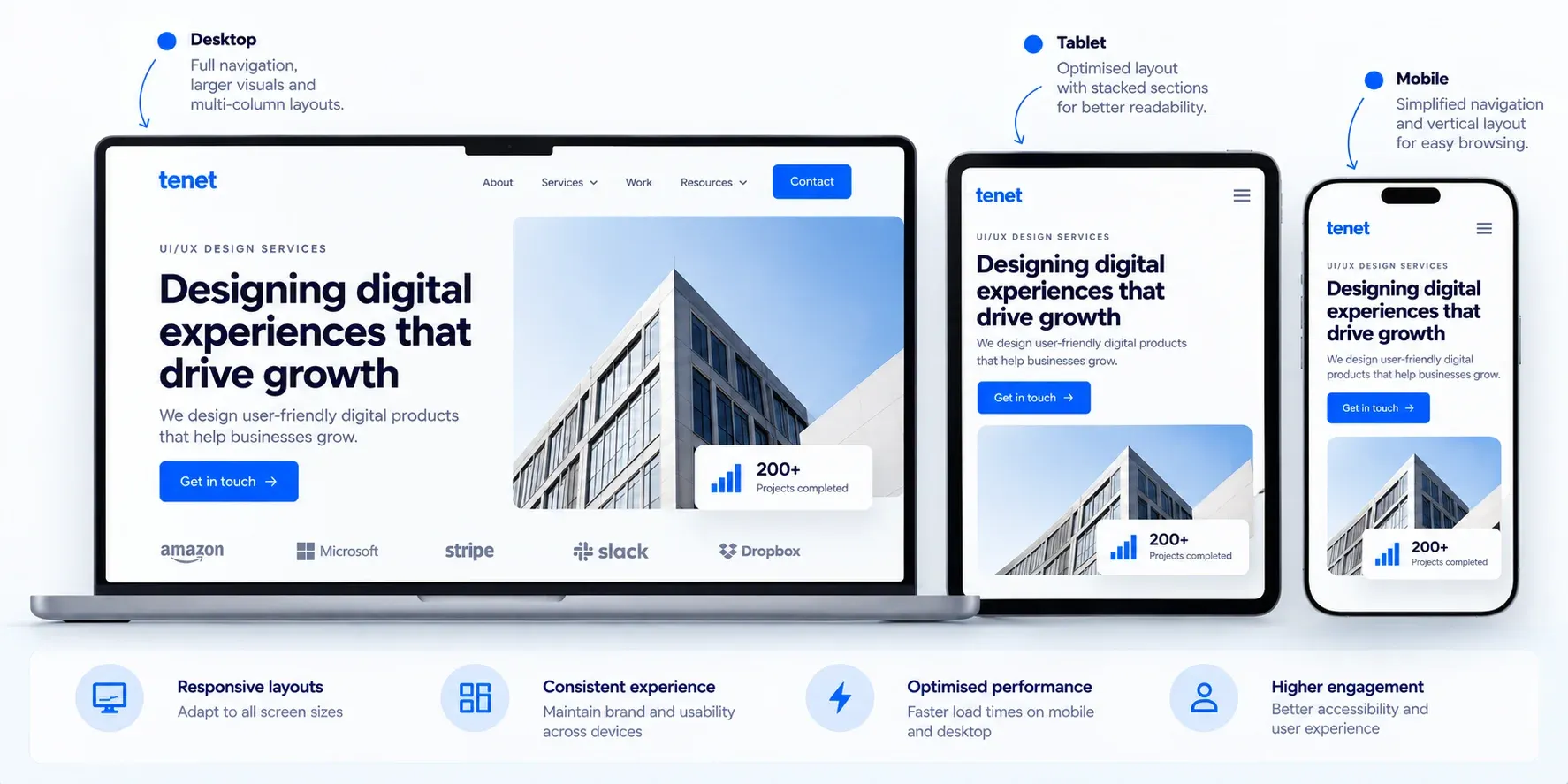
Responsive web design ensures website layouts and interface elements adapt effectively across desktop, tablet, and mobile devices. Maintaining consistency across screen sizes has become a standard requirement for modern websites, particularly those with significant mobile traffic.
Deliverables
- Responsive Layout Designs showing how page layouts adapt across desktop, tablet, and mobile breakpoints.
- Breakpoint Specifications defining screen widths, layout changes, and responsive behaviour rules.
- Responsive Grid System Documentation outlining column structures, spacing rules, and layout constraints.
- Mobile Navigation Designs defining menu patterns, navigation behaviour, and mobile-specific interactions.
- Adaptive Content Prioritisation specifying how content is reordered, hidden, or displayed across devices.
- Responsive Component Variations documenting how forms, cards, tables, sliders, and other UI elements behave on different screen sizes.
6. Website Prototyping and Interaction Design
Website prototyping and interaction design define how users interact with pages, forms, navigation elements, and other interface components before development begins. Interactive prototypes allow stakeholders to review user journeys and validate functionality before implementation.
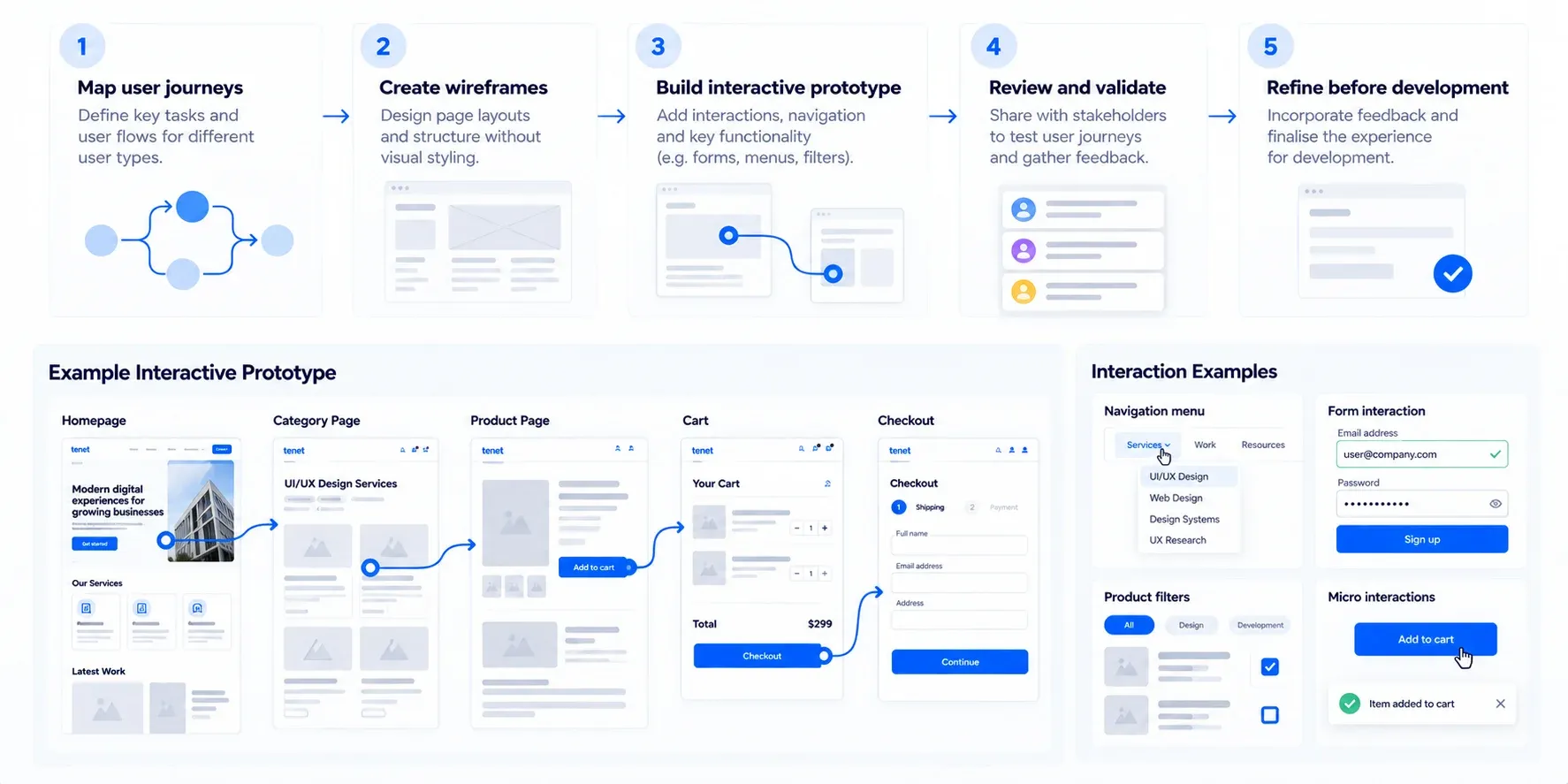
This approach is often used for ecommerce websites, SaaS products, booking platforms, and other complex digital experiences.
Deliverables
- Interactive Clickable Prototypes simulating user journeys, navigation flows, and page interactions before development.
- Interaction Design Specifications documenting hover states, click behaviours, transitions, animations, and feedback mechanisms.
- User Flow Prototypes visualising how users move between pages, screens, and conversion points.
- Microinteraction Documentation defining behaviours for buttons, form fields, notifications, dropdowns, tooltips, and interactive elements.
- Form Interaction Specifications outlining validation rules, error handling, success states, and field behaviours.
- Conversion Flow Prototypes testing key actions such as enquiries, registrations, bookings, purchases, and checkout experiences.
7. Design Systems
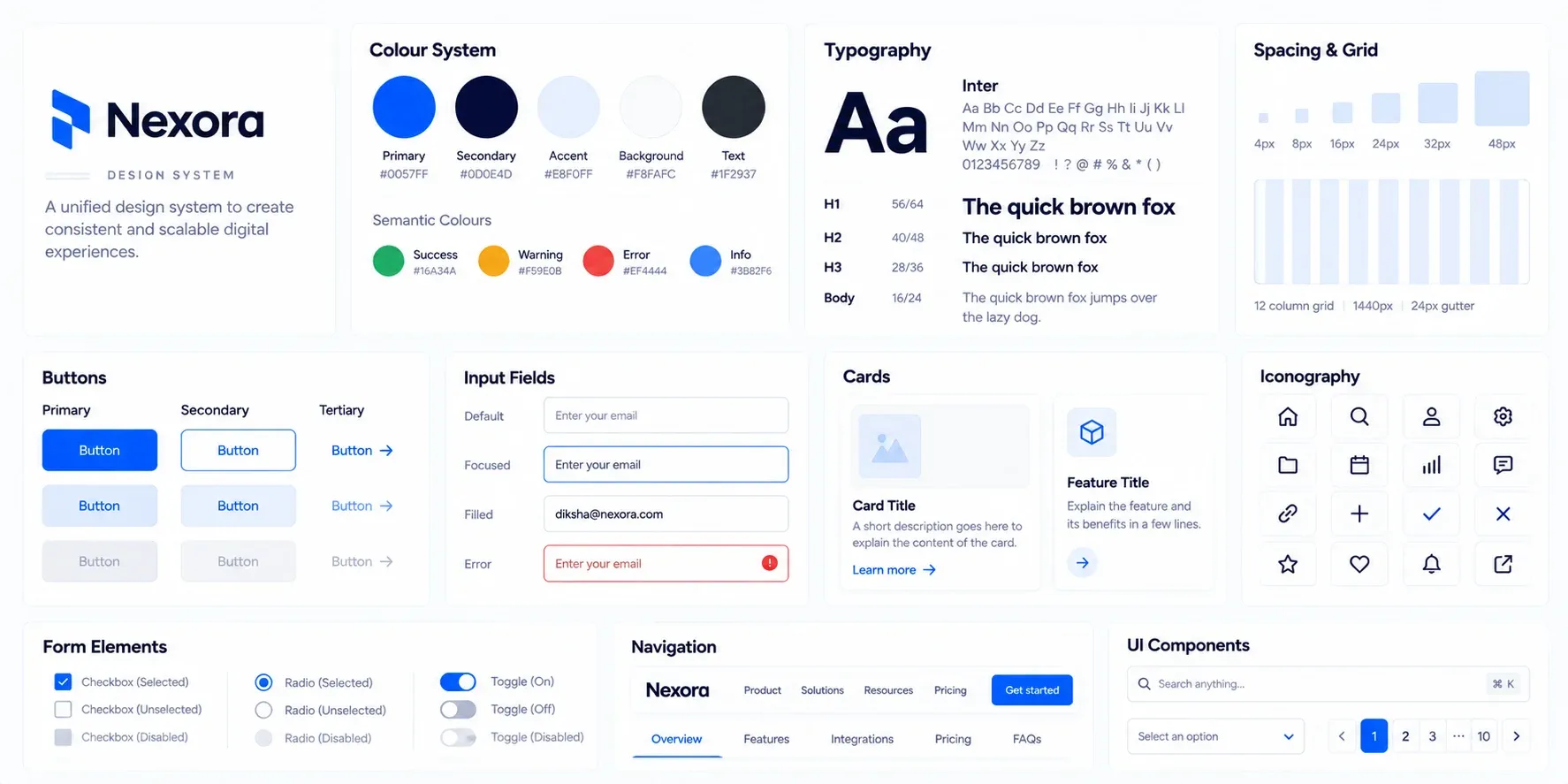
Design systems provide a reusable collection of components, standards, and design rules that promote consistency across digital products. They are particularly valuable for enterprise websites, SaaS platforms, and organisations managing large or frequently evolving digital ecosystems.
Deliverables
- Design System Documentation defining visual, interaction, and implementation standards across the website.
- UI Component Library containing reusable buttons, forms, cards, navigation elements, tables, modals, and other interface components.
- Design Tokens Library documenting colours, typography scales, spacing values, shadows, borders, and other design variables.
- Component Usage Guidelines specifying when, where, and how individual components should be used.
- Interaction Pattern Documentation defining behaviour for navigation, forms, search, filtering, validation, and feedback states.
- Responsive Component Specifications documenting component behaviour across desktop, tablet, and mobile breakpoints.
- Accessibility Standards Documentation outlining accessibility requirements for components and interaction patterns.
- Visual Style Guidelines defining typography systems, colour palettes, iconography, imagery styles, and branding rules.
- Developer Component Specifications providing measurements, spacing rules, states, properties, and implementation guidance.
- Design System Governance Guidelines documenting processes for updating, maintaining, and expanding the system over time.
8. Website Accessibility Design
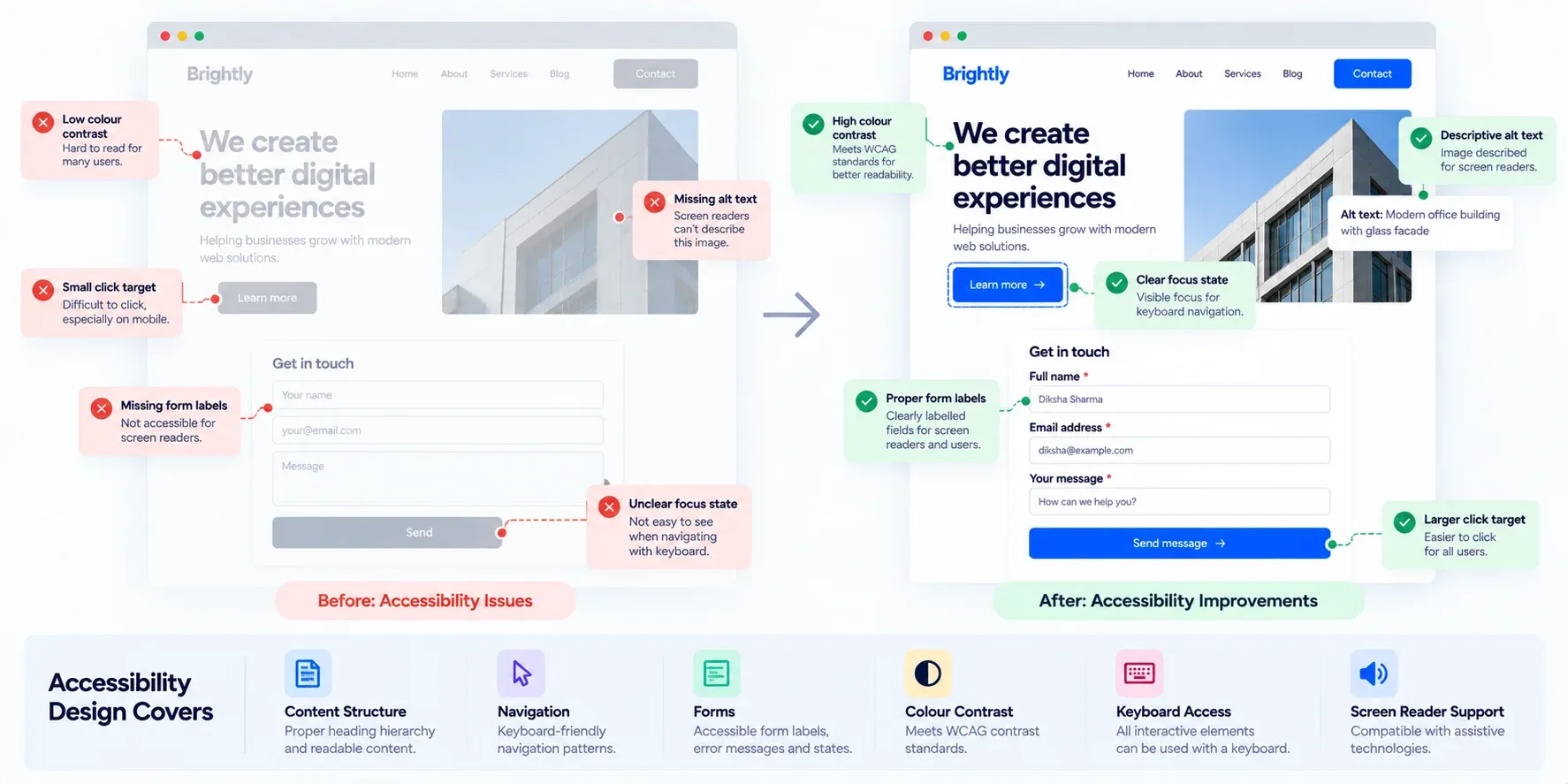
Website accessibility design addresses the needs of users who rely on assistive technologies or alternative methods of navigation. Accessibility considerations influence content structure, interface design, navigation patterns, and interactive elements, making this an important component of modern web projects.
Deliverables
- Accessibility Audit Report identifying accessibility issues across layouts, navigation, content, forms, and interactive elements.
- WCAG Compliance Assessment evaluating the website against applicable Web Content Accessibility Guidelines (WCAG) criteria.
- Accessibility Remediation Recommendations documenting required fixes, priorities, and implementation guidance.
- Colour Contrast Analysis verifying text, buttons, links, and interface elements meet contrast requirements.
- Keyboard Navigation Review testing focus states, tab order, skip links, and keyboard accessibility.
- Form Accessibility Specifications defining labels, error messages, validation behaviour, and assistive technology support.
- Screen Reader Compatibility Review evaluating content structure, headings, landmarks, ARIA attributes, and semantic HTML requirements.
- Accessible Component Guidelines documenting accessibility requirements for navigation, forms, modals, tables, accordions, and other UI components.
- Accessibility Testing Documentation capturing findings from manual reviews, automated testing tools, and assistive technology testing.
- Accessibility Compliance Roadmap prioritising accessibility improvements based on severity, effort, and business impact.
99. Website Usability Testing
Website usability testing evaluates how effectively people can navigate a website and complete important tasks. Observing user behaviour during structured testing sessions can reveal friction points, usability issues, and opportunities for improvement before or after launch.
Deliverables
- Usability Testing Plan defining participant criteria, tasks, success metrics, and testing methodology.
- Task Completion Analysis documenting completion rates, drop-off points, and user difficulties.
- Session Recordings and Observation Notes capturing user behaviour and feedback.
- Usability Findings Report identifying friction points, navigation issues, and interaction problems.
- Design Improvement Recommendations outlining actions to improve usability and task completion.
- Conversion Barrier Analysis identifying obstacles affecting enquiries, purchases, registrations, or other key actions.
- Post-Test Executive Summary summarising findings, opportunities, and recommended next steps.
What should a web design agency deliver at the end of a project?
At the end of a web design project, you should receive all approved design deliverables and supporting documentation required for development, future updates, and internal use. The exact handoff varies by project scope, but it typically includes:
- Approved desktop and mobile designs
- Design source files (such as Figma files)
- Design systems and UI component libraries
- Interactive prototypes
- Visual assets created during the project
- Design specifications and annotations
- Developer handoff documentation
Before signing a contract, it's also important to clarify ownership of project materials. Businesses should confirm ownership of:
- Design source files
- Visual assets and graphics
- Website content
- Prototypes and documentation
- Design systems and component libraries
A clear handoff process helps ensure your team has access to the assets, documentation, and files needed to maintain and evolve the website after the project is completed.
What to expect from a website design service proposal from agencies?
A website design proposal should clearly outline the project's scope, services, deliverables, timeline, responsibilities, and estimated investment. Before signing, review what work is included and what outputs you'll receive at each stage.
Typical proposal components include:
Before approving a proposal, confirm which services are included, what deliverables you'll receive, who owns the final assets, and whether development, content creation, SEO, or post-launch support are included in the scope.
If you're planning a website project and would like a proposal customized to your requirements, you can request a website design proposal outlining the recommended scope, deliverables, timeline, and estimated investment for your project.
Web design project checklist
FAQs
What are web design deliverables?
Web design deliverables are the outputs created during the website design process. These typically include sitemaps, wireframes, UI designs, interactive prototypes, design systems, and developer handoff files.
The exact deliverables depend on the project's scope, website complexity, and business requirements.
Does web design include UX design?
Yes, most modern web design projects include UX design. UX design focuses on user journeys, information architecture, navigation, and usability, while UI design focuses on the website's visual appearance.
Together, UX and UI help create websites that are both easy to use and visually effective.
Does website design include development?
Not always. Some agencies offer design-only services, while others provide both design and development as part of a complete website project. It's important to confirm whether development, CMS implementation, testing, and launch support are included in the project scope.
Does website design include SEO?
Website design often includes foundational SEO considerations such as site structure, navigation, mobile responsiveness, and page hierarchy. These elements help search engines understand and crawl the website effectively.
However, services such as keyword research, content creation, technical SEO audits, and link building are often offered separately.
👉 Learn more about our website design services and request a free proposal.
How much do web design services cost?
Web design services typically cost between $5,000 and $20,000+, depending on the website's size, complexity, functionality, content requirements, and integrations. Small marketing websites generally fall at the lower end of the range, while ecommerce, SaaS, and enterprise websites often require significantly larger budgets.
The most accurate way to estimate costs is to create a detailed web design brief and request proposals based on clearly defined requirements.
👉 For a better understanding of pricing factors and typical project costs, you can refer to a web design pricing guide.
Planning a website project? Get expert guidance on your requirements, scope, and next steps.
Planning a website project? Get expert guidance on your requirements, scope, and next steps.
















Got an idea on your mind?
We’d love to hear about your brand, your visions, current challenges, even if you’re not sure what your next step is.
Let’s talk


