
13 Best AI Tools for Product Managers in 2026
 By
By Share

Share
Get a quick blog summary with



Product managers are not short on AI options.
What is harder to find are AI tools that actually hold up in real product work. Most lists are built on feature scans, not hands-on use. At Tenet, after 450+ projects across startups and enterprises, we tested these tools while supporting clients through discovery, planning, execution, and post-launch iteration.
How we chose them: we looked for tools covering every stage of the PM workflow, from PRDs and user research to roadmaps and analytics. Each one was checked against its official pricing and product pages, and anything shut down, rebranded, or merged into another product was cut or corrected. Each tool was used inside live product workflows where it naturally fit.
Note: This article was last updated on October 15, 2026 to include Productboard as a new suggestion, corrects pricing for ChatPRD, Dovetail, tl;dv, Miro, Figma, Notion AI, Aha!, and ClickUp AI.
Here are our recommended AI tools for product managers at a glance
- ChatPRD: best for PMs who need to quickly turn scattered notes or ideas into structured PRDs without heavy writing time.
- Dovetail: best for Research-focused PMs who run frequent user interviews and need fast theme extraction from qualitative data.
- tl;dv: best for PMs in frequent customer or internal meetings who need instant summaries and action capture without manual note-taking.
- Miro AI: best for PMs and designers running collaborative workshops, design sprints, brainstorming sessions, and cross-functional alignment work.
- Figma AI: best for Growth-stage PMs and designers who need to prototype dashboards, screens, and UI variations quickly for early validation.
- Whimsical AI: best for PMs and product teams creating user flows, mind maps, decision trees, and strategy documents during early ideation and alignment.
- Notion AI: best for Solo PMs, small teams, and Notion-native growth-stage workspaces that need fast content structuring, synthesis, and lightweight research.
- Aha!: best for Growth-stage PMs and portfolio managers managing complex roadmaps, cross-team dependencies, and defensible quarterly prioritization.
- Jira Product Discovery: best for Growth-stage product teams already working in Jira that need structured idea intake, scoring, and a seamless handoff to development.
- Linear: best for Engineering-led product teams focused on speed, clean execution, and minimal overhead in day-to-day delivery.
- Amplitude: best for Growth-stage PMs and product teams with structured event tracking who want behavioral insights, experimentation, and AI-assisted analysis.
- ClickUp AI: best for PMs and teams who need AI assistance for task management, project updates, and workflow coordination.
- Productboard: best for PMs sitting on mountains of customer feedback who need AI help turning it into prioritized, evidence-backed roadmaps.
1. ChatPRD
Best For: PMs who need to quickly turn scattered notes or ideas into structured PRDs without heavy writing time.
What it is:
ChatPRD helps PMs turn unstructured inputs like meeting notes, interview summaries, or early feature ideas into clear product requirement documents. You can paste raw text and get a draft PRD with standard sections such as problem statement, goals, user stories, metrics, risks, and dependencies.
It is useful for solo PMs, early product teams, and fast-moving orgs that want a clean first draft before reviews. The output is easy to edit, making it practical for internal discussions rather than final documentation only.
👉 While AI can draft PRDs quickly, combining it with structured digital product design processes ensures documents translate into actionable design work.
Standout Features
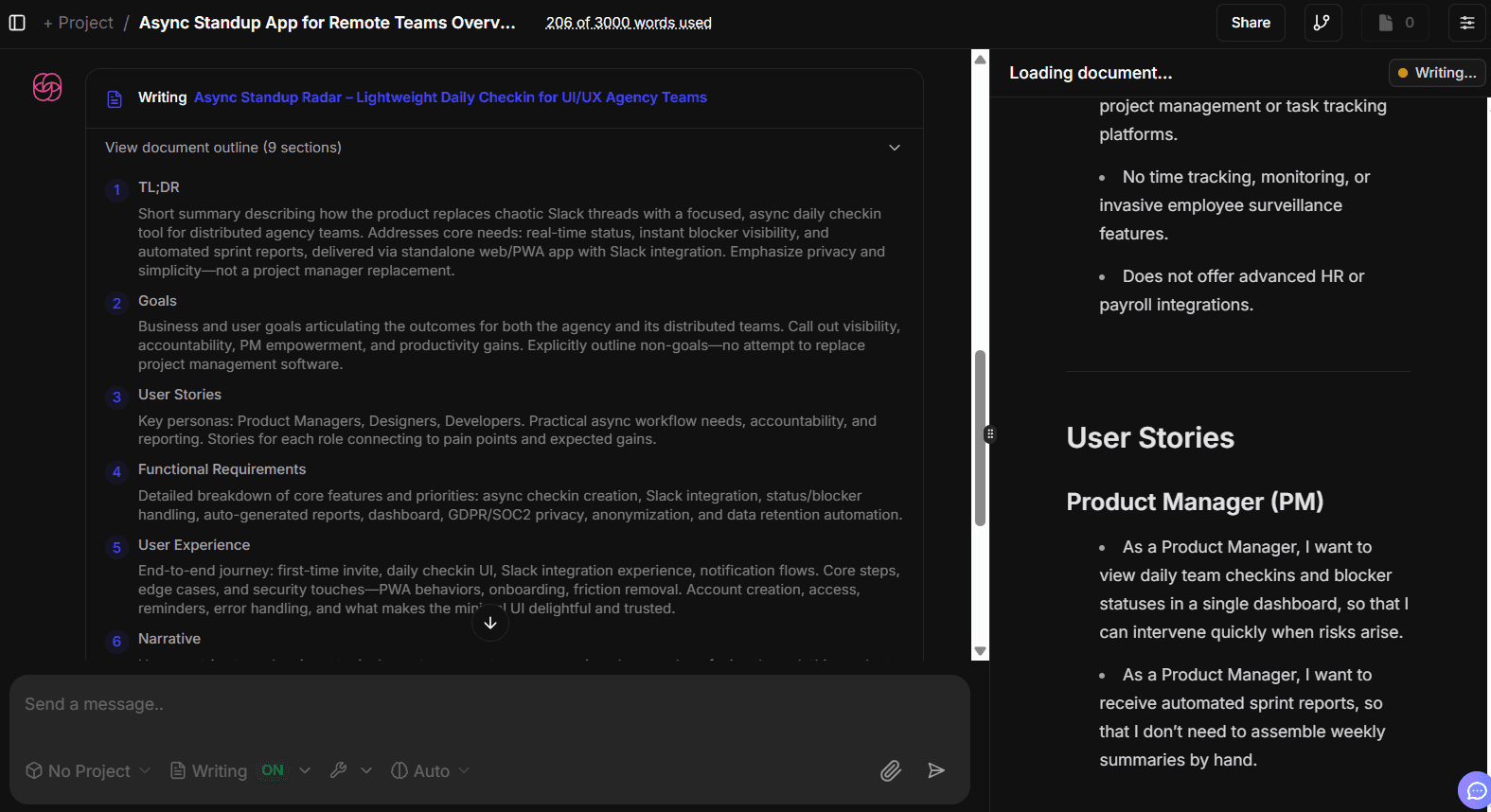
- ChatPRD generates structured PRDs with standard sections like problem statement, goals, user stories, metrics, risks, and dependencies from raw text inputs.
This visual shows how ChatPRD generates structured PRDs:
- Individual sections can be edited or refined without regenerating the full PRD, making it suitable for iterative reviews and feedback cycles.
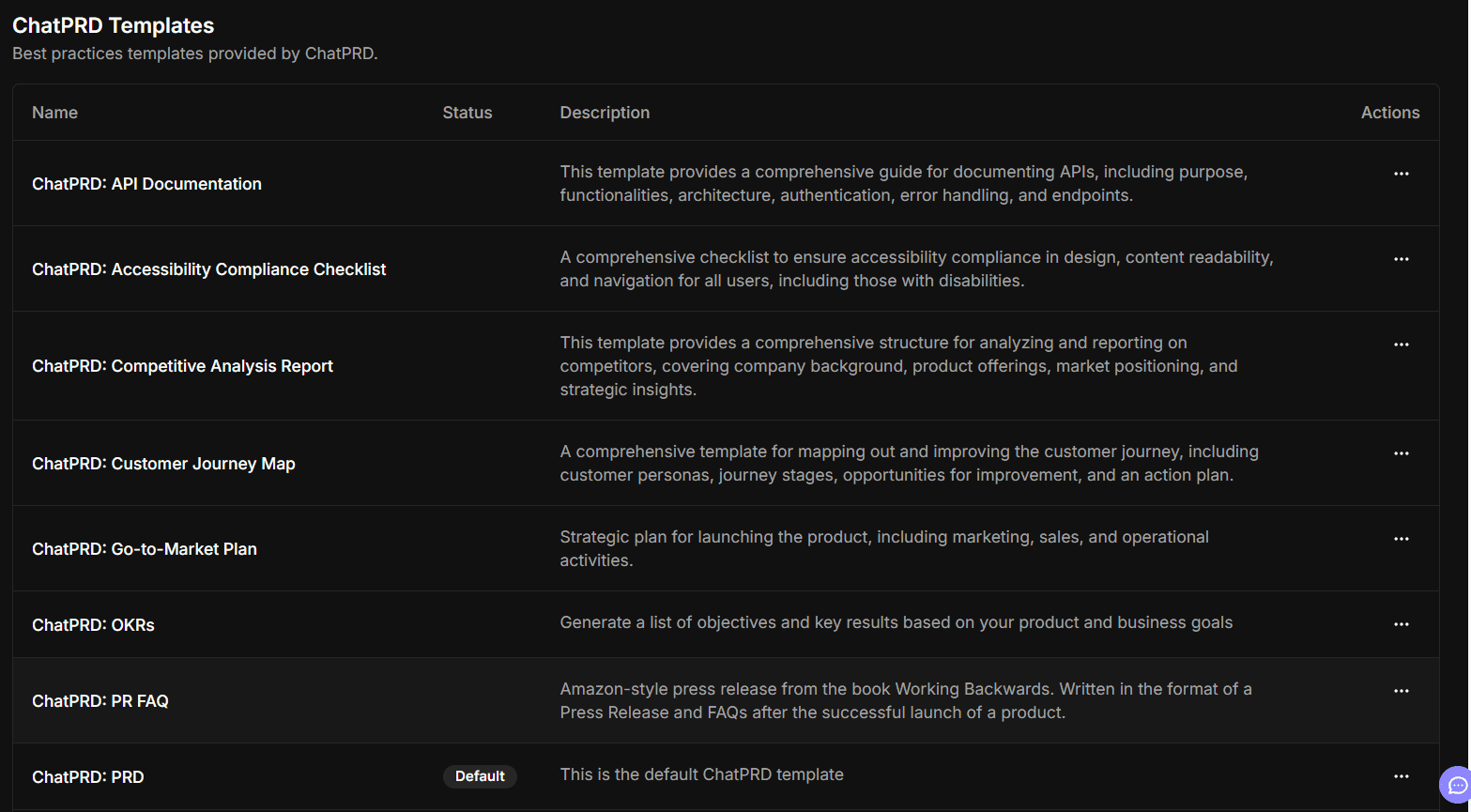
- Built-in templates help surface assumptions, trade-offs, success criteria, and missing requirements that product managers often overlook in early drafts.
Below given visual shows how one can create prompt templates or use the pre-existing prompt templates in ChatPRD:
- Documents can be exported directly to tools like Notion, Google Docs, Jira, and other collaboration platforms, so PRDs stay connected to execution.
Pricing & Plans
ChatPRD offers a Free plan for basic PRD generation and testing the tool. Paid tiers include Pro at $15 per month and Teams at $29 per month per seat (both billed annually), which add higher usage limits and collaboration features for product teams.
2. Dovetail
Best For: Research-focused PMs who run frequent user interviews and need fast theme extraction from qualitative data.
What it is:
Dovetail is a qualitative research platform that helps product teams make sense of user interviews, support conversations, surveys, and feedback in one place. Instead of scattered notes and transcripts, PMs get a structured way to store research, tag insights, and link findings back to real user evidence.
It supports continuous discovery by making past research easy to search, revisit, and reuse. AI-powered summaries and reports help teams turn raw conversations into clear insights that can directly inform product decisions.
👉 Research tools like Dovetail generate valuable insights, but they need to feed into comprehensive UX research services that turn findings into design decisions.
Standout Features
- Centralized research library automatically organizes interviews, calls, surveys, support tickets, and feedback into a single searchable workspace.
- AI-assisted tagging and theme detection help PMs identify recurring patterns across hundreds of qualitative inputs without manual coding.
- Templates and standardized research workflows ensure consistency across teams working on interviews, usability tests, and discovery studies.
- Permissions and redaction controls allow teams to manage sensitive data and share research safely with stakeholders, vendors, or leadership.
- AI-powered summaries and chat let PMs ask questions across past research and generate insight reports that can feed directly into product planning.
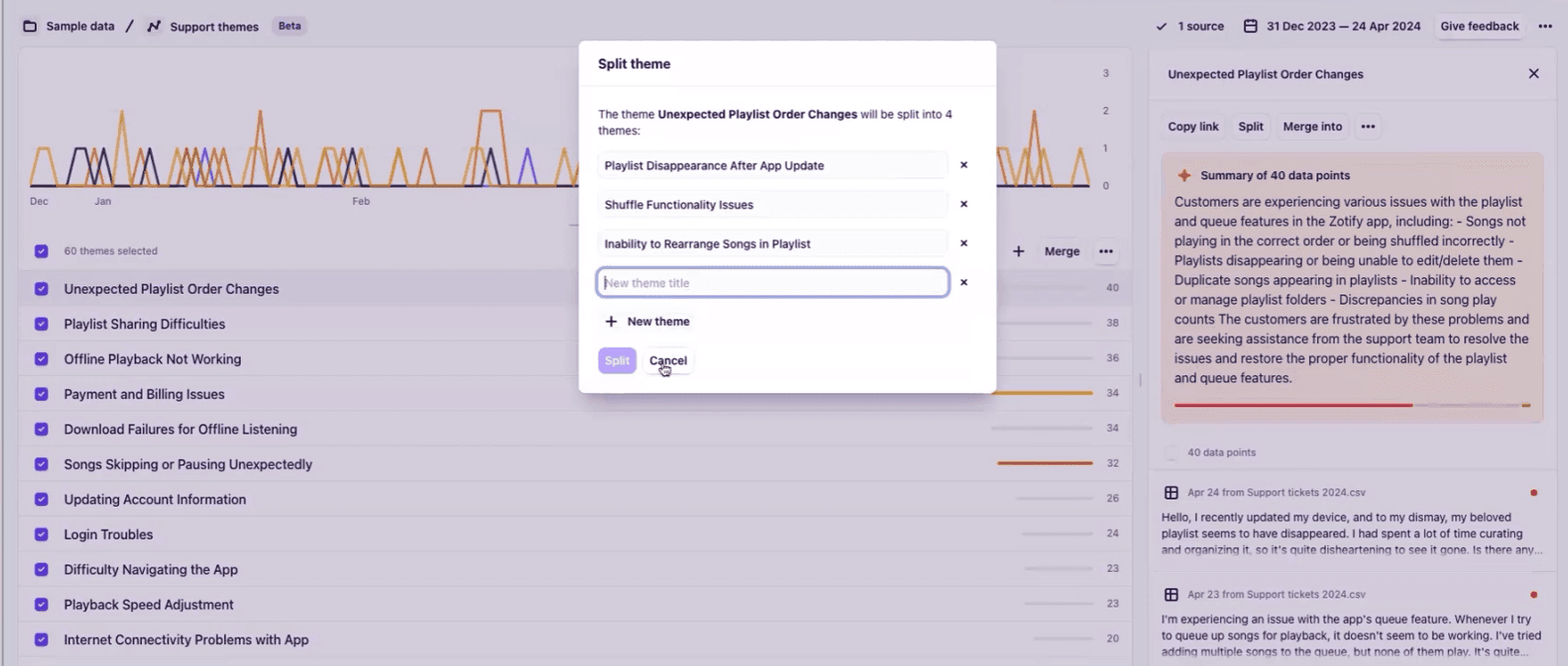
- Themes and insights can be tracked over time, helping teams monitor long-term trends and connect research findings to roadmap decisions.
This shows the themes present in Dovetail and also how to split them:
- AI Agents track signals proactively, acting on issues before they become problems.
Pricing & Plans
Free plan available. Paid plans include Professional at $15 per month, with Enterprise on custom pricing.
3. tl;dv
Best For: PMs in frequent customer or internal meetings who need instant summaries and action capture without manual note-taking.
What it is:
tl;dv records, transcribes, and summarizes product and customer meetings automatically, turning conversations into searchable insights. It highlights key moments, extracts action items, and syncs structured notes into tools like Notion, Slack, and CRM platforms.
The tool helps PMs move from raw discussion to documented decisions without manual note-taking. It works best for teams running frequent discovery calls, user interviews, or cross-functional syncs that need organized follow-ups.
Standout Features
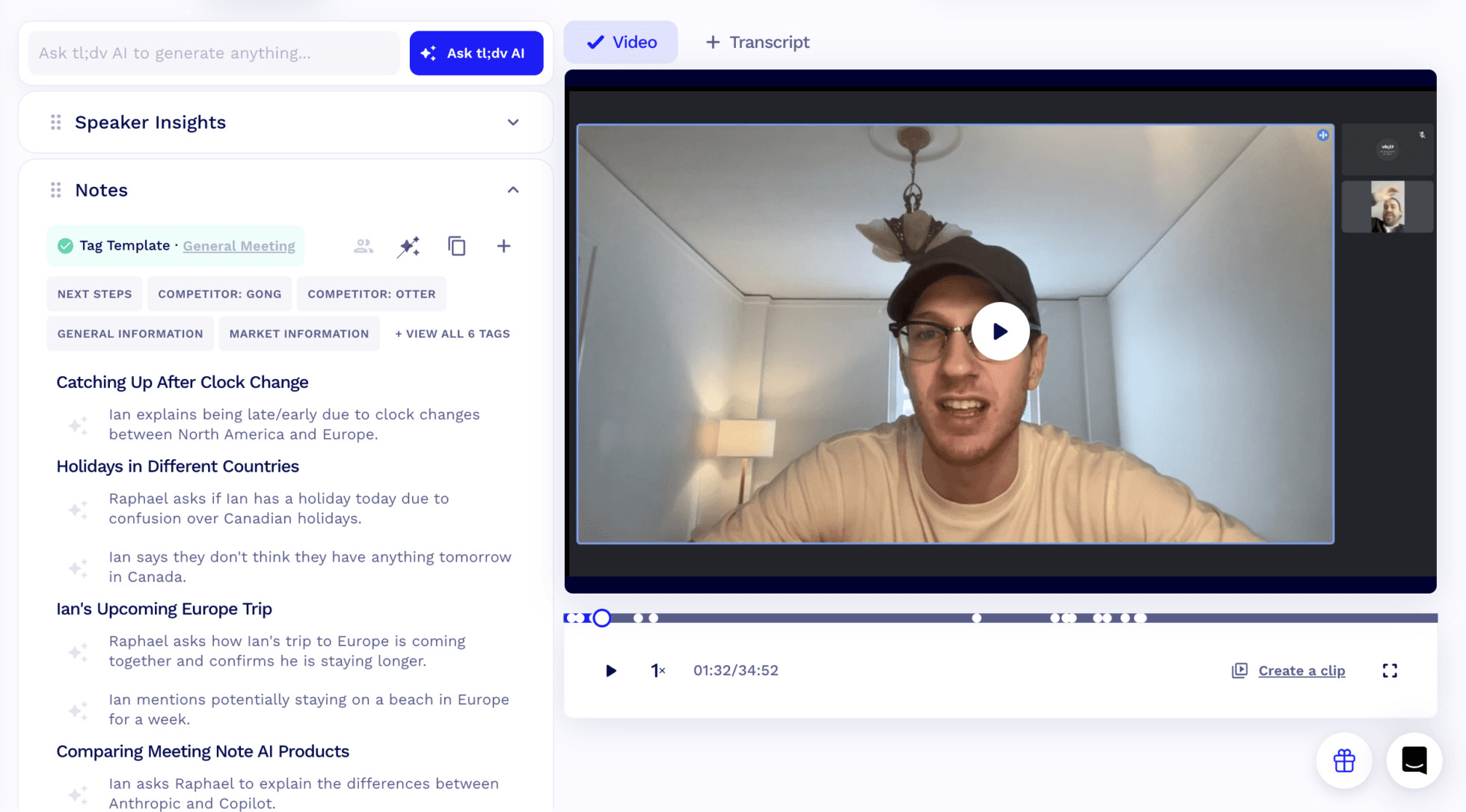
- Records and transcribes meetings in 30+ languages, generating instant AI summaries and translations for global teams.
Source: This shows how tl;dv records and transcribes meetings:
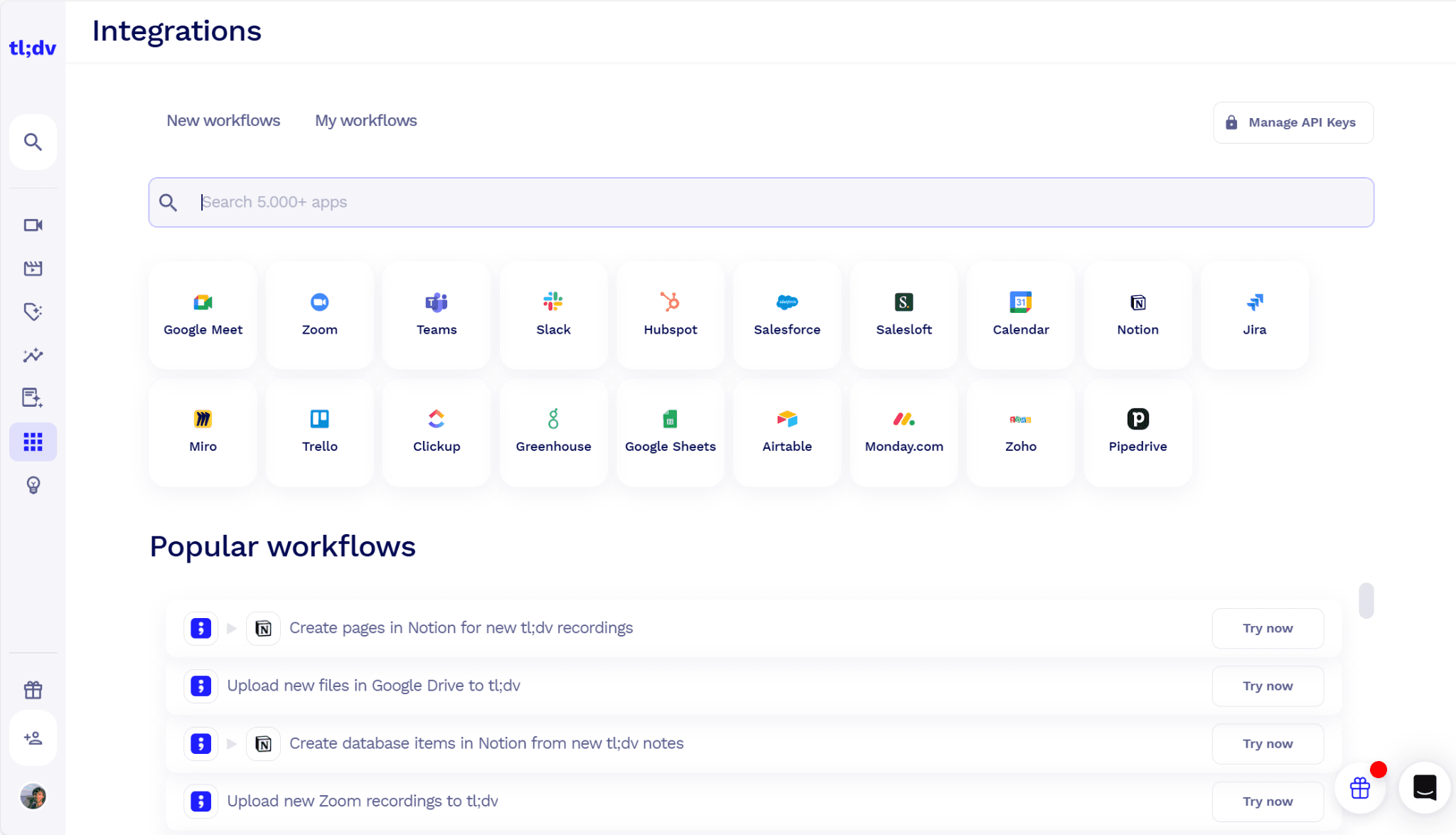
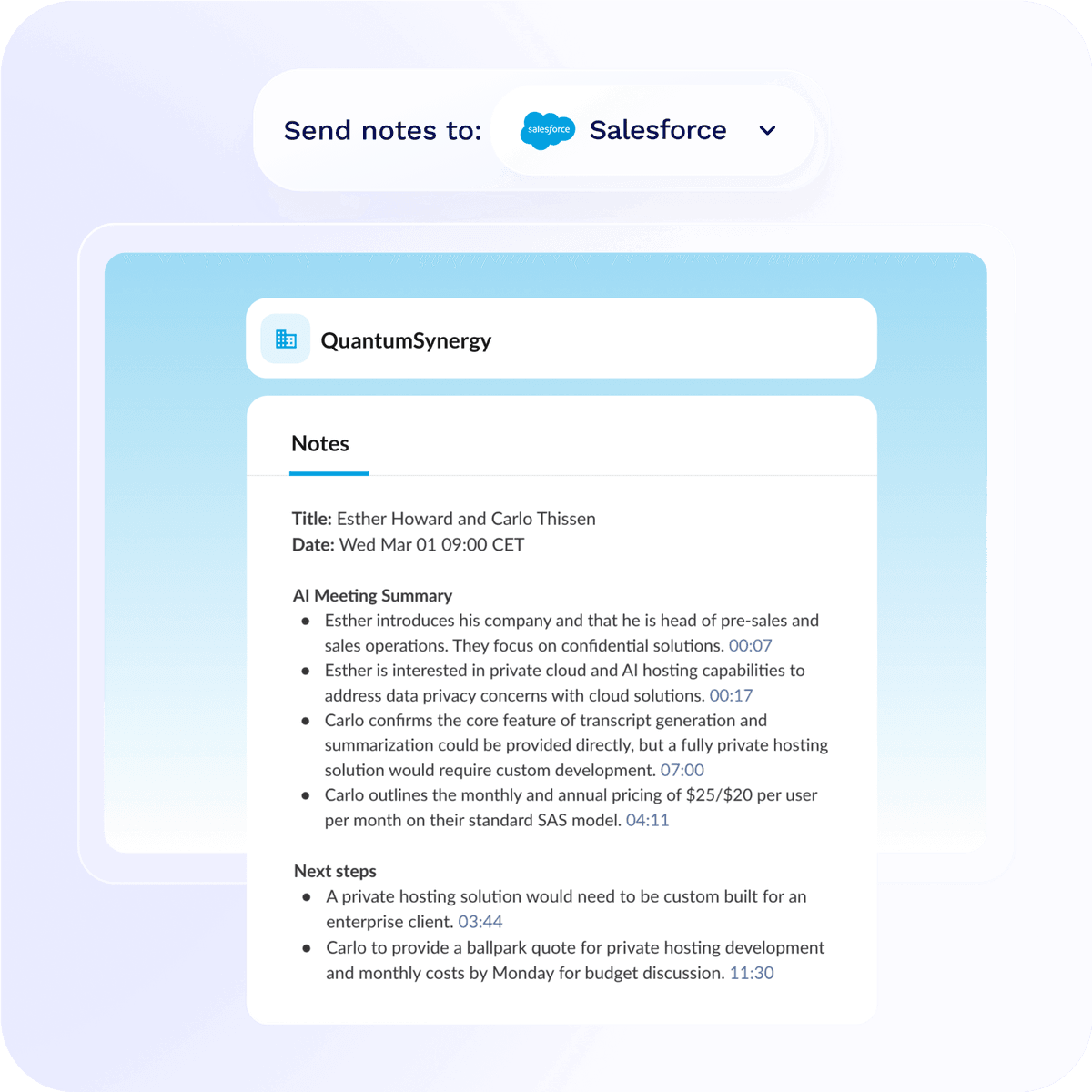
- Automatically updates CRMs, drafts follow-up emails, and creates action items, removing the need for manual data entry.
tl;dv directly integrates with 5000+ work apps:
Here is an image showing how tl;dv sents meeting notes to Salesforce:
- Produces AI-generated insight reports, such as recurring objections from weekly calls or product issues mentioned during sales conversations.
- Delivers sales coaching insights by tracking playbook adherence and highlighting opportunities to improve objection handling.
- Supports custom AI prompts, for example, compiling pain points from discovery calls and mapping them to relevant sales solutions.
Pricing & Plans
Free plan available. Paid plans start at $18 per user per month (Pro, annual billing) and go up to $29 per user per month (Business, annual billing).
4. Miro AI
Best For: PMs and designers running collaborative workshops, design sprints, brainstorming sessions, and cross-functional alignment work.
Description
Miro AI enhances the Miro whiteboard by turning messy workshop outputs into structured results. Teams can convert sticky notes, diagrams, and rough ideas into organized mind maps, user flows, summaries, or tables without rewriting context into detailed prompts.
Because it works directly inside the collaboration space, teams can move from brainstorming to structured documentation in the same session. It’s especially useful for product teams that rely on workshops and need to synthesize discussions quickly while keeping everyone aligned.
Standout Features
- Uses the entire whiteboard as context, allowing AI to generate structured outputs directly from live workshop content.
Here is the image that proves the point in a practical way:
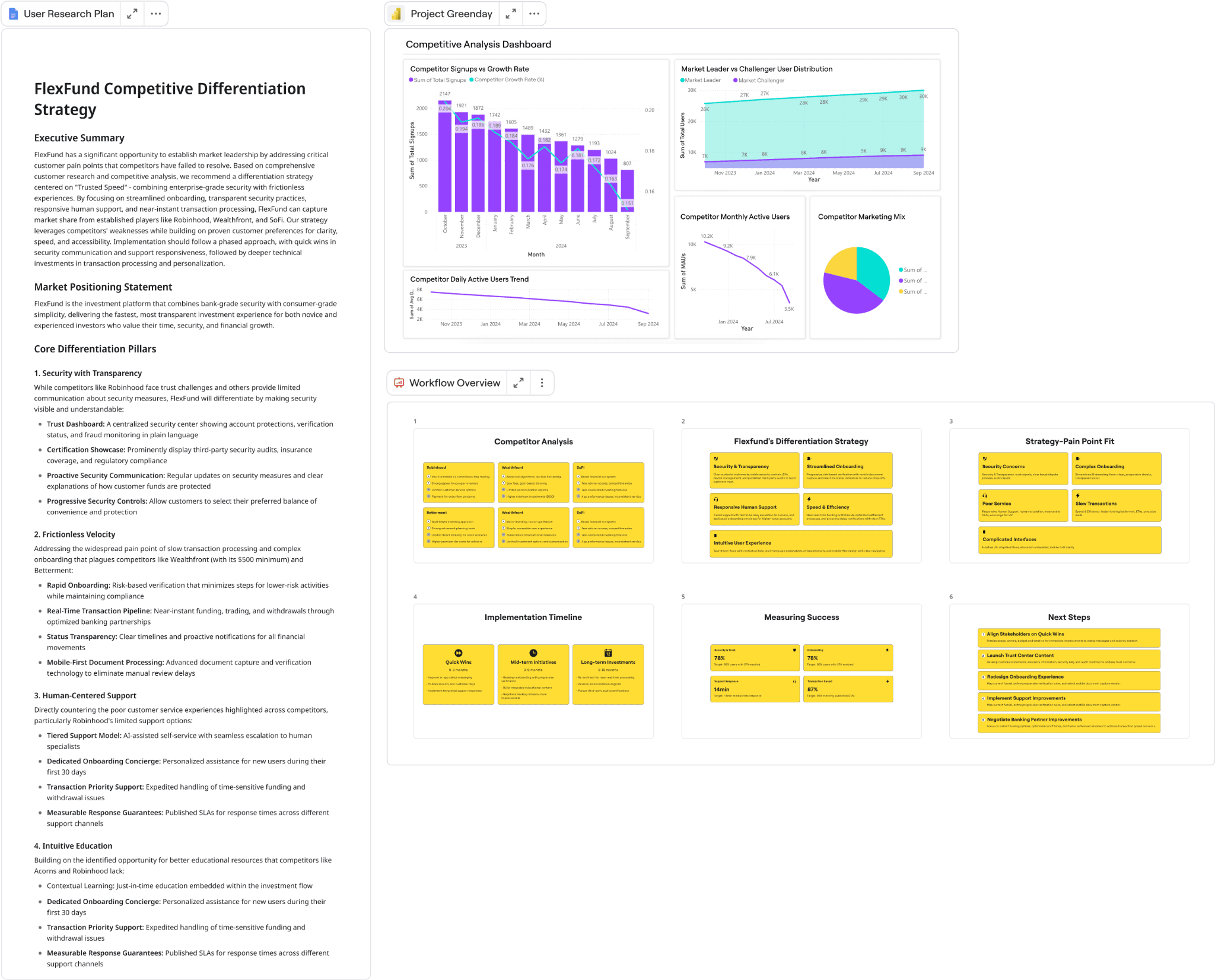
- Converts sticky notes into tables, transforms clustered ideas into summaries, and turns diagrams into draft documentation without manual rework.
- AI Sidekicks act as in-board assistants that help expand ideas, summarize discussions, and guide structured thinking during sessions.
- Supports multi-step workflows, helping teams turn design sprints and collaborative exercises into clear visual processes.
- Connects custom AI models and shared team knowledge to maintain consistency across cross-functional outputs.
Pricing & Plans
Free plan available. Paid plans start at $8 per user per month (Starter), with Business plans at $20 per user per month.
5. Figma AI
Best For: Growth-stage PMs and designers who need to prototype dashboards, screens, and UI variations quickly for early validation.
What it is:
Figma AI helps teams move from rough ideas to visual concepts without starting from a blank canvas. By generating editable layouts, components, and screen variations from text prompts or existing frames, it gives designers a structured starting point and helps PMs visualize requirements earlier in the process.
It works best for rapid exploration and concept testing rather than final production design. Teams can iterate faster, validate ideas with stakeholders sooner, and refine AI-generated drafts directly within Figma’s native design environment.
Standout Features
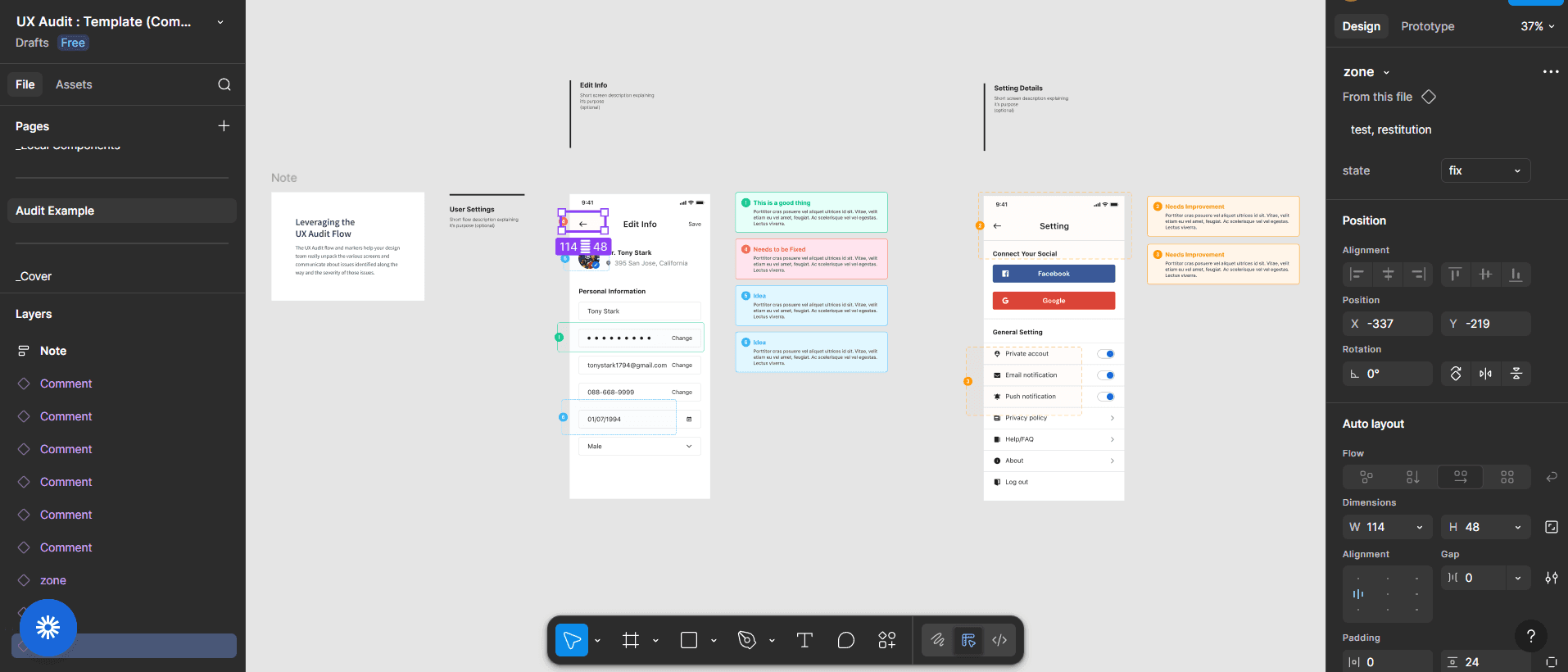
- Generates fully editable layouts, components, and design variants from text prompts or existing frames.
This image shows Figma’s workspace, where you can create all the editable layouts using different components and designs:
👉 Rapid prototyping tools work best within a structured design approach. See our digital product design examples to understand how leading brands combine speed with quality.
- Instantly creates dashboard and screen variations to support rapid prototyping and early stakeholder validation.
- Preserves full Figma compatibility, allowing designers to refine AI-generated outputs without disrupting existing workflows.
- Removes blank-canvas friction and accelerates early design exploration by approximately 3–5× for growth teams.
- Enables faster PM and designer collaboration by turning rough requirements into visual concepts quickly.
- Optimized for high-velocity prototyping and concept testing rather than final, pixel-perfect design delivery.
Pricing & Plans
Free starter plan available. Paid seats range from $16 per month (Professional) to $55 (Organization) and $90 (Enterprise). Note: Figma now markets its AI capabilities as Figma Make, Figma Agent, and Dev Mode AI rather than a standalone "Figma AI" product.
6. Whimsical AI
Best For: PMs and product teams creating user flows, mind maps, decision trees, and strategy documents during early ideation and alignment.
What it is:
Whimsical AI generates flowcharts, mind maps, wireframes, and diagrams directly from written descriptions, removing the need for manual diagram creation.
It helps teams quickly visualize onboarding flows, feature logic, and strategy roadmaps in a structured, easy-to-read format across infinite canvas boards and lightweight documents.
The tool is good for small to mid-sized teams that need clear visuals quickly during discovery, reviews, and cross-functional alignment, rather than detailed UI design or pixel-perfect prototyping.
Standout Features
- Whimsical AI instantly generates flowcharts, mind maps, wireframes, and diagrams from written descriptions.
This GIF is the best example that shows how Whimsical AI helps in creating sticky notes instantly:

- Removes the need for manual shape arrangement when creating user flows, decision trees, and onboarding logic.
- Combines infinite canvas boards with clean, lightweight documents for strategy roadmaps and team alignment.
- Automatically produces structured initiative docs and product strategy ladders in a Lenny- or Reforge-style format.
- Designed for early ideation, reviews, and cross-functional visual communication.
Pricing & Plans
Free plan available. Paid plans start at $10 per month and go up to $20 per month.
7. Notion AI
Best For: Solo PMs, small teams, and Notion-native growth-stage workspaces that need fast content structuring, synthesis, and lightweight research.
What it is:
Notion AI enhances the Notion workspace by turning scattered notes, outlines, and raw thinking into structured documentation. PMs can summarize meetings, expand bullet points into full specs, generate roadmaps, and organize research without leaving their existing pages.
Because it works inside the same workspace where planning already happens, teams can move from rough notes to structured documents in one flow. It’s especially useful for Notion-first teams that want faster synthesis, cleaner documentation, and better reuse of internal knowledge.
Standout Features
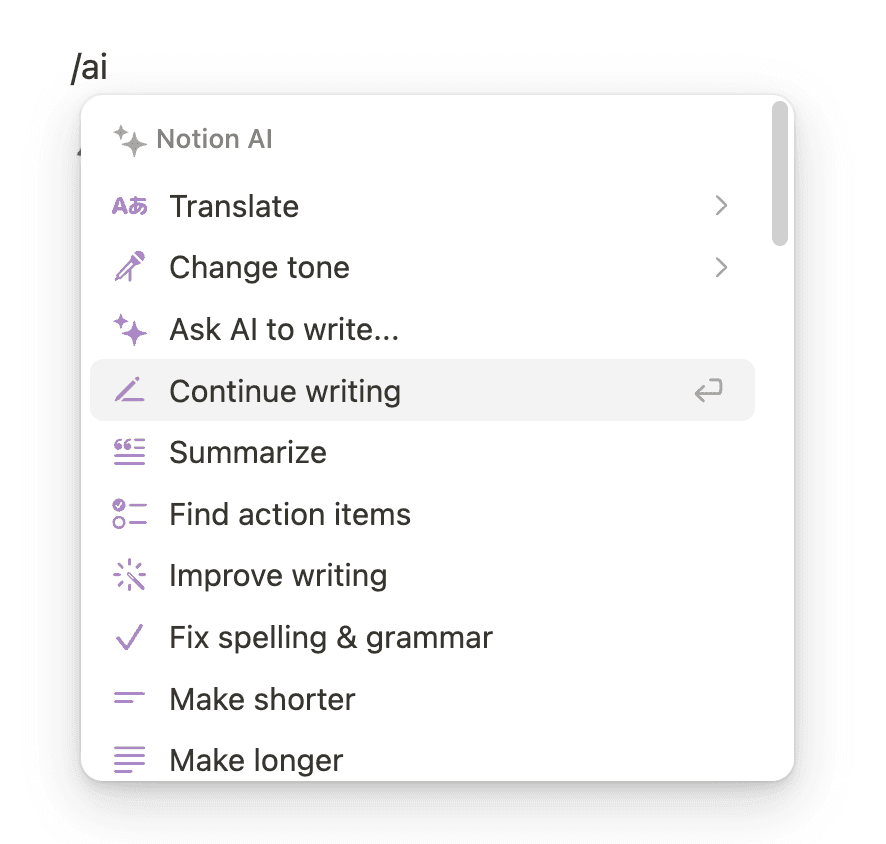
- Works directly inside Notion pages and databases, allowing AI to generate outputs without switching tools or rewriting context.
This image represents how using /ai one can use Notion’s AI for translation, writing, summarizing, and more:
- Summarizes notes, expands bullets into detailed sections, and generates roadmaps from raw content.
- Converts lists into auto-populated databases and creates flowcharts or diagrams directly within pages.
- Provides enterprise search across the Notion workspace and connected sources such as PDFs, email, and external tools.
- Supports AI meeting notes and custom agents that follow existing workspace permissions.
- Includes a research mode for drafting in-depth documents and reports using multiple sources.
- Maintains tone consistency and supports content translation across outputs.
Pricing & Plans
Free plan available. Notion AI is now bundled into paid plans rather than sold as a separate add-on: full AI access requires the Business plan at $15 per user per month (annual billing, $20 month-to-month).
8. Aha!
Best For: Growth-stage PMs and portfolio managers managing complex roadmaps, cross-team dependencies, and defensible quarterly prioritization.
What it is:
Aha! is a strategy-driven product planning platform that connects goals, initiatives, and features into structured roadmaps. It applies consistent scoring frameworks to help teams prioritize ideas with clear rationale and trade-off visibility.
Time-based roadmaps adjust as capacity or priorities change, maintaining alignment between strategy and delivery. The platform is designed for portfolio-level planning and works best for teams managing complex, multi-team product environments.
Standout Features
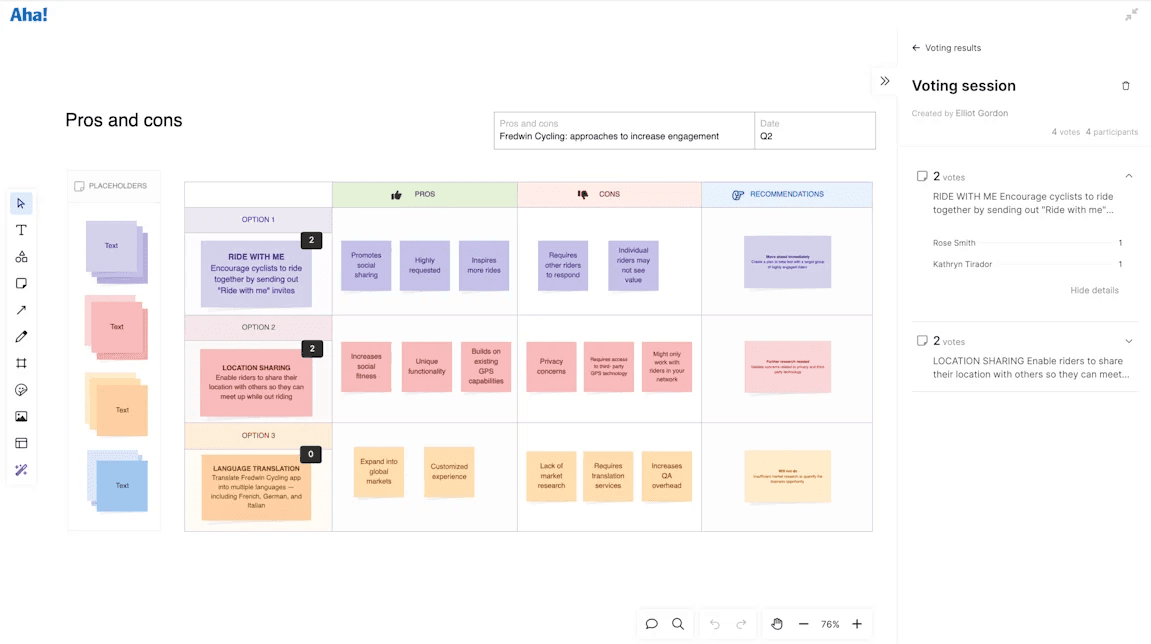
- Strategy-Aligned Scoring automatically evaluates feature ideas against predefined frameworks (impact, effort, strategic fit) and surfaces transparent reasoning behind prioritization decisions.
This view shows how ideas are scored and ranked based on strategic criteria:
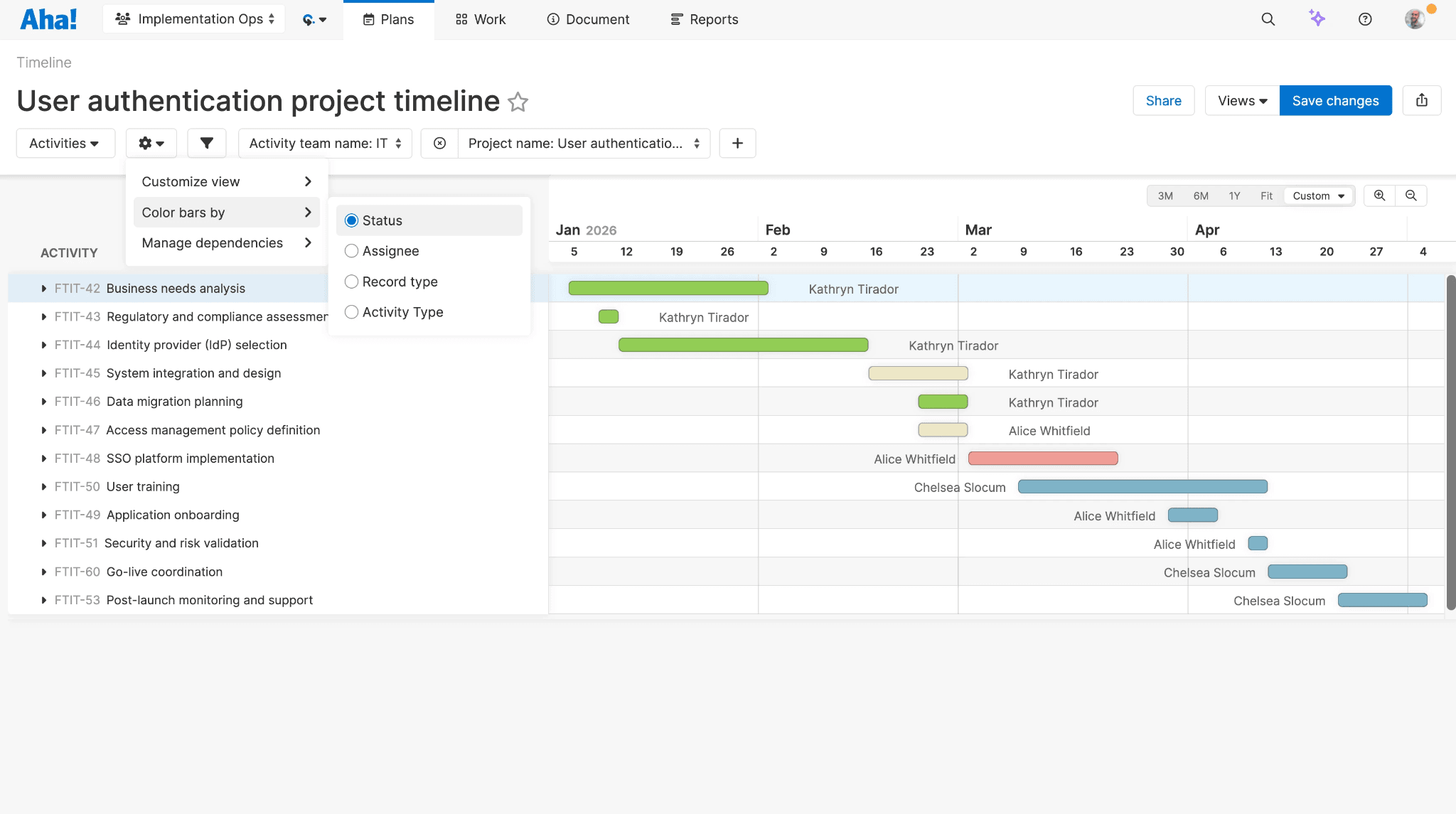
- Dynamic Time-Based Roadmaps adjust automatically when priorities shift or team capacity changes, reducing manual roadmap rework.
Below is an example of Aha!’s timeline view adapting to updated delivery inputs:
- Dependency Mapping & Release Planning provide clear visibility into cross-team dependencies, milestones, and risks to reduce delivery bottlenecks.
- Portfolio-Level Planning Standardizes prioritization outputs across teams, ensuring consistent decision-making during quarterly and annual planning cycles.
- Strategy Hierarchy Integration connects goals → initiatives → features throughout the entire workflow, maintaining traceability from vision to execution.
- Auditable Decision Trails preserve scoring history, prioritization changes, and roadmap adjustments for stakeholder reviews, OKR alignment, and executive reporting.
Pricing & Plans
Aha! Roadmaps, the roadmapping product covered here, starts at $59 per user per month, with Enterprise tiers at $99 and $149. (The $9 entry price belongs to Aha! Whiteboards, a separate product.)
9. Jira Product Discovery
Best For: Growth-stage product teams already working in Jira that need structured idea intake, scoring, and a seamless handoff to development.
What it is:
Jira Product Discovery centralizes feature requests, customer insights, and product opportunities in a dedicated discovery workspace. Teams can capture ideas from multiple sources and apply structured scoring frameworks (such as impact, effort, confidence, and custom fields) to prioritize work consistently and transparently.
Once ideas are validated, they convert directly into Jira Software epics, stories, or issues with full context preserved. Roadmaps stay synchronized across discovery, planning, and delivery, ensuring alignment between strategy and execution. The tool delivers the most value for teams deeply embedded in the Atlassian ecosystem.
Standout Features
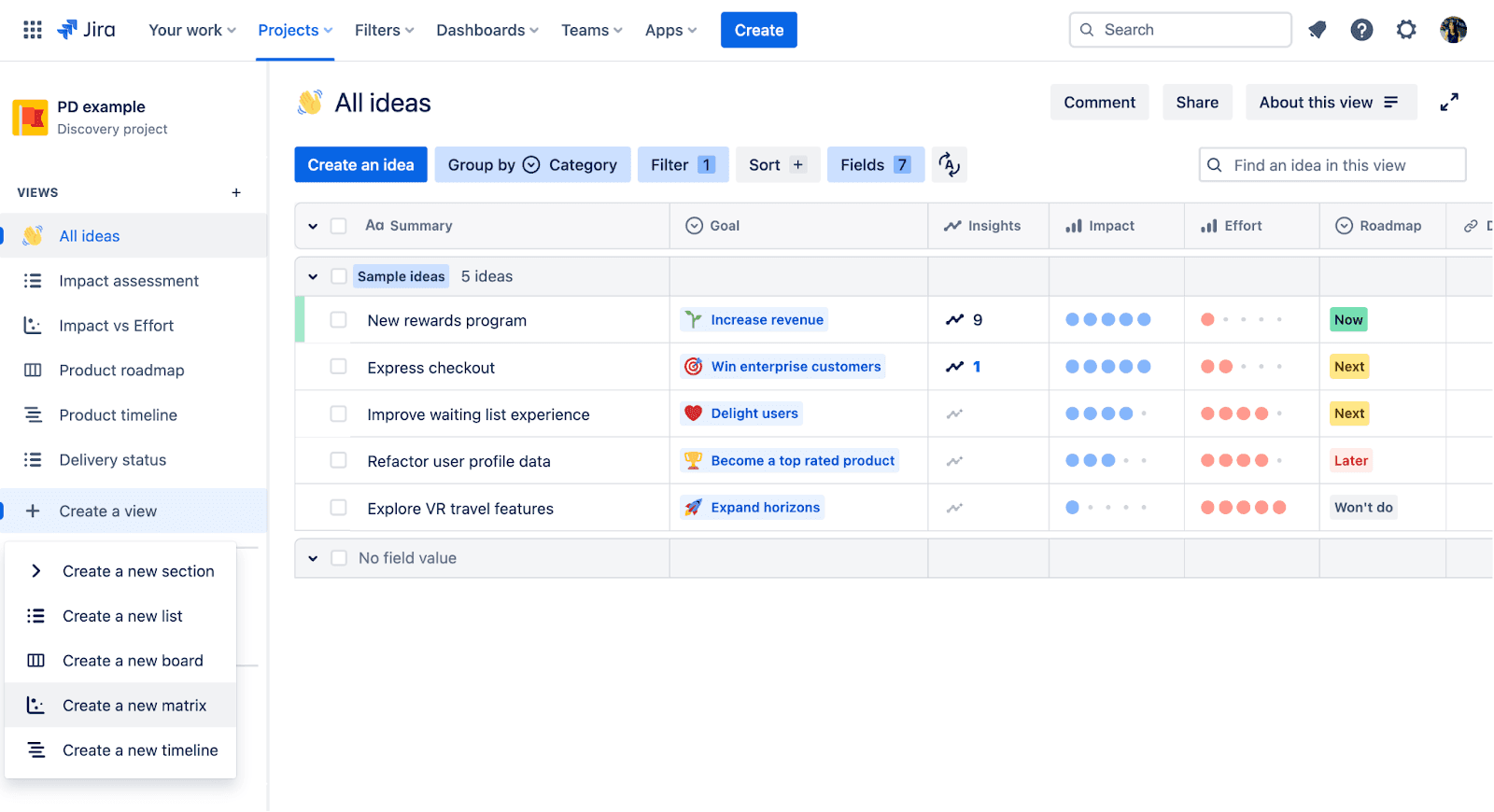
- Centralized Idea Hub consolidates feature requests, user feedback, and opportunities from multiple sources into a single structured discovery project.
This image shows how ideas are captured and organized inside Jira Product Discovery:
- Uses structured scoring frameworks (impact, effort, confidence, and custom fields) to create defensible prioritization decisions.
- One-Click Handoff converts validated ideas directly into Jira Software epics, stories, or issues with full context and rationale preserved.
- Live Roadmaps automatically sync across discovery, planning, and development, reducing manual updates and alignment gaps.
- Atlassian Intelligence surfaces trends, highlights high-impact opportunities, and assists with summarization and prioritization.
Pricing & Plans
Free plan available. Paid plans run $10 per creator per month (Standard) to $25 per creator per month (Premium).
10. Linear
Best For: Engineering-led product teams focused on speed, clean execution, and minimal overhead in day-to-day delivery.
What it is:
Linear handles issue tracking, backlog management, and sprint cycles for fast-moving teams. AI triage suggests priorities, labels, duplicates, and assignees to help work move smoothly from intake to completion.
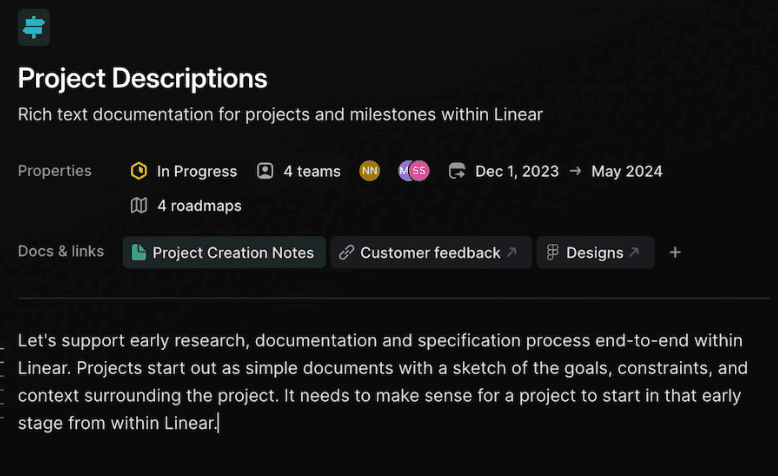
Cycles provide regular delivery routines, while projects bring together specs, milestones, tasks, and documentation in a shared workspace.
Linear Insights gives real-time analytics on velocity, scope, and progress without extra setup.
This tool is best for engineering-focused teams executing quickly. It is less suited for long-term strategic planning or complex portfolio management.
Standout Features
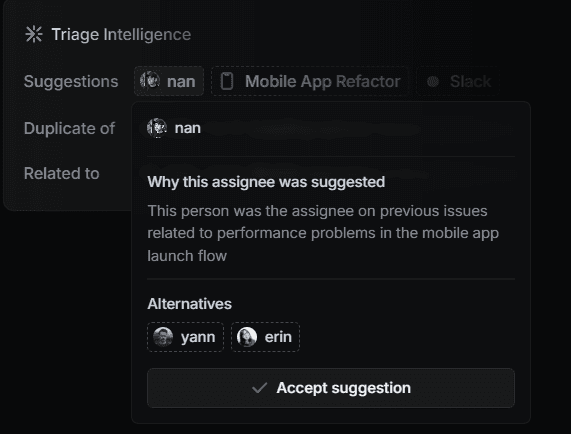
- AI Triage automatically suggests priorities, labels, duplicate detection, and task ownership for incoming issues.
This image shows how AI triage organizes and routes work inside Linear:
- Cycles support sprint planning with time-boxed delivery windows that help teams focus on the next set of tasks.
- Projects organize specs, milestones, tasks, and documentation in one view.
- Linear Insights provides real-time visibility into velocity, scope changes, and delivery progress without additional configuration.
- Figma integration links design files directly to issues, reducing context switching between product and engineering.
- Linear MCP enables integration with tools like Cursor, Claude, and ChatGPT for AI-assisted coding and task support.
Pricing & Plans
Free plan available. Paid plans start at $10 per user per month and go up to $16 per user per month.
11. Amplitude
Best For: Growth-stage PMs and product teams with structured event tracking who want behavioral insights, experimentation, and AI-assisted analysis.
What it is:
Amplitude turns raw product event data into behavioral insights that help teams understand how users move through their product. With natural language queries, PMs can quickly generate funnels, cohorts, path analysis, and breakdowns without building complex reports manually.
👉 Analytics tools provide data, but interpreting it requires expertise, and for that, you can check out our enterprise UX research services that help teams turn behavioral data into design improvements.
Standout Features
- Natural language queries generate funnels, cohorts, path analysis, and breakdowns from tracked product events.
- AI Agents continuously monitor product metrics and proactively surface anomalies, behavioral shifts, and emerging trends.
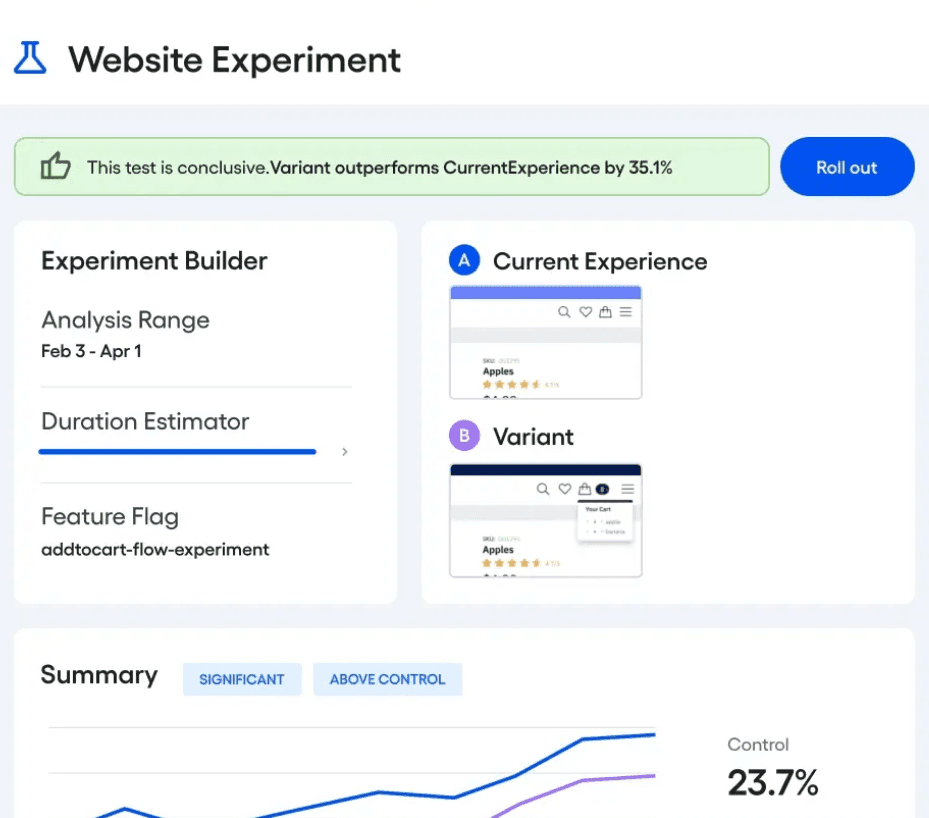
- Feature Experimentation enables controlled rollouts and hypothesis testing on new releases, while Web Experimentation runs A/B tests tied directly to behavioral data.
These visuals demonstrate how experimentation is configured and analyzed in Amplitude:
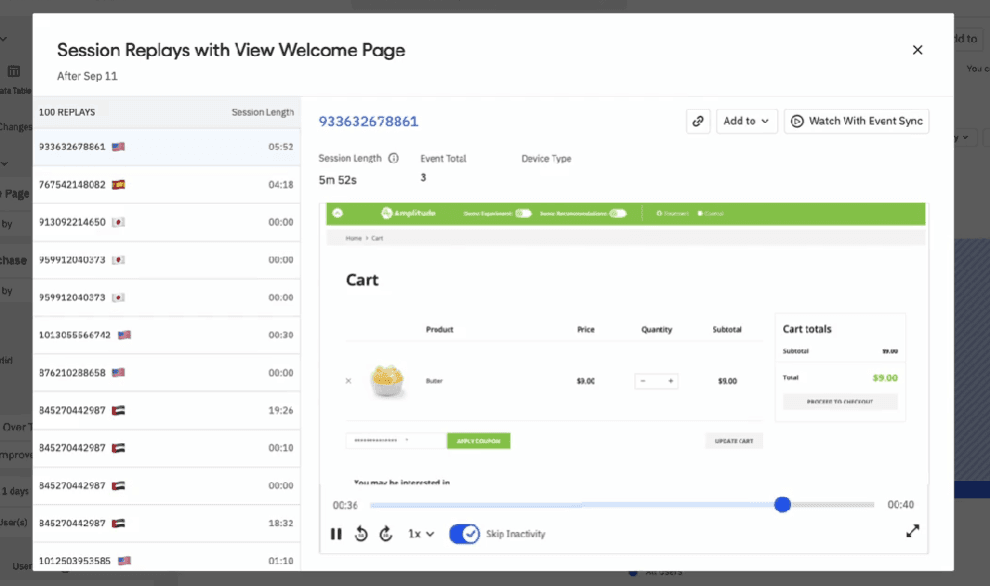
- Session Replay connects quantitative drop-offs with qualitative behavior, showing exactly what users did before exiting.
This image highlights how session replay reveals friction points in user journeys:
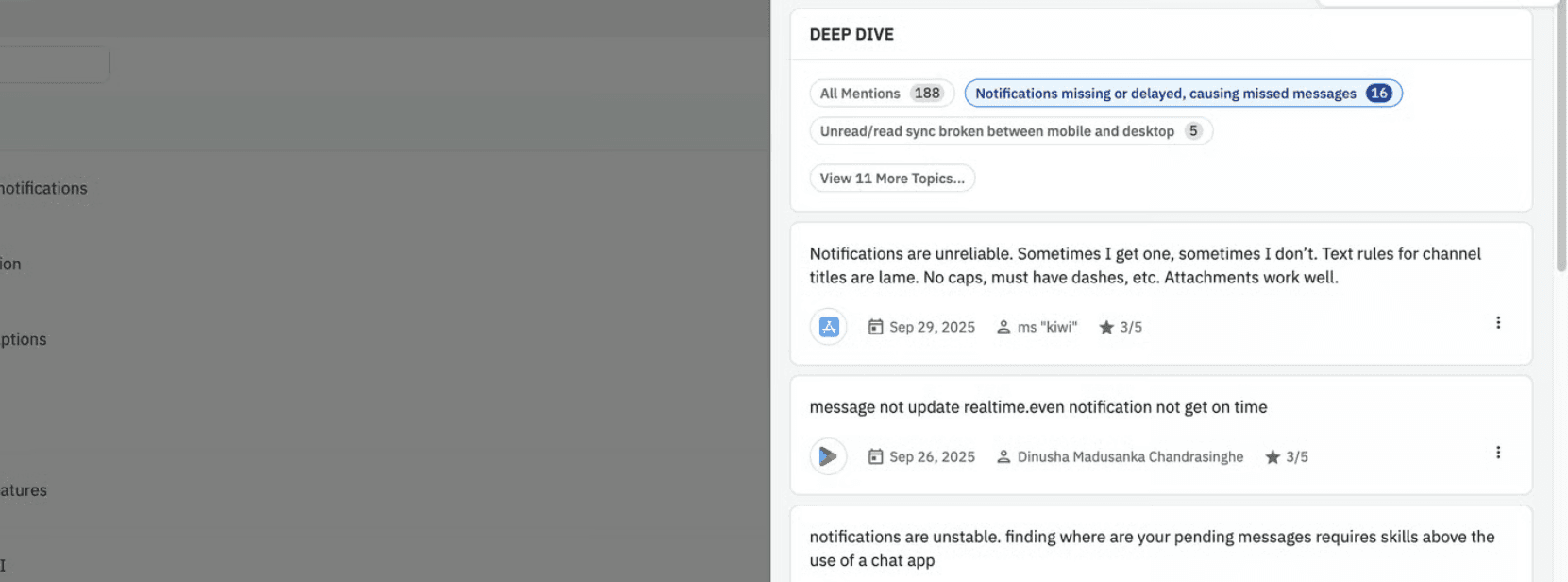
AI Feedback transforms open-text customer responses into structured themes and measurable behavioral segments.
- MCP integration allows teams to prompt product insights directly inside tools like Claude or Cursor, extending analytics into AI-assisted workflows.
Pricing & Plans
Paid plans start at $49 per month, with custom pricing for higher tiers. Freemium model is available.
12. ClickUp AI
Best For: PMs and teams who need AI assistance for task management, project updates, and workflow coordination.
Description
ClickUp AI is built directly into tasks, docs, and comments, helping teams turn high-level goals into structured execution plans. PMs can break initiatives into subtasks, summarize long comment threads, generate project updates, and draft documentation without leaving their workspace.
Because it operates inside the system where work is already tracked, AI suggestions stay connected to real tasks, timelines, and owners. It’s most effective when ClickUp acts as the team’s system of record, keeping planning, execution, and reporting aligned in one environment.
Standout Features
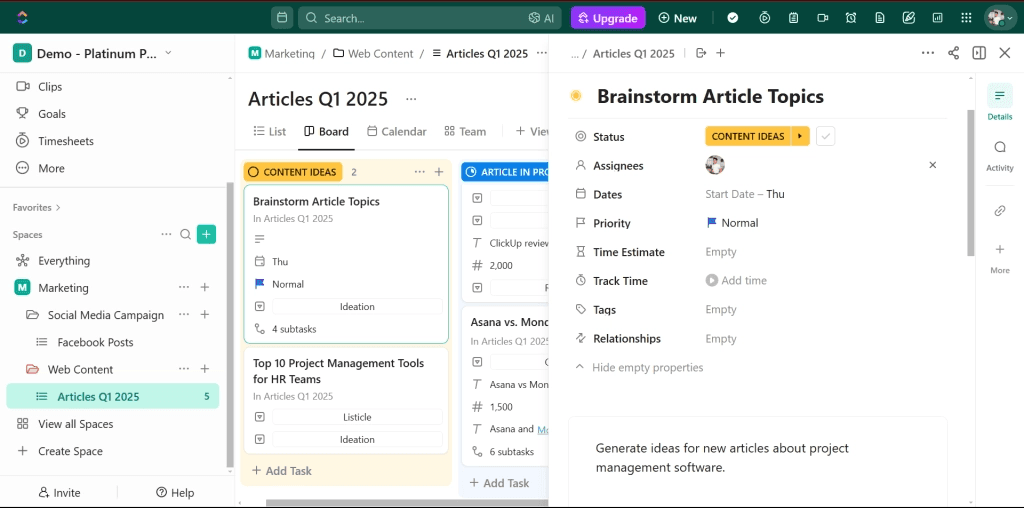
- Breaks goals into subtasks, summarizes threads, and generates updates directly in tasks, docs, and comments.
These images are of ClickUp’s dashboard showing how everything is maintained and labelled:
- Includes role-based AI Agents such as PM Agent for tracking deliverables and timelines, and Intake Agent for standardizing project kickoffs.
- The Content Agent drafts promotional or product copy, while the Brand Agent helps maintain tone and internal guidelines.
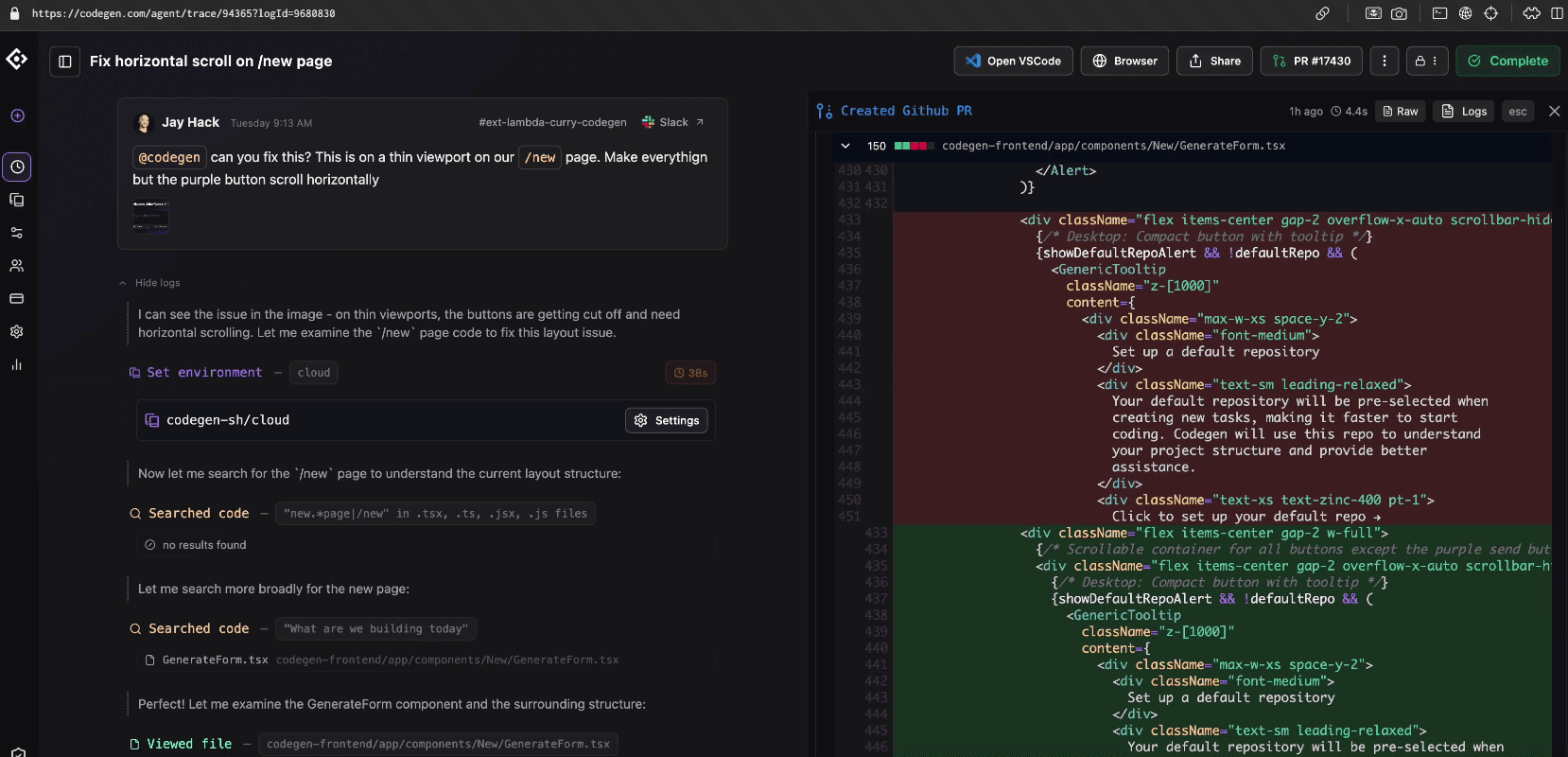
- The Triage Agent prioritizes bugs and issues, while the Codegen Agent generates code from requirements within the task context.
Here is how the Triage and Codegen agents work together in ClickUp:
- Live Answers Agent provides real-time workspace insights, and Alignment Agent supports cross-functional coordination across teams.
Pricing & Plans
Free plan available. Base plans run $7 to $12 per user per month, but ClickUp AI (ClickUp Brain) is a separate paid add-on at around $9 per user per month and is not included in those base prices.
13. Productboard
Best For: PMs sitting on mountains of customer feedback who need AI help turning it into prioritized, evidence-backed roadmaps.
What it is:
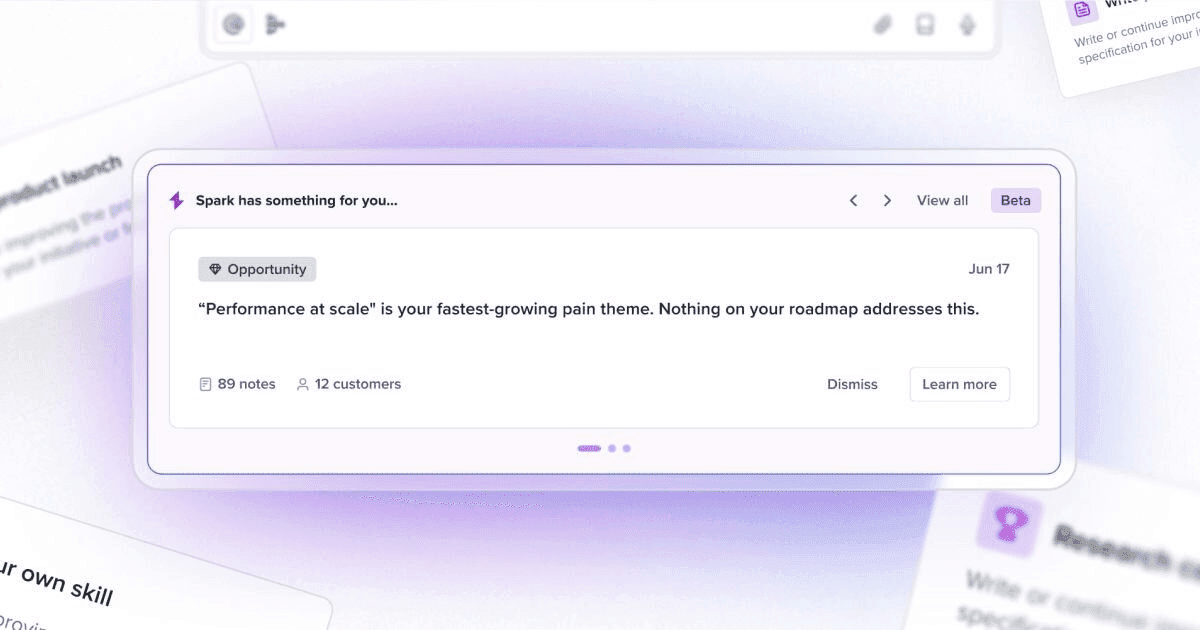
Productboard centralizes customer feedback from sales calls, support tickets, surveys, and integrations into one searchable repository. Its AI agent, Spark, clusters themes, surfaces product opportunities with citations back to the source, and drafts delivery-ready specs from feedback synthesis. Because insights link directly to roadmap items, prioritization stays grounded in real customer evidence instead of opinions.
Standout Features
AI clustering and trend detection group similar feedback automatically, cutting hours of manual tagging.
Customizable prioritization formulas rank features by demand, revenue impact, and strategic fit.
Timeline and portal roadmaps share plans with stakeholders and customers for validation.
Integrations pull feedback from Salesforce, Intercom, Zendesk, Gong, Slack, and Jira.
Pricing & Plans
Free plan available for one maker. Paid plans start at $19 per maker per month (Plus, annual billing; $25 month-to-month) and go up to $59 per maker per month (Business, annual billing; $75 month-to-month), with Enterprise on custom pricing. Spark AI is included in all paid plans with monthly credit pools.
Further reading
- Digital Product Design Process: 8 Must-Have Steps
- 10 Product Development Strategies for Scaling in 2026
- AI Tools for UX Research
Use AI Tools More Effectively With Our Product Design Expertise
AI tools for product managers can speed up tasks like drafting PRDs, sketching early concepts, or ranking features. Without strong user research and clear product design foundations, these outputs often fail to reflect real user needs.
At Tenet, we have worked with teams using tools like Miro AI for flow mapping or Productboard for prioritization. In many cases, the challenge is not the tool itself, but translating AI-generated outputs into decisions that align with existing interfaces, user behavior, and long-term product direction.
Our digital product design services help teams shape these early outputs into usable product experiences that fit real constraints and design systems.
In parallel, our UX research services ensure insights from tools such as Dovetail or Amplitude are grounded in validated user evidence rather than assumptions.
This approach helps product managers move beyond surface-level automation and build products that scale with clarity and intent.
👉 If you are bringing AI tools into your product workflow and want the surrounding process to hold up, get a UI/UX design proposal and we will map out how research and design support your roadmap.
Talk to our product experts and find the right AI tools for your workflow
Talk to our product experts and find the right AI tools for your workflow
















Got an idea on your mind?
We’d love to hear about your brand, your visions, current challenges, even if you’re not sure what your next step is.
Let’s talk


