
How To Choose The Right CMS? (7 EASY Steps)
 By
By Share

Share
Get a quick blog summary with



According to W3Techs, over 71% of all websites now use a CMS rather than custom code. This shift is happening because modern businesses need to move fast.
However, with 800+ options available, the "most popular" choice isn't always the right one for your specific goals. If you pick the wrong one, you might find yourself stuck with a slow site, high developer costs, or a system that your marketing team hates using.
A CMS is more than just a place to type blog posts. It affects three main things:
Speed and SEO: How fast your pages load and how well you rank on Google.
Maintenance: How much time and money do you spend on updates and security?
Team Efficiency: How quickly your team can launch a new page without waiting for a developer.
After managing 300+ client websites across industries, we have seen how the right CMS can speed up growth while the wrong one can slow teams down.
This guide cuts through marketing hype and helps you choose a CMS based on real business needs, team workflows, and long-term scalability.
What is a CMS?
A content management system (CMS) is software that lets you create, edit, and publish website content without editing code directly for routine changes. Instead of relying on a developer to update a homepage headline or publish a blog post, marketing and content teams can make updates through a visual interface.
Here’s what that means in practice. Without a CMS, changing “Summer Sale” to “Fall Sale” on your homepage requires editing HTML files, uploading them to a server, and testing to ensure nothing breaks. With a CMS, you open the page editor, update the text, and publish the change.
CMS platforms also handle more than text updates. They manage:
- Content structure: organizing pages, blog posts, products, and landing pages
- User permissions: allowing designers to edit layouts while limiting access to sensitive settings
- Media libraries: storing, reusing, and optimizing images, videos, and documents
- Publishing workflows: routing content through reviews and approvals before it goes live
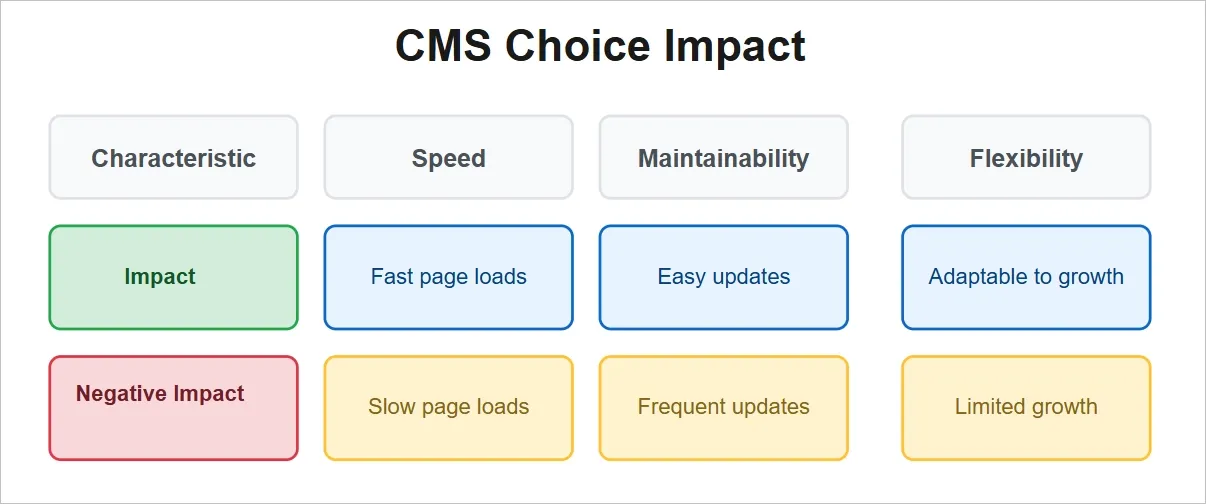
The impact of a CMS choice shows up in three practical areas.
Speed:
A well-configured CMS setup, combined with proper hosting and caching, can serve pages in under one second. Poor configuration can push load times to three to five seconds, which can increase bounce rates by up to 90%.
Maintainability:
Some CMS platforms depend heavily on plugins that require frequent updates and compatibility checks. Others handle security patches and core updates automatically. This difference matters when teams need to launch campaigns quickly instead of troubleshooting site issues.
Flexibility:
As websites grow, requirements change. You may start with a blog and later need ecommerce features, gated content, or custom applications. Some CMS platforms support this growth through extensions or APIs, while others require partial or full rebuilds.
This table represents how CMS choices impact speed, maintainability, and flexibility, with positive and negative outcomes.
👉 Learn more about modern web design trends that impact CMS selection.
If you are planning a new website or struggling with an existing CMS, our Custom CMS Development services help businesses design scalable, secure, and easy-to-manage CMS setups built for real-world workflows.
Discover our Custom CMS Development services by country:
- CMS development agency in India
- CMS development agency in London, UK
- CMS development agency in the USA
- CMS development agency in Dubai
What are the types of CMS platforms?
CMS platforms generally fall into five categories. Each category solves different problems and comes with clear trade-offs.
1. Traditional CMS (Monolithic CMS)
Traditional CMS platforms handle content storage, page templates, and content delivery in one system. When a user visits the site, the CMS pulls content from a database, applies the design, and delivers a complete web page.
Examples: WordPress, Drupal, Joomla
Best for: Small businesses, blogs, marketing sites, and content-heavy websites that need quick setup.
Pros
- Fast initial setup, often within a week
- Large library of themes and plugins
- Strong community support
- Lower upfront cost
Cons
- Performance depends on caching and hosting
- Security relies on keeping plugins updated
- Design changes can affect functionality
- More complex to manage at scale across multiple sites
2. Headless CMS
Headless CMS platforms separate content management from content display. Editors manage content in the CMS, while websites and apps pull content through APIs.
Examples: Contentful, Strapi, Sanity
Best for: Teams publishing to multiple channels or using custom front-end frameworks.
Pros
- Publish content to many platforms from one source
- Full control over design and front-end performance
- Smaller public attack surface
Cons
- Requires developer involvement
- Content previews require custom setup
- Higher initial build cost
- Steeper learning curve for non-technical teams
3. Hybrid CMS (Decoupled CMS)
Hybrid CMS platforms combine traditional editing with API-based delivery. Editors get visual previews, while developers can use APIs for advanced use cases.
Examples: Drupal (decoupled setups), Adobe Experience Manager
Best for: Organizations that want visual editing today with flexibility for future channels.
Pros
- Visual previews for editors
- Supports multiple front-end technologies
- Easier transition from traditional to headless
Cons
- Higher implementation cost
- Requires technical expertise
- Unnecessary complexity for simple websites
4. SaaS CMS (Cloud-Based CMS)
SaaS CMS platforms are fully hosted and maintained by the provider. Infrastructure, security, and updates are handled for you under a subscription model.
Examples: Webflow, Wix, Squarespace, Shopify (ecommerce-focused)
Best for: Teams without developers or businesses needing fast launch.
Pros
- No server or security management
- Automatic updates and backups
- Built-in hosting and SSL
- Fast setup
Cons
- Ongoing monthly costs
- Limited customization
- Vendor lock-in
- Platform-specific limitations
5. Open-Source CMS
Open-source CMS platforms provide full access to the source code and are typically self-hosted. Open-source refers to licensing, and these systems can be traditional or hybrid in architecture.
Examples: WordPress, Drupal, Craft CMS
Best for: Teams with technical resources and long-term customization needs.
Pros
- No licensing fees
- Full control over functionality
- No forced vendor lock-in
Cons
- You manage security and updates
- Requires development support
- Hosting and performance are your responsibility
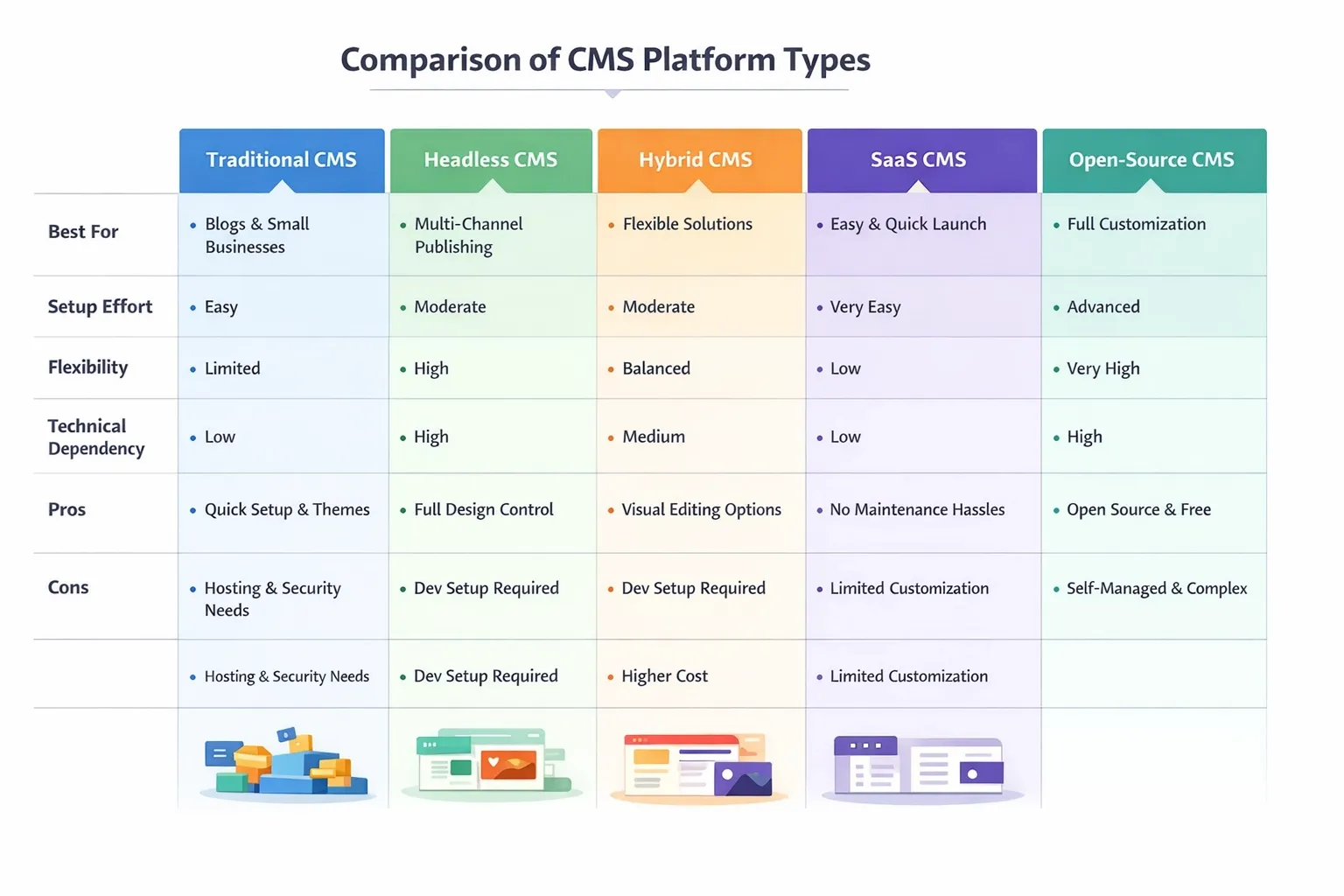
Below is a table comparing the 5 CMS platform types across best use cases, setup effort, and key trade-offs.
👉 Explore custom CMS development services for customized solutions.
7 Steps to select the right CMS platform for your website
Step 1: Define your website’s primary purpose and goals
Start by identifying what your website actually does today, not what it might do in the future. This step sets the foundation for every CMS decision that follows. Skipping this often leads to choosing features you do not need and missing the ones you do.
What to consider
- Is the website mainly a blog, an e-commerce store, a lead generation site, or a web application?
- Will users need to create accounts and log in?
- Do you need different user role,s such as authors, editors, and reviewers?
- How often will content change: daily, weekly, or monthly?
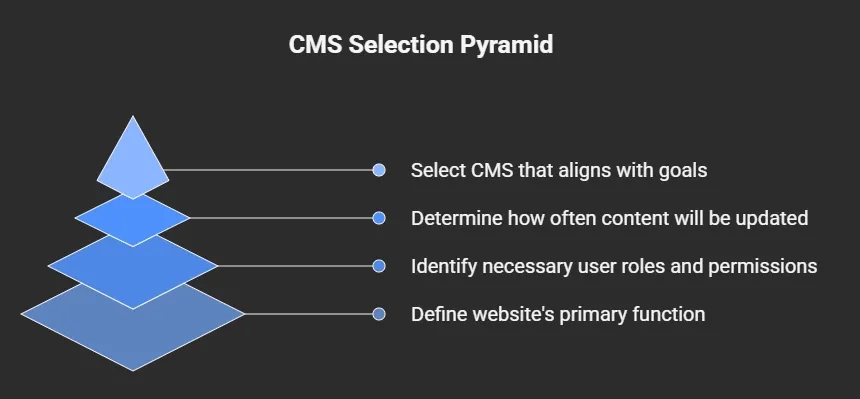
Here this pyramid shows the foundational steps for CMS selection, starting with defining your website's primary purpose and goals.
Why it matters
CMS platforms are built around specific use cases. A CMS designed for publishing content will struggle with product catalogs or user accounts. An e-commerce-first CMS may feel restrictive for editorial workflows. Clear goals help narrow options early and prevent rework later.
Pitfalls to avoid
- Planning for every possible future feature instead of current needs
- Choosing a CMS because it is popular rather than suitable
- Assuming one CMS can handle all use cases equally well
Step 2: Assess your team’s technical skills and workflow
A CMS should support how your team works day to day. Before comparing platforms, understand who will manage the website and how often changes will be made.
What to consider
- Who updates content most often: marketers, editors, or developers?
- Can your team handle basic technical tasks like templates or structured fields?
- Do you rely on agencies or freelancers for regular updates?
- How quickly do changes need to go live?
Why it matters
Some CMS platforms are built for non-technical teams and offer visual editors. Others require developer involvement for layouts, previews, or publishing. A mismatch can slow updates and increase dependency on external support.
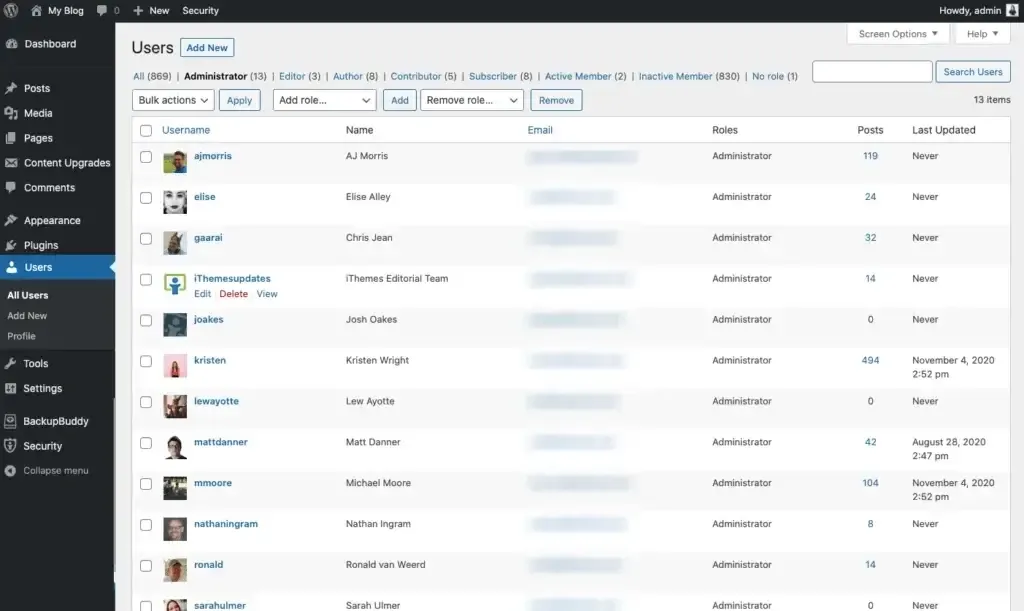
This visual represents WordPress user roles and permissions management for different team members.
Pitfalls to avoid
- Assuming your team will learn a complex CMS without training time
- Choosing a developer-heavy platform for a marketing-led team
- Ignoring approval flows and publishing workflows
Step 3: Understand your content structure and volume
Before selecting a CMS, you need to understand what kind of content you will manage and how much of it there will be. Content type and volume directly affect how well a CMS performs and how easy it is to maintain over time.
What to consider
- What types of content will the site have: pages, blog posts, products, case studies, or resources?
- Does content need relationships, such as authors linked to posts or products linked to categories?
- Will the site grow to hundreds or thousands of content items?
- Do you need search, filters, or tagging to help users find content?
Why it matters
Some CMS platforms handle structured and relational content better than others. A CMS that works fine for ten pages may struggle when managing thousands of entries. Poor content structure leads to duplication, messy URLs, and difficult updates as the site grows.
Pitfalls to avoid
- Treating all content as simple pages
- Ignoring future content growth
- Choosing a CMS without strong search or organization features
👉 Read our guide on website navigation best practices to structure your content effectively.
Step 4: Evaluate performance, hosting, and delivery needs
CMS selection affects how fast your website loads and how reliably it handles traffic. Performance is not only about design or images. It is closely tied to how the CMS stores content, processes requests, and delivers pages to users.
What to consider
- Expected traffic levels and traffic spikes
- Hosting model: self-hosted, managed hosting, or fully hosted SaaS
- Need for caching, CDN support, or static page delivery
- Geographic location of users
Why it matters
Slow websites hurt user experience and search rankings. Some CMS platforms depend heavily on server-side processing, which can slow down under traffic without proper caching. Others are designed to deliver content through APIs or static files, which can improve speed and reliability when configured correctly.
Pitfalls to avoid
- Assuming the CMS alone guarantees good performance
- Ignoring hosting costs when traffic grows
- Choosing a platform without CDN or caching support
Step 5: Assess security and compliance requirements
Your CMS choice affects how secure your website is and whether it meets regulatory requirements. Security and compliance are critical, especially if you handle user data, payments, or sensitive content.
What to consider
- Does the CMS provide role-based access and permissions?
- How are updates, patches, and backups handled?
- Does it meet compliance standards such as GDPR, HIPAA, or PCI?
- How does the CMS protect against common attacks like SQL injection or cross-site scripting?
Why it matters
A CMS with weak security exposes your website to hacks, data breaches, and legal risk. Some platforms require you to manage security manually, while others provide built-in protections and automated updates.
Pitfalls to avoid
- Assuming hosting automatically covers all security concerns
- Ignoring access controls for different user roles
- Selecting a platform without understanding compliance requirements
Step 6: Factor in cost and long-term maintenance
Every CMS has ongoing costs beyond the initial setup. Hosting, plugins, updates, and developer support can quickly add up, especially as your website grows. Evaluating these expenses upfront prevents choosing a platform that becomes expensive or difficult to maintain later.
What to consider
- Licensing or subscription fees
- Hosting or server costs
- Costs for plugins, extensions, or third-party integrations
- Resources required for updates, backups, and troubleshooting
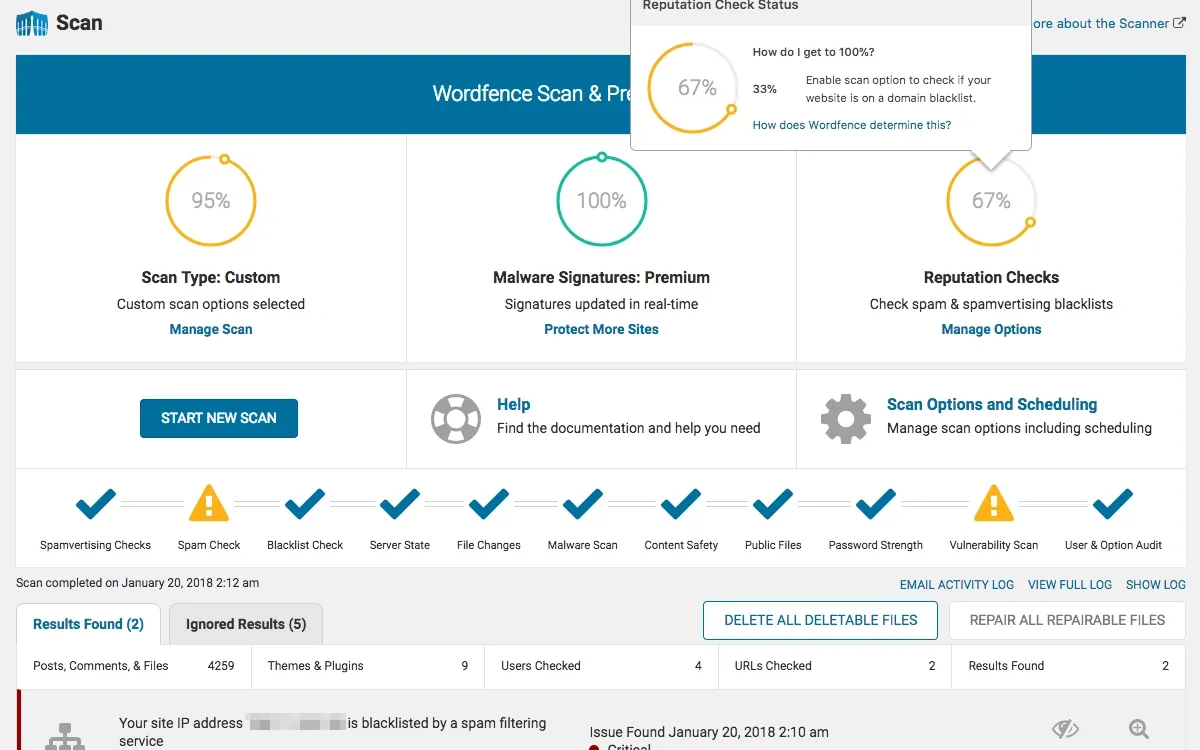
The following image shows the Wordfence security dashboard with automated scans and threat protection features.
Why it matters
Some CMS platforms appear cheap initially but require frequent paid plugins or developer support. Others have predictable subscription models but less flexibility. Understanding long-term costs ensures your CMS remains manageable and fits your budget as your site scales.
Pitfalls to avoid
- Looking only at initial setup fees
- Underestimating developer or maintenance time
- Ignoring renewal costs for subscriptions or extensions
Step 7: Test, review, and finalize your CMS choice
Before committing, try the CMS with real content and workflows. Hands-on testing often reveals issues that feature lists or marketing pages don’t show.
What to consider
- Can your team create, edit, and publish content easily?
- Does the CMS handle your actual content structure and workflows?
- How fast do pages load with realistic content and traffic?
- Are integrations with your CRM, analytics, or e-commerce tools smooth?
- How intuitive is the interface for different user roles?
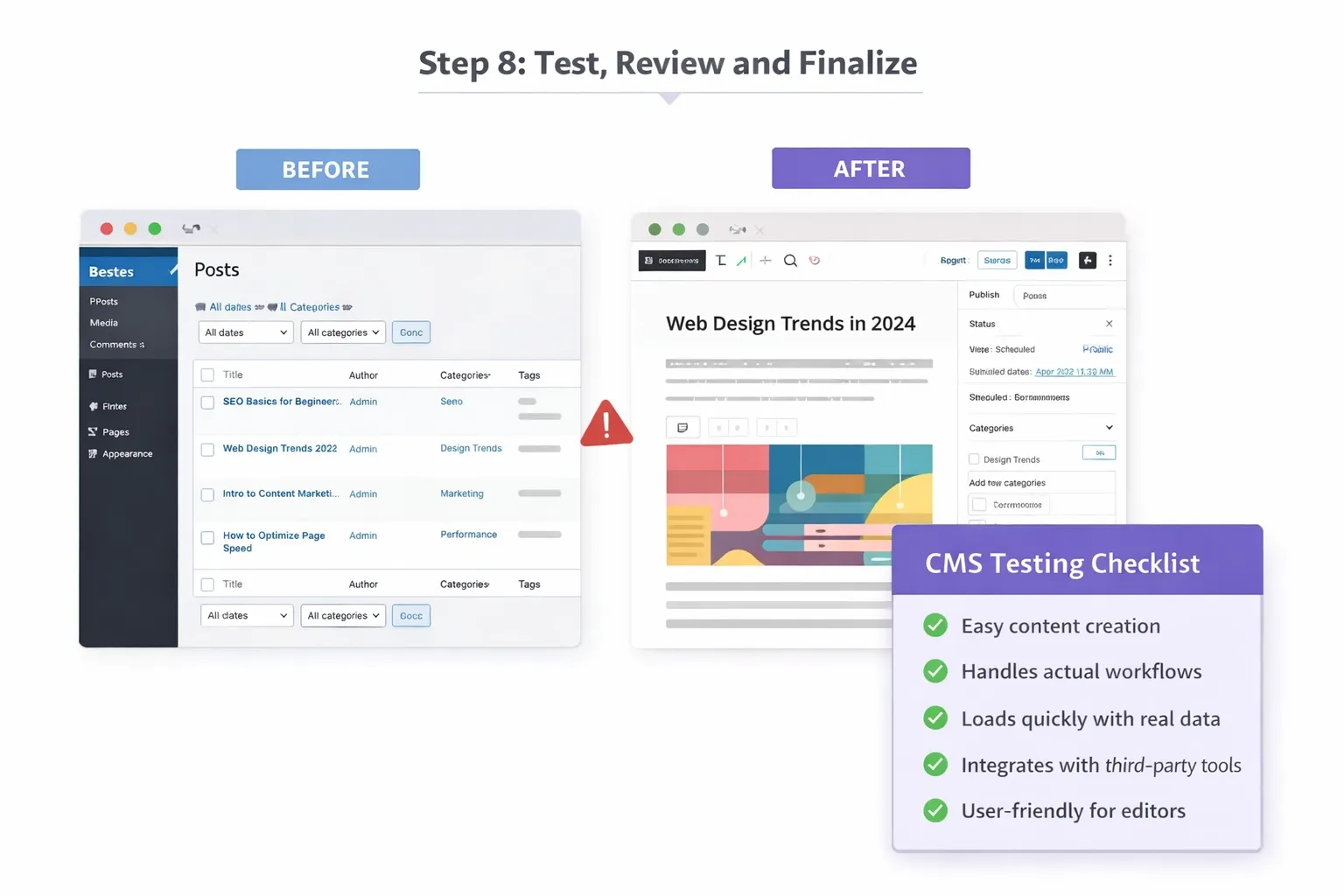
Below is a visual showing before/after CMS testing, confirming workflows, load times, and integrations work smoothly.
Why it matters
Testing helps identify bottlenecks, missing features, or workflow problems. A CMS that looks good on paper might slow your team, make maintenance harder, or require workarounds for basic tasks.
Pitfalls to avoid
- Skipping hands-on trials and relying only on demos or feature lists
- Testing only with sample content instead of realistic data
- Ignoring feedback from the team that will manage the site
How Tenet designs scalable sites on modern CMS platforms
The most technically impressive CMS setup fails if content teams can't use it effectively. We design admin interfaces that match how teams actually work, not just how the CMS defaults function.
This means custom field layouts that group related content, clear labeling that uses business terminology instead of technical jargon, and publishing workflows that match existing approval processes.
Here is how we do planning for website growth and scalability:
Websites need to evolve without requiring complete rebuilds. We implement CMS architectures that support common expansion paths:
- Content model flexibility: Structured content types that accept new fields without breaking existing pages
- Design systems: Component-based designs that maintain consistency when adding new page types
- Performance headroom: Infrastructure that handles 10x traffic growth without emergency upgrades
- Integration architecture: API-first designs that make adding new tools straightforward
We also document everything. When we hand off a project, clients receive plain-language guides for common tasks, troubleshooting steps for typical issues, and clear explanations of technical decisions.
This reduces their dependence on us for routine updates while keeping us available for strategic improvements.
Also, we don't force every client into one platform. Each business has different needs, budgets, and team capabilities. Our job is to match those specifics to the right technical foundation.
If you're trying to decide between CMS platforms or need help planning a website project, Tenet can provide a technical assessment of your options.
We'll review your requirements, explain trade-offs in practical terms, and help you avoid expensive mistakes.
Contact us today to discuss your project. 😀
We manage your CMS so your site stays fast, secure, and easy to update.
We manage your CMS so your site stays fast, secure, and easy to update.














Got an idea on your mind?
We’d love to hear about your brand, your visions, current challenges, even if you’re not sure what your next step is.
Let’s talk


