
A Complete SaaS MVP Development Plan
 By
By Share

Share
Get a quick blog summary with



How confident are you that your SaaS idea solves a problem real people will pay to fix?
Most founders build SaaS products in a bubble. They add features based on what feels important rather than what users actually request. Then they launch without ever testing their assumptions. The result? Their ideas crash.
Here is why: confidence without customer conversations is just guessing.
At Tenet, our team has completed 450+ projects and maintains a 98% client satisfaction rate. We have helped more than 300 clients turn vague ideas into MVPs that attract paying users within weeks of launch.
This guide breaks down how to use SaaS MVP development to test your riskiest assumptions first, so you build something people actually want.
What Is SaaS MVP Development?
A SaaS Minimum Viable Product (MVP) is the simplest functional version of a software application designed to solve a core problem for early users. It is a production-ready tool that allows a company to collect the maximum amount of validated learning with the least amount of effort.
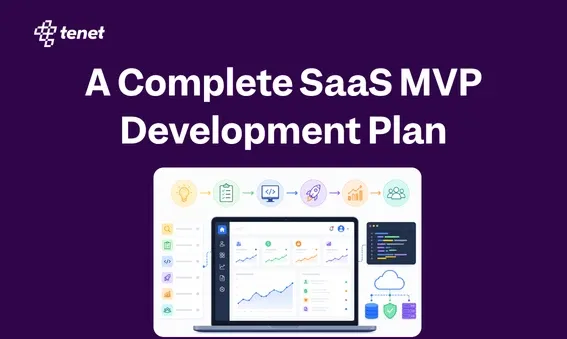
A visual representation of the SaaS MVP development lifecycle, showing the progression from identifying a core problem to launching a focused, functional version.
The objective of an MVP is to test your business hypothesis in a live market. It is not about launching a "lite" version of a larger product; it is a strategy to ensure you are building something people actually want.
Typically, a SaaS MVP follows three rules:
- One core problem. Your MVP solves exactly one problem for one type of user. If you try to solve two problems, you are already building too much.
- One core user action. The product should allow users to complete a single meaningful task from start to finish. Everything else is a distraction.
- One measurable outcome. Before you write code, define what success looks like. It could be a user completing a task in under two minutes or returning to the product three times in a week. If you cannot measure it, you cannot learn from it.
Focus on building only what proves real demand and launch as quickly as possible. Pay close attention to how people actually use the product once it is in their hands.
Then add features based on that real behavior rather than on guesses or assumptions. That is the difference between a successful SaaS product and an expensive lesson that could have been avoided.
When Should You Build an MVP?
Not every SaaS product needs a classic MVP. Some ideas are extensions of proven markets, and founders can move faster. But if any of the following describe your situation, an MVP-first approach is the right call.
- You have not yet spoken to 20+ potential paying customers about the problem
- You are entering a market where existing tools exist, but you believe you can serve a niche better
- Your product requires users to change how they currently work
- You are pre-revenue and funding the build yourself or with early-stage capital
- You have strong opinions about what users want but little data to back them up
On the other side, you might be ready to build beyond an MVP when you have early users who are paying and retained, when the core use case is clear and proven, or when you are optimizing and scaling rather than discovering.
👉 If you are pre-revenue and still validating demand, the UX design for startups guide is a useful companion read, as it covers lean UX principles that apply directly to the MVP-first stage of a product.
Step-by-Step SaaS MVP Development Process
The MVP development process below focuses on how you think about each stage and what decisions you make, rather than the engineering details.
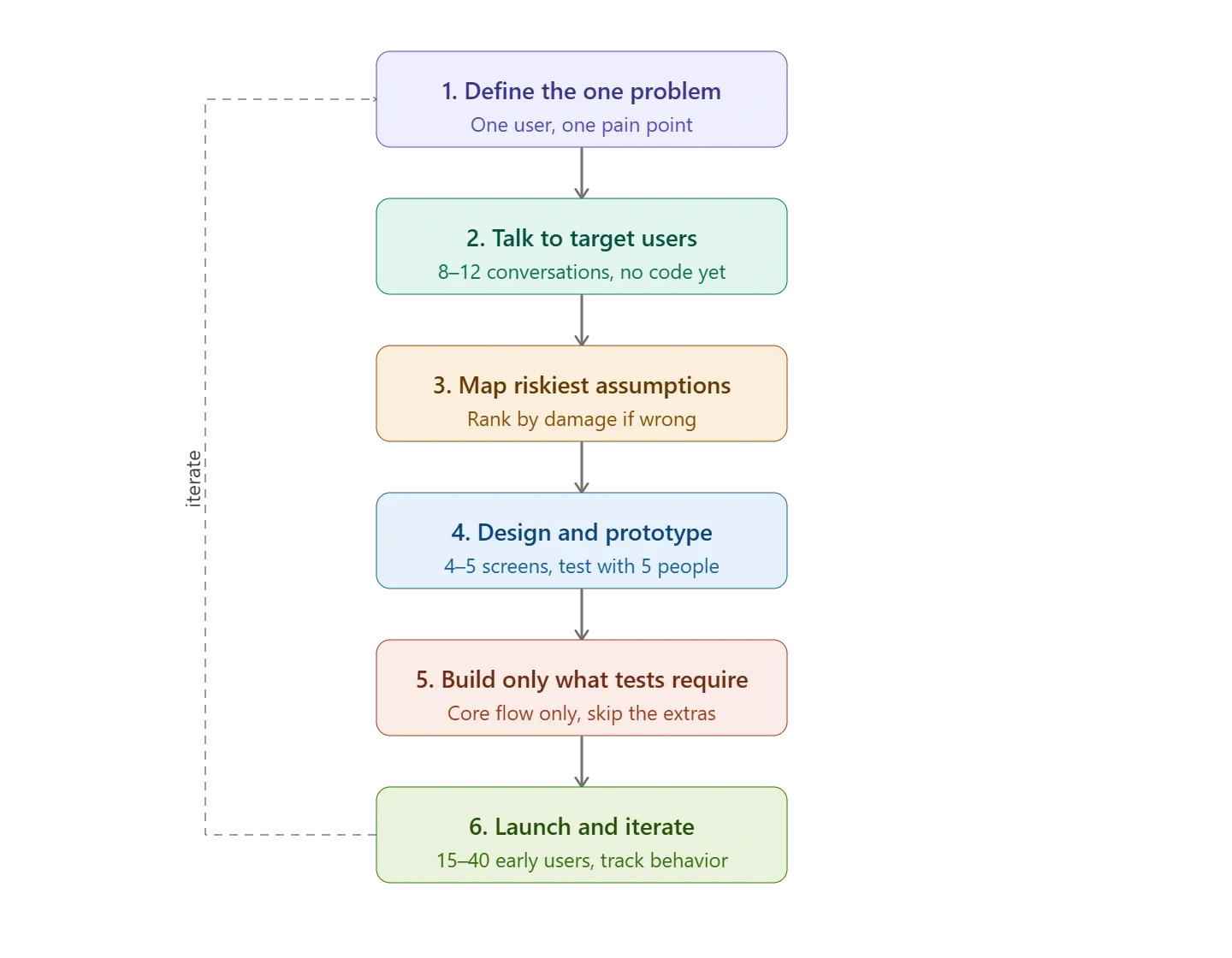
Step 1: Define the one problem you are solving
Grab a notebook or Google Doc and write one paragraph in the exact words your users would use.
Example for a reporting tool:
"Marketing consultants handling 6-8 clients spend every Thursday night copying numbers from Google Analytics, Meta, and their email inbox into Excel. They make mistakes, miss deadlines, and look unprofessional when clients point out wrong figures."
Spend 2-3 hours checking real places:
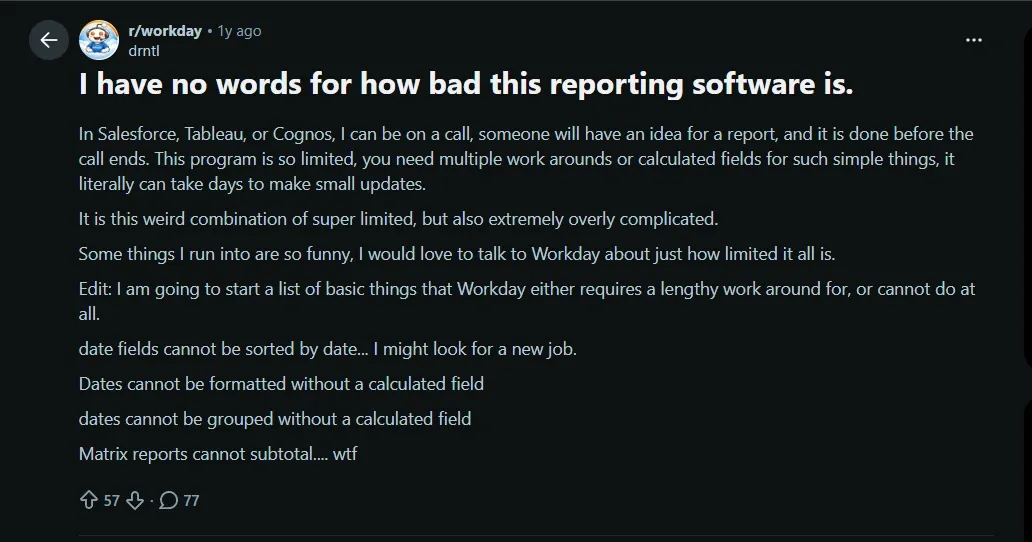
- Reddit (r/marketing, r/freelance) or LinkedIn groups where people rant about reporting
Here is an image for a Reddit thread where someone has shared about their problems:
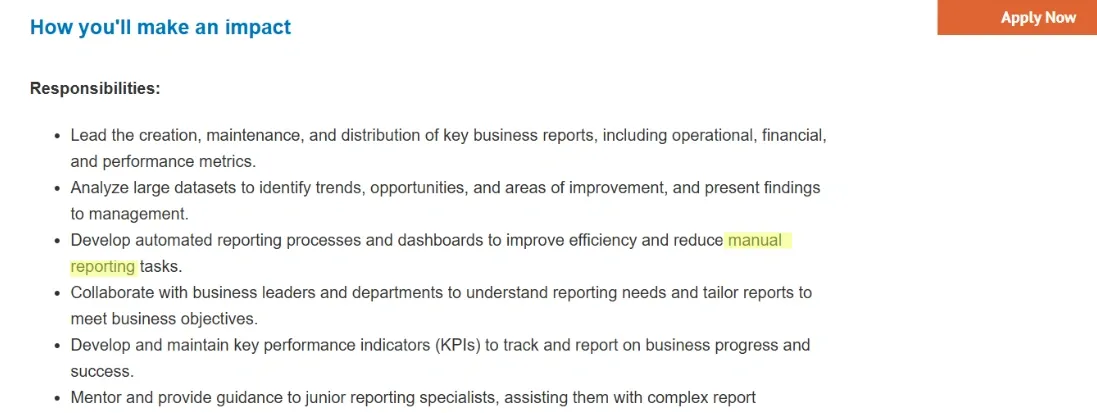
- Job posts that mention "manual reporting" or "client deliverables." Like this:
- Your own past experience or notes from old conversations
Then test it by messaging 5 people who match the description on LinkedIn or WhatsApp: "Quick question - does this Friday reporting headache sound familiar? Takes me 2 minutes."
💡 If 4 out of 5 say "yes, that's me every week," keep it. If they say, "it's annoying but not the biggest issue," narrow it more. This one paragraph decides what you build and what you delete later.
Step 2: Talk to your target users before you design anything
Do this before opening Figma or writing any code. Aim for 8-12 conversations in one week with users who match your target profile. Ask about their current workflow, what they have tried before, and what frustrates them the most.
Here is how you can find those target profiles fast:
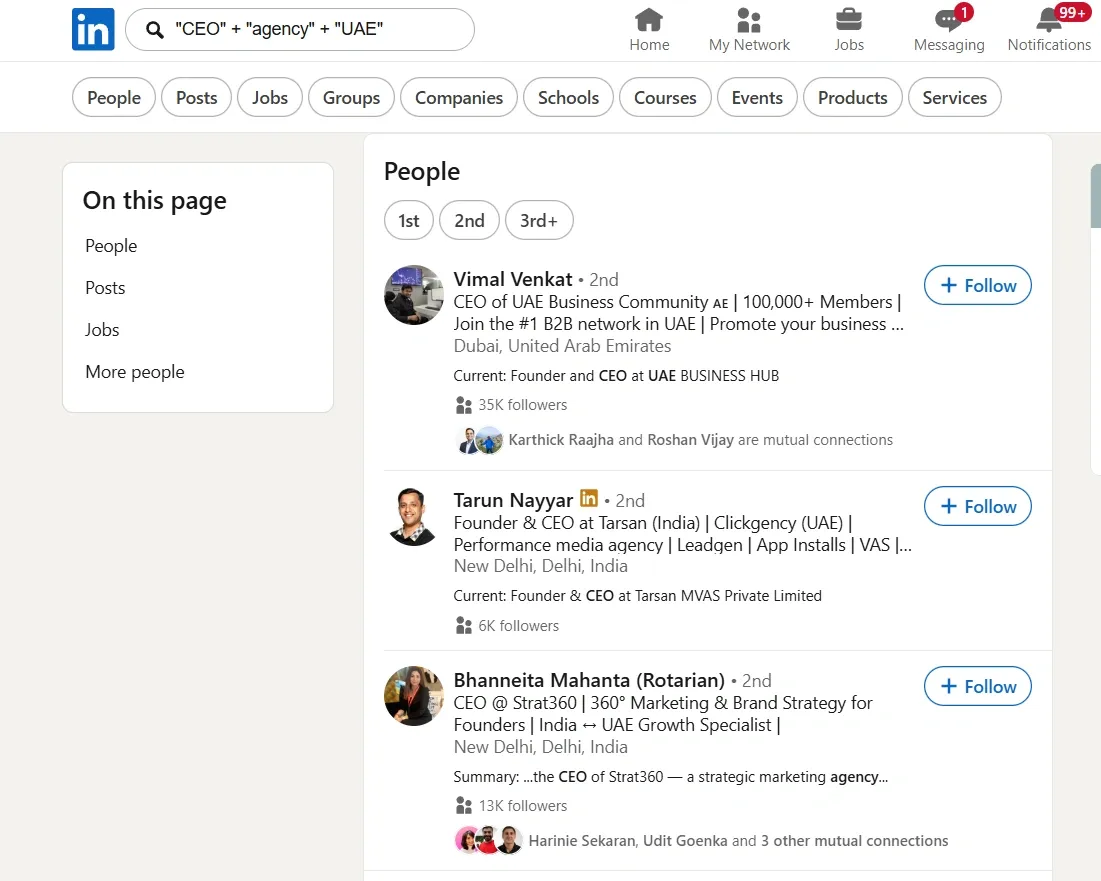
- LinkedIn search: job title + "agency" or "freelance" + location California/UAE/London
(You can generate a Boolean search using free Boolean generating tools for better and quicker search.
This image shows how this search really helps in finding profiles quickly:
- Post in Indian Facebook groups like "Digital Marketing Canada" or "Freelancers UK"
- Cold message 20-30 people: "I'm working on a simple tool for client reporting. Can I get 15 minutes of your time this week? I'll send a Amazon voucher of $XX as thanks."
Once you are on a call, apart from asking about their workflow, also ask about their pain points:
- How are you solving this issue today?
- What is the most frustrating part of that process?
- Have you paid for a solution before?
Write down the exact phrases they use. One founder learned that users hated reformatting tables for each client more than collecting the data itself. That changed the MVP focus from full dashboards to one-click branded exports.
If most people say the pain is not severe enough or they already have an acceptable workaround, treat that as useful information. It is better to change direction now than after weeks of building.
Step 3: Map your riskiest assumptions
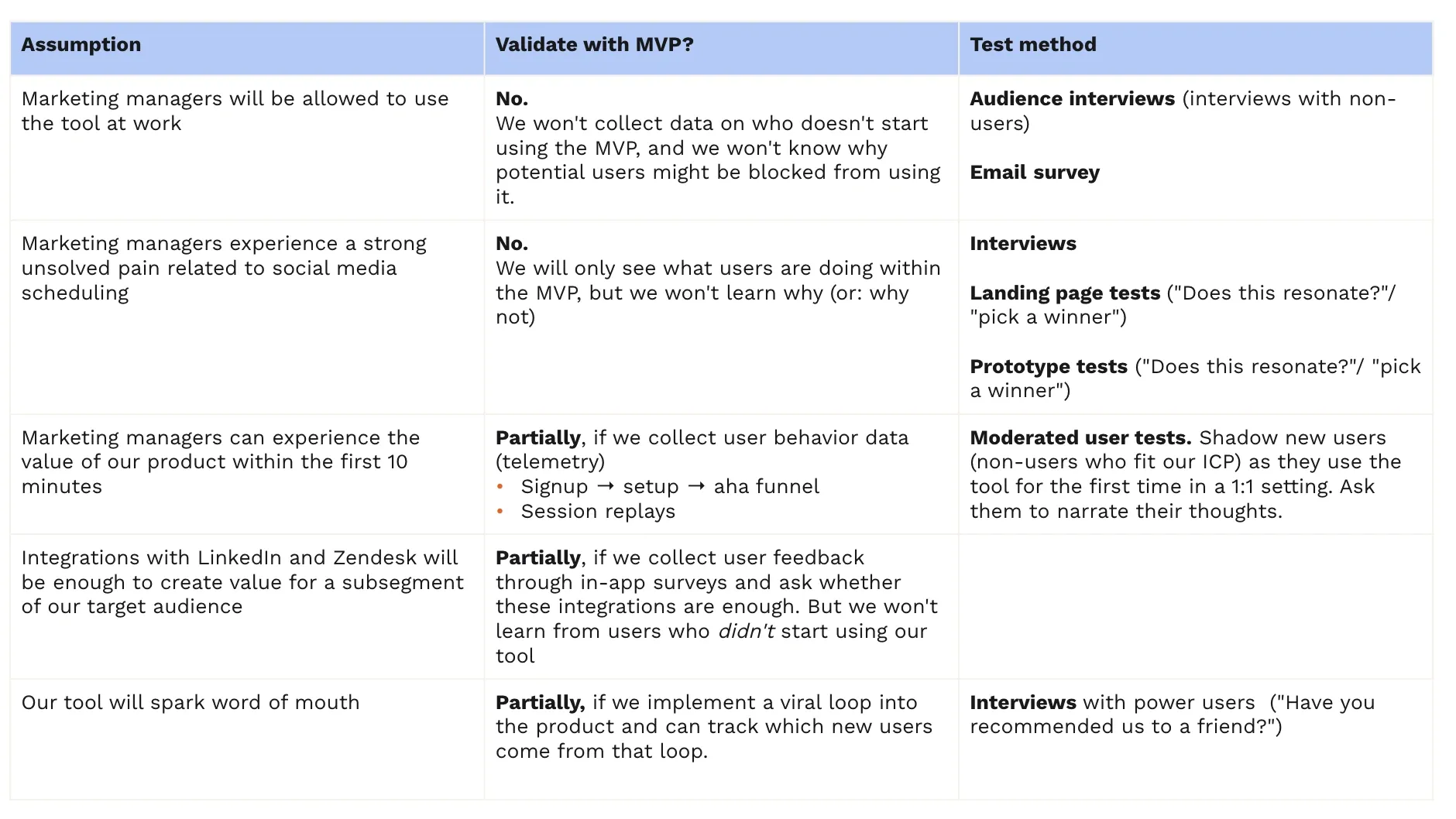
Create a simple table in Google Sheets with 4 columns: Assumption, Why it would kill the product, How to test it, and Success signal.
Here is a sample of creating a Gsheet for mapping risk ( you can create the columns acc. to your product’s needs ):
Common risky assumptions include:
- Users will connect their accounts and return to the tool at least twice a week.
- They will pay between $29 and $79 per month once they see real-time savings.
- The core task can finish in under eight minutes without extra help.
Rank the assumptions by how much damage they would cause if wrong. Focus your early work on the top two or three.
For the first assumption, run a cheap test. Build a simple landing page on Carrd or Framer that describes the solution. Add a "Try it now" button that leads to a Google Form where users describe one real report. Count how many actually complete the form.
Review and update this table every Sunday night with what you learned during the week. Many MVPs fail because the team never listed these assumptions clearly.
Step 4: Design and Prototyping
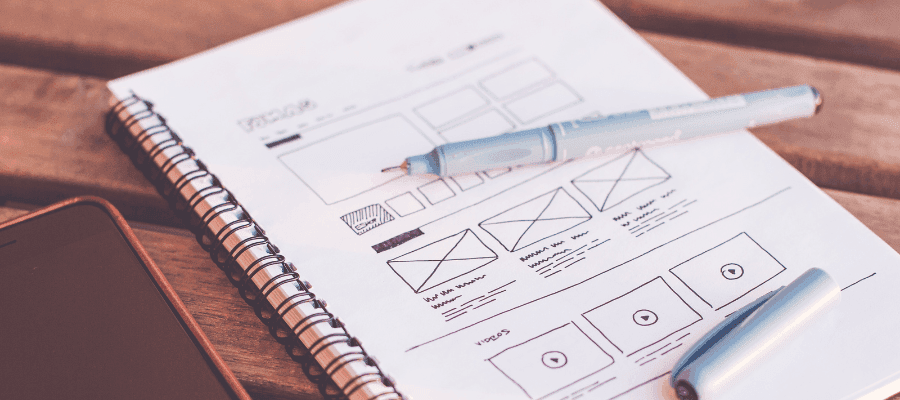
Keep it deliberately rough. Use pen and paper for the first version or a free Figma file with only 4-5 screens that cover only the exact flow needed to solve your one problem. Like this:
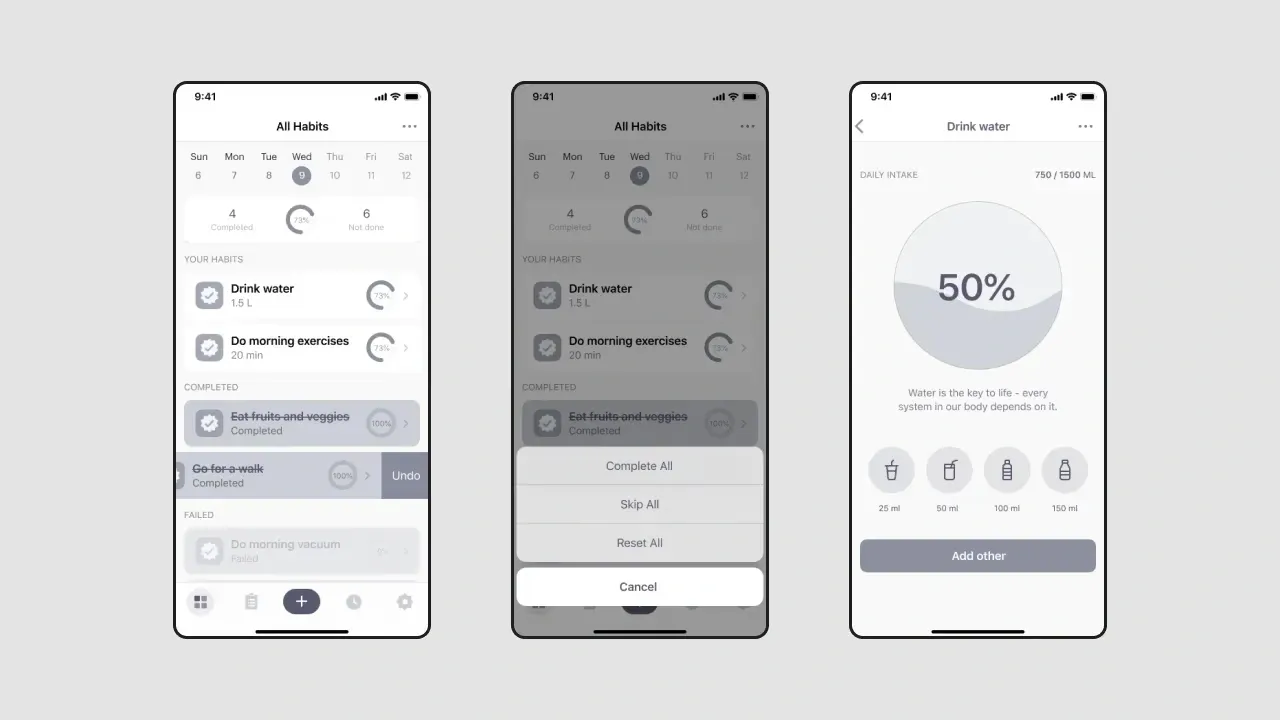
👉 Here is our MVP UX design guide that explains exactly what to include in your first 4 to 5 screens and what to leave out.
Show the prototype to 5 people from your earlier calls. Sit with them (Zoom screen share works) and say: "Pretend this is real. Try to complete one report. Think out loud."
Do not explain buttons. Watch where they hesitate, click wrong, or say "I expected this to happen."
Common findings at this stage:
- Users ignore your "smart" features and hunt for the obvious button
- The flow has one extra click that feels annoying
- They want to see a sample output before connecting real data
Fix only the blockers. Then test again with 2-3 new people. Stop when most users can finish the core task without your help.
Step 5: Build only what your test requires
Now code only the pieces needed to run your riskiest-assumption test. Here are some Practical rules that many founders follow:
- Start with no-code tools when possible. Use Bubble, Softr, or FlutterFlow for quick flows. If you prefer code, combine Next.js with Supabase.
- Include only simple sign-up through Clerk or Supabase Auth, one core workflow, basic export, and Stripe test mode.
- Skip everything else for now: multiple data integrations, team accounts, custom branding, or advanced filters.
Real examples of "build only what the test requires":
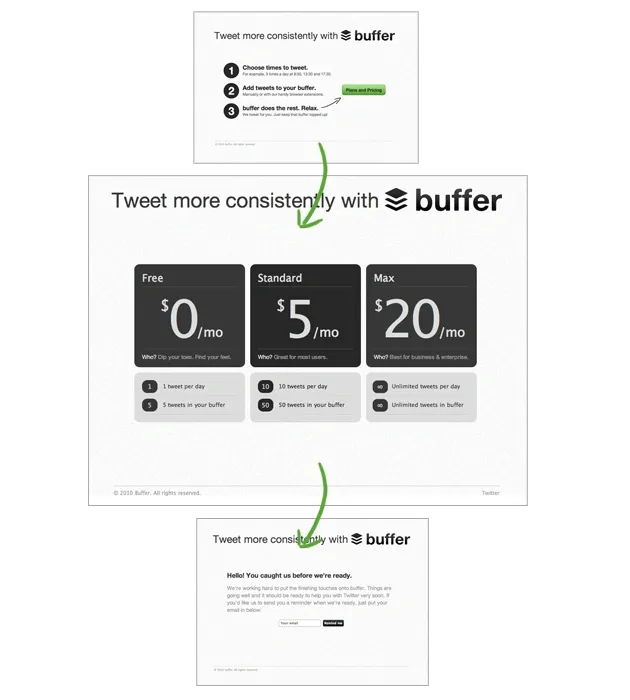
Buffer started with a landing page + manual scheduling done by the founder in the background.
Source: This image shows the pages Buffer created to test things before launching the whole product:
Dropbox made a 3-minute video showing the sync working (no actual multi-device code yet) and measured sign-ups.
So, for example, if your core task is “generating one report”, build exactly that path from sign-up to export. Nothing more.
Many people waste weeks adding user management or beautiful dashboards before they know whether users will return and use the basic version.
Step 6: Launch to a small group and gather structured feedback
Launch privately to the 15-40 people you already talked to. Send a message: "Here's the early version. It only does one thing right now. Please try making one real report and tell me what you think. No pressure, this is just a test."
Set up these feedback tracking methods from day 1:
- One simple in-app question after export: "Did this save you time compared to last week? Yes/No + 1 sentence comment
- Track how many log in again on day 3 and day 7 (use PostHog or Supabase analytics - free tier works)
- Book 10-minute calls with the 5-7 most active users every week
Ask specific questions during reviews:
- How many minutes did this actually save you this week?
- Would you continue using this if the price were $49 per month?
- What is the one change that would make the biggest difference right now?
Pay attention to actions more than words. If only 20-30% come back and complete the task again, the idea needs work.
If 50%+ return and some say they would pay, you have a real signal.
Every weekend, spend 30 minutes reviewing usage data and feedback, and observe: What broke or confused people? Which fixes would increase repeat usage the most?
And then update your assumptions table in the sheet made in Step 3. This step turns early testers into long-term supporters.
After this, try to have a “Quick weekly routine” to keep momentum (add this habit), like on Monday: Fix the top 2 issues from last week's feedback, Wednesday: Talk to 2-3 new or existing users, Friday: Deploy a small update and Sat/Sunday: Review usage numbers + update assumptions table (30 minutes max)
Common traps to avoid (that waste the most time):
- Building features because "one user asked for it" instead of waiting for 4-5 to say the same
- Making the UI pretty before confirming people will use the core flow
- Adding payments or multiple logins too early
- Waiting for "perfect" instead of launching & showing it to real users
Follow this and most weeks you will either learn something useful or kill a bad idea quickly. The goal is not to build a big product fast; it's to know within 4-8 weeks whether real users will return and pay for the core thing.
👉 If early users return and signal willingness to pay, our SaaS onboarding design examples show how leading products structure that first experience.
How Much Does SaaS MVP Development Cost in 2026?
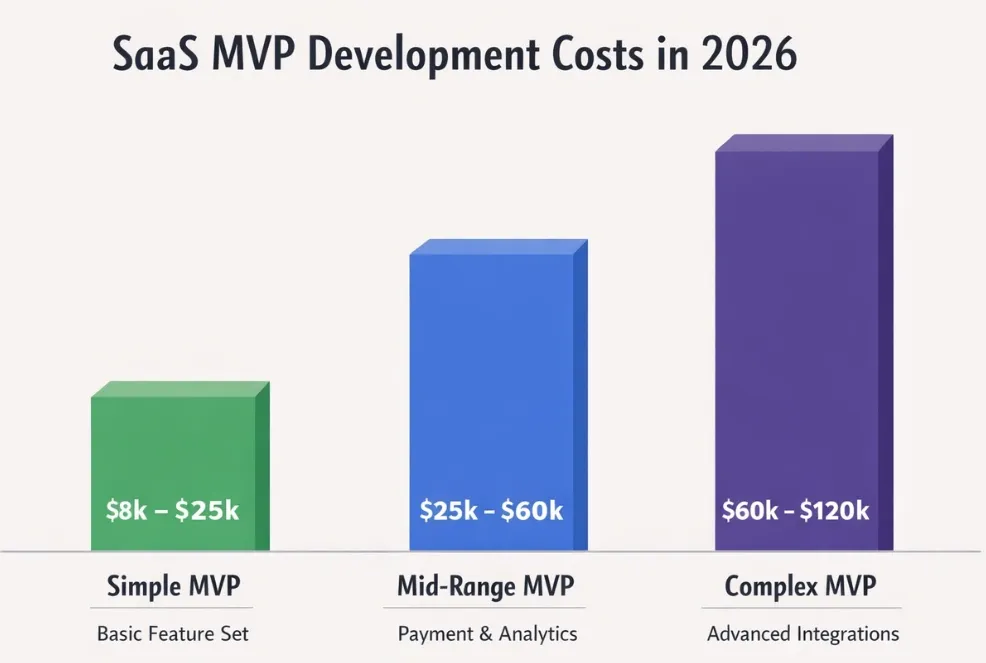
The cost of SaaS MVP development typically ranges from $25,000 to $75,000. This investment depends on four primary factors: your feature set, the expertise of your team, your desired timeline, and the underlying technical complexity.
Here is a practical breakdown of what MVP development typically costs, based on scope:
- Simple MVP: $8,000 to $25,000 (Single core feature, basic authentication, no external integrations).
- Mid-range MVP: $25,000 to $60,000 (2–3 core features, payment gateways, and basic analytics).
- Complex MVP: $60,000 to $120,000 (Multi-role users, deep third-party API integrations, and custom data logic).
These ranges assume you are partnering with a specialized product agency.
The visual is just to have a glance at the pricing of SaaS MVP development:
While freelance teams might offer lower rates, they often lack the end-to-end reliability required for a professional launch. Conversely, in-house teams carry high overhead and often take longer to ship.
Timeline matters too.
A rushed MVP that skips testing or relies on messy shortcuts will eventually cost more to fix than it saved upfront. Building the first time correctly is always more economical than refactoring a broken product post-launch.
For a deeper look at these variables, read our full guide on how much SaaS app development costs.
Certain requirements also naturally inflate your budget regardless of scope.
Let Our Expert MVP Developers Get Your SaaS Product Live in Days
Most SaaS founders come to us after spending months trying to figure out scope, juggling freelancers, or recovering from a first build that went over budget without delivering what they needed.
We skip all of that.
Our process starts with a scoping call where we define exactly what your MVP needs to do, what it does not need, and how quickly we can ship it. From there, our team of product designers and SaaS engineers works in focused sprints. Most of our MVP projects go from kick-off to live product in four to eight weeks.
Here is what working with Tenet includes:
- Product strategy session to define your core assumption and scope
- UI/UX design that converts without a tutorial
- Full-stack SaaS development with clean, scalable architecture
- Launch support and post-launch iteration planning
- Ongoing development if you choose to continue building with us
We have shipped MVPs for founders across health tech, fintech, B2B productivity tools, marketplace platforms, and industry-specific SaaS products. The work is the same regardless of sector: define the core, build it well, ship it fast, and learn from real users.
If you are ready to stop planning and start building, talk to our team today. We will tell you in the first call whether we are the right fit for your project.
Ready to Turn Your SaaS Idea Into a Working MVP?
Ready to Turn Your SaaS Idea Into a Working MVP?
















Got an idea on your mind?
We’d love to hear about your brand, your visions, current challenges, even if you’re not sure what your next step is.
Let’s talk


