
SEO Client Reports: What SEO Agency Should Report to Clients
 By
By Share

Share

Get a quick blog summary with



After working on 70+ SEO projects and generating $12M+ worth of leads for clients, we have sat through hundreds of SEO month-end reporting meetings.
We have seen what clients actually need from a report, what creates confusion, and what helps them understand the value of SEO.
So, instead of sharing a theoretical SEO report template, we are sharing the structure we have built and refined through real client work.
What is an SEO client report?
An SEO report is a month-end summary of how a website is performing in search. It gives you a clear picture of where the website stands and how its performance has changed over the past 28 to 30 days.
The report compares the current performance with the previous month. This makes it easier to see what improved, what declined, and whether the SEO work is moving in the right direction.
A good SEO report also goes beyond numbers. It highlights the key tasks that are still pending and any blockers that could slow down SEO growth.
For example, the content team may not have published enough content, or a technical issue on the website may be preventing important SEO improvements.
An effective SEO report also explains:
- what each SEO task blocker is
- why it is happening (who is responsible)
- what needs to be done to resolve it
The goal of an SEO client report is not just to show SEO data. It is to help the client understand the progress, the problems, and the actions needed to keep SEO moving toward business goals.
What should an SEO client report include?
Before we get started, let’s look at the simple structure we use to build our SEO report template. This is not based on theory. It is based on what we have practically tested across hundreds of SEO month-end report meetings.
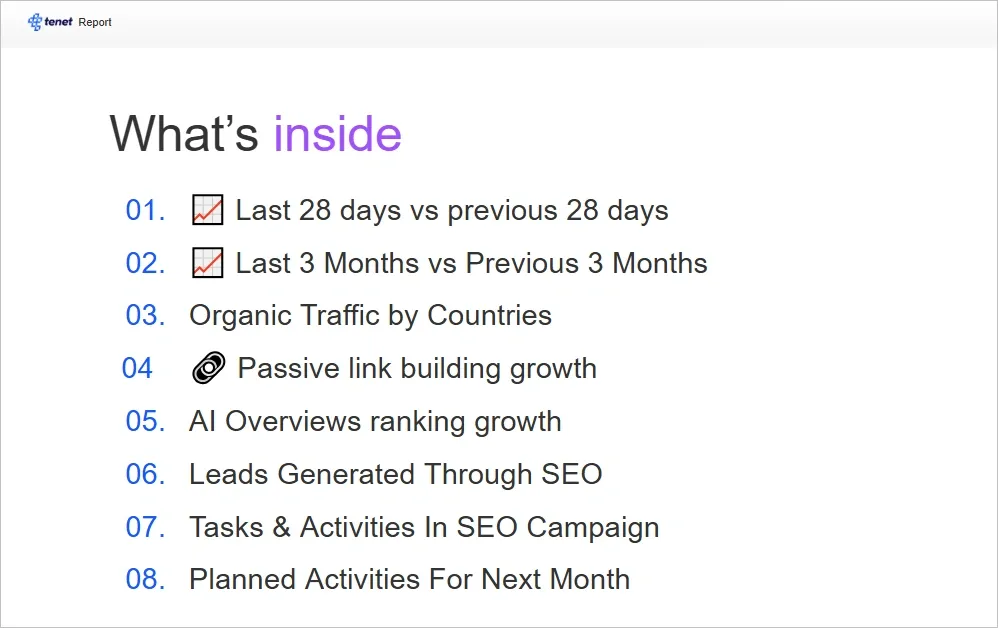
1. Executive summary
The executive summary gives the client a quick view of what the report covers and what happened during the reporting period.
It provides the context needed to understand the SEO project before getting into the detailed numbers. This is especially useful when a new person joins the client team and needs to understand the project without going through previous reports.
Tool(s) required:
The executive summary uses insights from the data and analysis covered throughout the report.
What it shows:
It summarizes the key changes, important developments, and areas that need attention during the month.
Why it matters:
It sets the context for the rest of the report, so the client knows what to look for when reviewing the data.
2. Clicks by page type
Total organic clicks tell you how much traffic the website received from search, but they do not tell you which pages are responsible for that traffic.
That is why we break organic clicks down by page type. We usually separate pages based on their purpose, such as commercial pages, service or product pages, and informational pages such as blog articles.
For example, a website may see a 30% increase in organic clicks during the month. At first, this looks like strong growth. But if most of those additional clicks came from blog articles while service pages saw little or no growth, the overall number does not tell the full story.
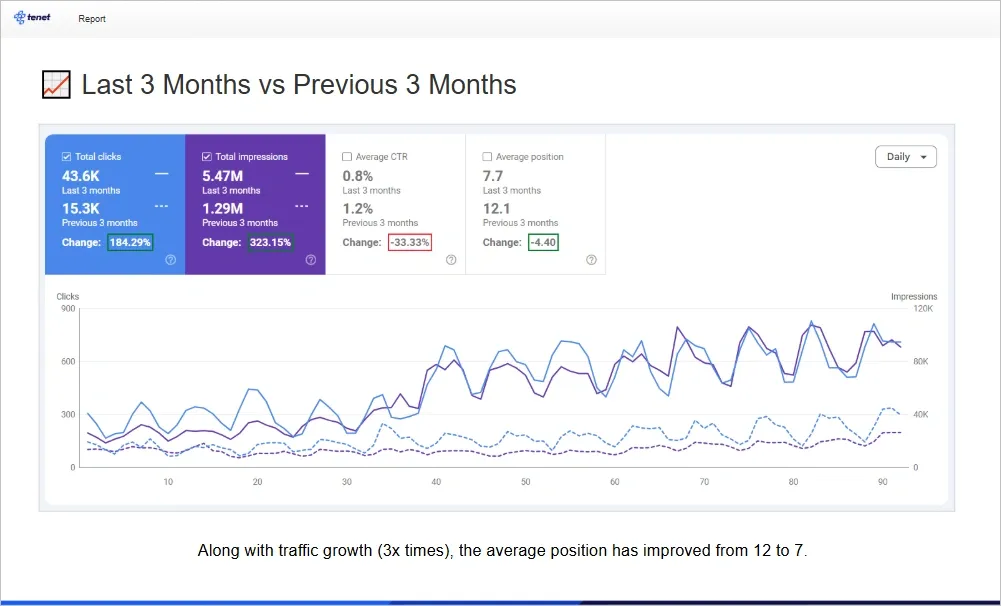
To give the client a long-term growth picture, we also recommend adding the last 3 months vs previous 3 months clicks growth report:
Tool(s) required:
Google Search Console and Google Analytics 4.
What it shows:
It shows how many organic clicks each page type received and how that number changed compared with the previous reporting period.
Why it matters:
The breakdown shows whether traffic growth is coming from pages that support business goals or mainly from informational content. This gives more useful context than the overall click count alone.
3. Impressions by page type
We also break search impressions down by page type. This shows where the website is gaining or losing visibility in search. For example, the report can show impression changes for service pages, product pages, and blog articles separately.
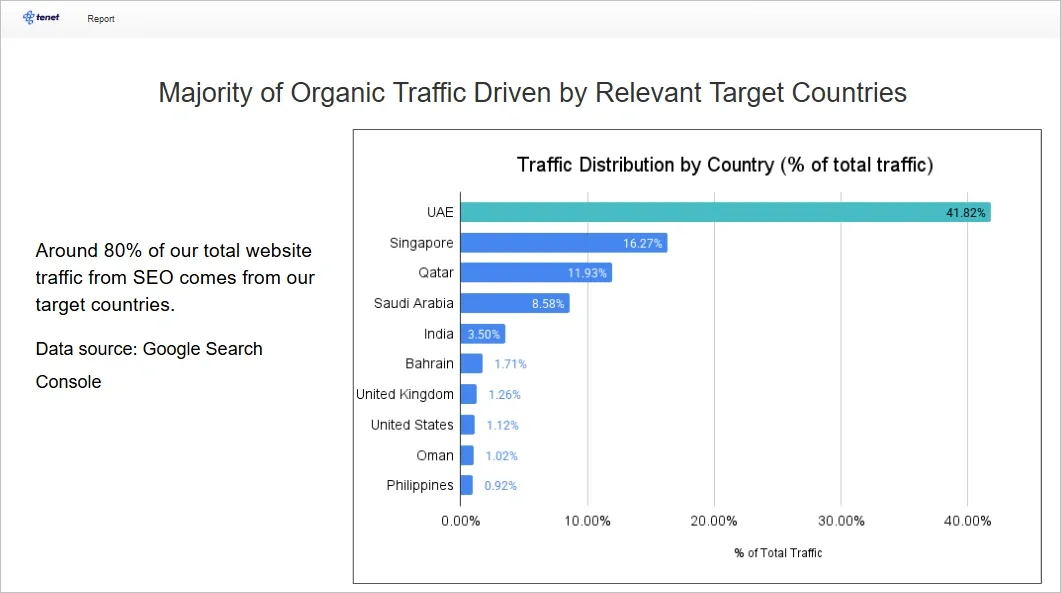
Here’s an example where client wanted to know whether they are receiving clicks from their preferred regions, so we added the data with transparency:
Tool(s) required:
Google Search Console
What it shows:
It shows the number of times pages appeared in search results and how impressions changed compared with the previous reporting period.
Why it matters:
It helps identify which types of pages are gaining search visibility. This can reveal changes that are hidden when all website impressions are grouped into one number.
4. AI impressions and AI citations
Search visibility now extends beyond traditional search results. Where data is available, we also track visibility in AI search experiences.
This includes AI impressions from Google Search Console, AI citations tracked through SEO tools such as Ahrefs, and referral traffic from AI platforms in Google Analytics 4.
Pro Tip from SEO experts at Tenet:
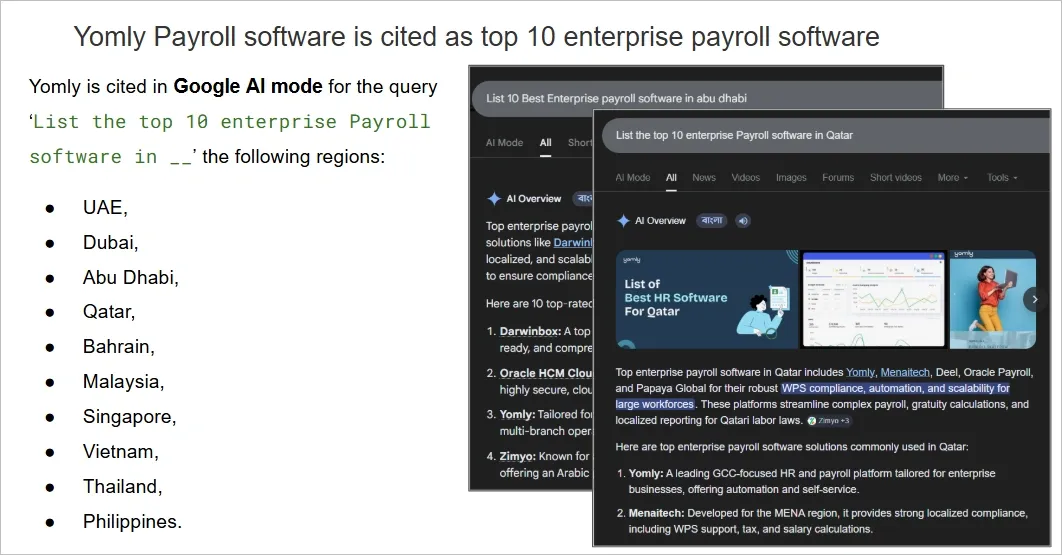
Manually check the responses for relevant commercial queries across ChatGPT, Claude, and Gemini. Record whether the client’s website or brand appears in the responses and track its current visibility across these AI platforms. Here’s an example from one of our SEO reports:
👉 Learn about our AI SEO approach and Services Trusted by 70+ Brands
Tool(s) required:
Google Search Console, Ahrefs or other SEO tools that track AI citations, and Google Analytics 4.
What it shows:
It shows how often the website appears in AI search experiences, where the website or brand is cited, and whether AI platforms are sending visitors to the website.
Why it matters:
These metrics provide another view of search visibility that traditional rankings may not capture. They also help determine whether visibility in AI search is translating into actual website visits.
5. Lead count
For a service business, traffic is not the outcome. The more important question is whether that traffic is creating new business opportunities.
That is why lead count is an important part of the SEO report. We track how many leads the website generated during the reporting period and compare the number with the previous month.
The conversion we track depends on the type of business. A service business may measure enquiries or leads, an ecommerce business may track add-to-carts and sales, while a SaaS business may track product demos or another meaningful conversion.
Tool(s) required:
Google Analytics 4 and, where applicable, the client's CRM or lead tracking system.
What it shows:
The report shows the number of leads or relevant conversions generated during the month and compares it with the previous month.
Why it matters:
It connects SEO performance with a measurable business outcome. A change in traffic becomes more meaningful when the report can also show whether that traffic resulted in more or fewer business opportunities.
6. Key tasks completed in the last 28 to 30 days
An SEO report should also show what the team actually worked on during the reporting period. This gives the client a clear view of the work completed alongside the performance data.
The focus should be on measurable outputs rather than a long list of individual activities. For example, the report can show how many articles were published, how many backlinks were acquired, and how many service or product pages were created.
Here’s a simple table format you can use to outline key SEO tasks performed in the last cycle:
What it shows:
It gives a month-by-month summary of the key SEO deliverables completed during the last 28 to 30 days.
For example, the report may show that the team published 8 articles, acquired 12 backlinks, created 2 service pages, produced 1 linkable asset, and refreshed 6 existing articles.
Why it matters:
This section gives the client a simple way to see what was delivered during the month. It also makes it easier to compare planned work with completed work and identify anything that was delayed or not completed.
7. What is next: The growth plan for the next 30 days
The report should not end with what happened last month. It should also explain what the SEO team plans to do during the next 30 days.
Some activities may remain consistent from month to month. For example, the SEO plan may normally include a fixed number of articles, backlinks, service pages, product pages, or content updates.
However, the next month plan should also highlight activities that are different from the regular SEO workflow. These activities often come from new growth opportunities, changes in the business, or areas where the website needs additional support.
To make it clearer for the client, you can mention the future tasks planned, who is responsible for each task, and the expected outcome.
What it shows:
It shows the key SEO activities planned for the next 30 days, including the regular tasks as well as any new or additional initiatives.
For example, the team may plan a PR campaign around a new business announcement or expansion. In that case, the SEO team may need information, data, or approvals from the client before the work can begin.
Other planned activities could include building more visibility through social media user generated content or increasing the number of customer reviews on Google Business Profile and relevant third party websites.
The report should also clearly identify who is responsible for each task. Some activities may sit with the SEO team, while others may require action from the client, content team, development team, or another stakeholder.
Why it matters:
A clear next month plan turns the report into an action document rather than simply a record of past performance.
It also helps prevent delays caused by unclear ownership. When the report clearly states what needs to happen, who needs to do it, and what information or approval is required, both the SEO team and the client know what they need to do to keep the project moving.
How to make the monthly SEO reports effective
A monthly SEO report should not just show what happened during the month. It should help the client understand the progress, the work behind it, and what needs to happen next.
Here are some practical ways that we follow during our month-end SEO report:
1. Include links to your SEO resources and working documents
Your monthly report should give the client easy access to the documents and sheets used to manage the SEO project.
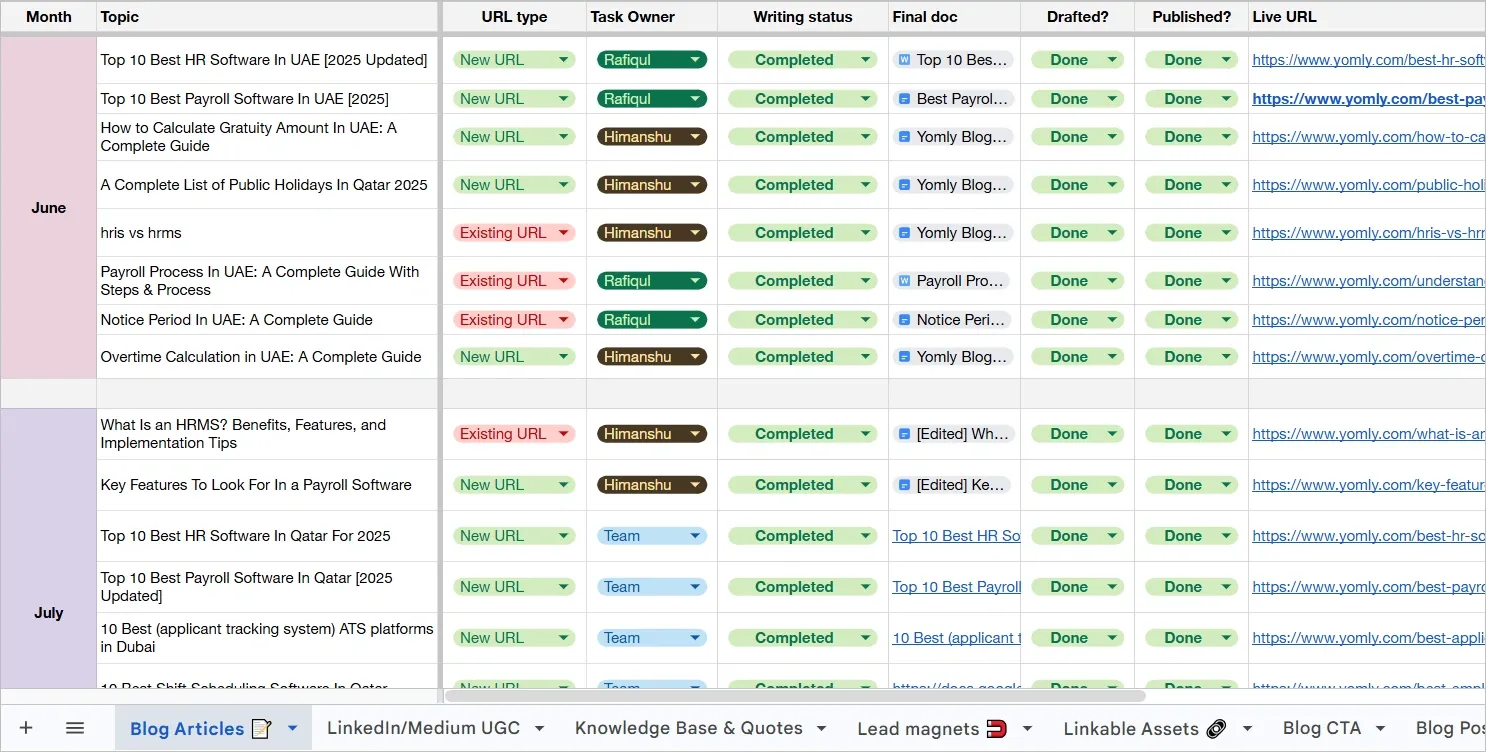
For example, at Tenet, we maintain a content inventory that shows the content planned, currently being worked on, and scheduled for future publication.
Here’s what our content inventory sheet looks like:
We also maintain a backlink inventory to track link building activities and an SEO task tracker that records the tasks completed by the SEO team each week.
These resources give the client more visibility into the work happening behind the monthly report. They can check what was planned, what has been completed, and the current status of each task without having to ask the SEO team for an update.
Here are the documents we maintain every month and include in the SEO report:
- Content inventory sheet
- Backlink inventory sheet
- SEO task trackers (weekly task breakdown)
- Technical SEO task tracker
- Master SEO sheet (with links to all other resources)
2. Present the report to the client instead of only sending it by email
Sending a report by email may give the client access to the data, but it does not guarantee that they understand what the data means.
Not every client or stakeholder working with the SEO team will have a strong technical understanding of SEO. For example, you may report that the team acquired 10 organic backlinks during the month, but the client may not understand why those links matter or how they can contribute to SEO growth.
That is why it is better to walk the client through the report in a meeting whenever possible. Explain the important numbers in simple language and give them the context behind the results.
3. Turn data into a story
An SEO report becomes more useful when the numbers are connected to a clear story.
For example, instead of saying that organic clicks increased by 25%, explain what contributed to that increase. Was it new content, improved rankings for existing pages, stronger performance from commercial pages, or another change?
The same applies when performance declines. Explain what changed, what caused the decline if known, and what the team plans to do about it.
For example, at Tenet, we use linkable assets as part of our link building strategy. For Yomly, this approach helped us acquire 20+ high-quality organic backlinks.
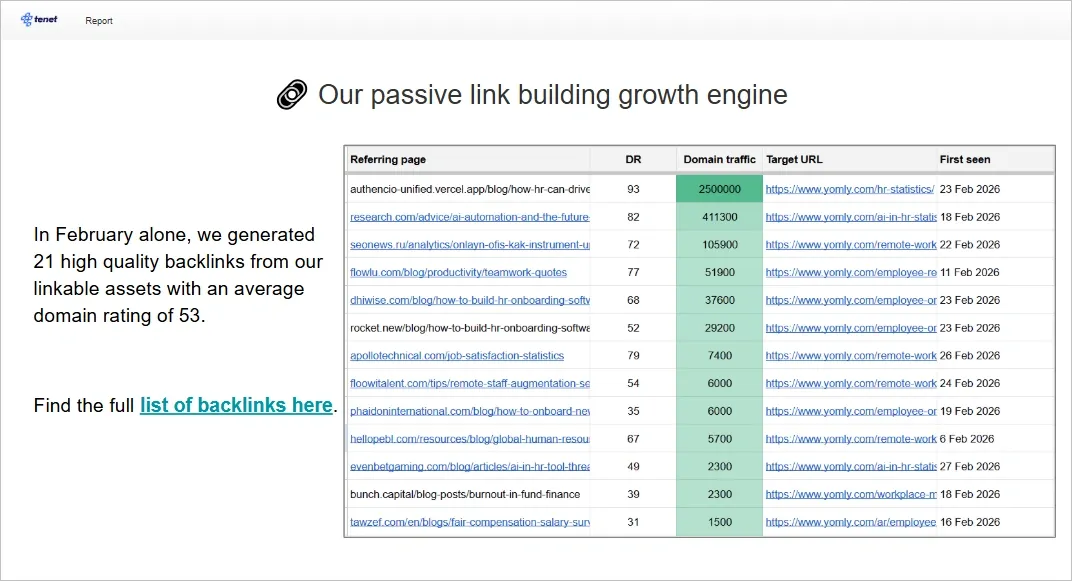
Instead of simply mentioning “20+ backlinks acquired” in the report, we explain how the result was achieved. Read the full SaaS HR SEO case study →
We can also put the result into a cost context. If Yomly had to acquire a similar number of high-quality backlinks through paid link placements, it could cost at least $2,000 per month. This makes the report much easier for the client to understand. They can see not only what the SEO team did, but also the value created by the approach.
Find more about Tenet’s SEO approach that gets us results for our clients →
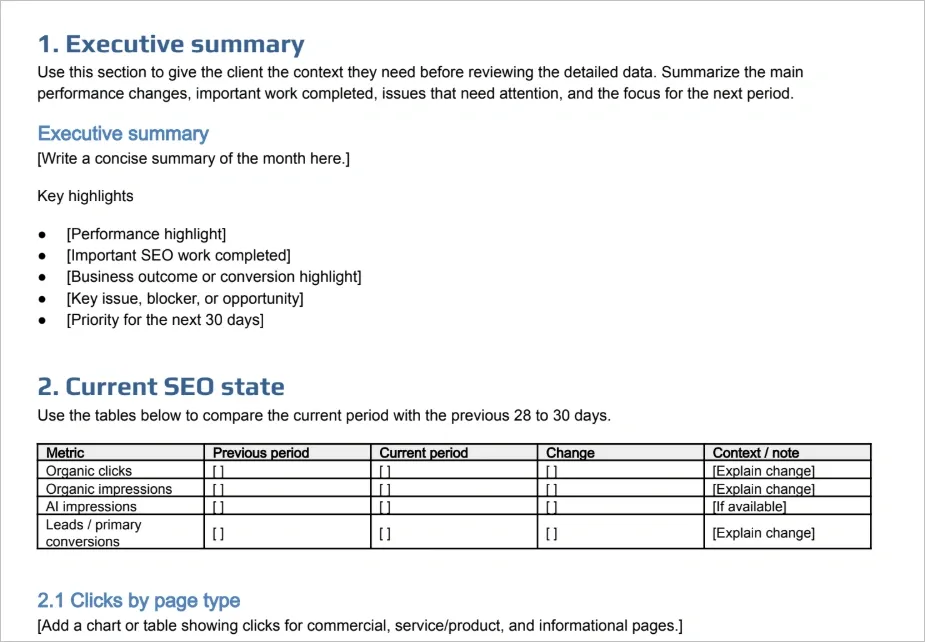
Download the SEO report template
Want to build a monthly SEO report without starting from scratch?
Download our SEO report template to see the exact structure we use to track performance, explain SEO progress, document completed work, identify blockers, and plan the next 30 days.
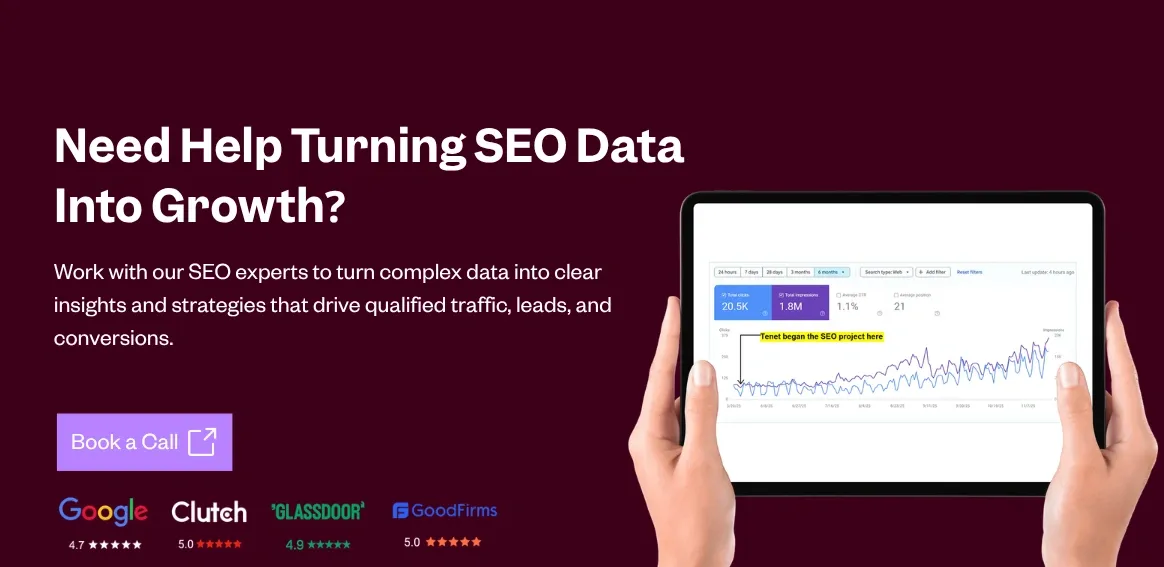
Want SEO reports that connect to business growth?
SEO reporting should do more than show rankings, traffic, and completed tasks. It should help you understand whether your SEO investment is creating meaningful business results.
Our SEO team focuses on connecting SEO activities with measurable outcomes such as organic traffic growth, qualified leads, conversions, and revenue opportunities. We use monthly reporting to show what changed, why it changed, what is holding growth back, and what we plan to do next.
Get an SEO proposal (Read through our SEO case studies) →
Request a Customized AI Brand Visibility Report
Request a Customized AI Brand Visibility Report
























Got an idea on your mind?
We’d love to hear about your brand, your visions, current challenges, even if you’re not sure what your next step is.
Let’s talk


