
Website Scalability: How To Build a Scalable Website?
 By
By Share

Share

Get a quick blog summary with



Website scalability isn’t about handling more traffic. It’s about whether your website can absorb growth without rewrites, delayed launches, or silent performance and SEO losses. Most sites work fine at around 10K monthly visitors. Problems surface at 5 to 10 times growth, when: Traffic spikes from campaigns and launches Teams ship faster and more frequently Regions, users, and content expand Early architectural shortcuts become systemic failures The result is predictable. Pages slow down. Deployments become risky. Changes feel fragile and performance debt accumulates. At Tenet, we help SaaS, e-commerce, and B2B teams rebuild sites that break under scale by untangling tightly coupled systems and designing architectures that support millions of visits and continuous releases. This guide documents the patterns and trade-offs that actually make websites scale, and the mistakes teams usually discover too late.
When does your business need website scalability?
Website scalability becomes necessary when the way your site handles requests, data, and changes no longer matches how the business is growing. The situations below explain what specifically fails and why.
1. Rapid User Growth in Startups
Early startup websites are usually built to move fast, not to handle volume. They rely on shared servers, basic databases, and simple request handling. This works until usage grows unevenly.
What actually happens
As users increase, multiple actions such as logins, sign-ups, page loads, and background tasks start competing for the same resources. Since nothing is isolated or prioritized, spikes cause queues to form and requests to fail.
Why does this become a problem?
New users experience slow or broken first interactions. These users do not return, and early churn compounds faster than growth.
👉 Explore how SaaS products manage rapid user growth in this guide on SaaS UX design best practices for scaling products.
Trigger signals
Crossing 5,000 to 10,000 daily active users, sign-up failures during busy hours, or response times crossing three seconds.
👉 Need help with website designing? Explore our website design services by country:
- Web design services in India
- Web development services ncy in London
- Web development agency in the USA
- Web design agency in Dubai

2. Seasonal Traffic Spikes in E-Commerce
E-commerce traffic does not grow evenly. It arrives in short, intense bursts during sales, promotions, or launches. Sites built for average traffic struggle under simultaneous demand.
What actually happens
Thousands of users load product pages at the same time. Each request hits pricing, inventory, and recommendations. Databases slow down, page rendering blocks, and checkout steps fail mid-flow.
Why does this become a problem?
Users who intend to buy abandon the session when pages stall or payments fail. Lost revenue during peak events cannot be recovered later.
Trigger signals
Past campaigns have caused slow product pages, checkout errors, or sharp increases in cart abandonment.
3. Expanding Features in Established Businesses
As B2B products mature, new features depend on existing data, services, and workflows. Over time, these dependencies become tightly connected.
What actually happens
New dashboards, integrations, or reporting features increase database reads and writes. Changes in one area affect others, making releases harder to test and more likely to break existing behavior.
Why does this become a problem?
Engineering teams slow down because every release carries risk. Fixes take longer, and technical issues start blocking product plans.
👉 Learn more about handling complex feature growth in this article on enterprise UX design challenges and best practices.
Trigger signals
Feature development stretching beyond two months, frequent fixes after launches, or rising errors as usage grows.
4. Global Expansion in Any Business
When users are spread across regions, distance becomes a technical constraint. A site that performs well in one location may struggle elsewhere.
What actually happens
Requests from distant regions take longer to reach servers. Static assets load slowly, and dynamic requests fail more often during peak usage.
Why does this become a problem?
Users perceive the product as unreliable. Engagement drops, and search rankings suffer in regional markets.
👉 Discover strategies to optimize websites for multiple regions in these UI/UX design guides for complex digital products.
Trigger signals
User complaints from specific countries, uneven response times by region, or planned traffic increases above 20 percent.
What are the components of a scalable website architecture
A scalable website architecture relies on systems that distribute load, isolate failures, and grow without forcing full rewrites. These components handle growth in traffic, data, and functionality without slowing the site down.
1. Load Balancers to Prevent Single-Server Failures at Scale
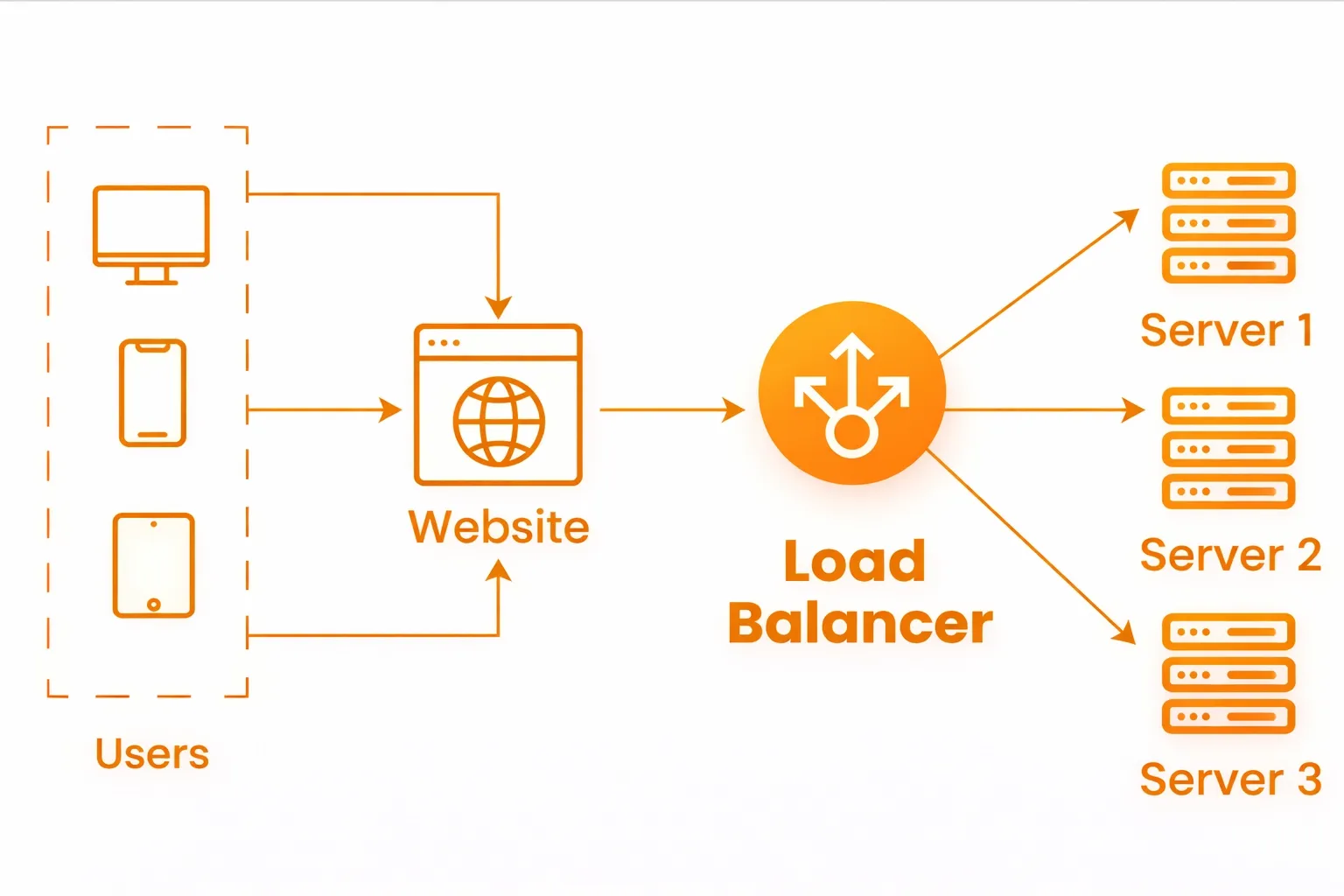
A load balancer sits in front of your web servers and controls how incoming requests are distributed. Instead of sending all traffic to one machine, it spreads requests across multiple servers so no single system becomes a bottleneck.
Here’s how a load balancer sits in front of your website and spreads traffic across multiple servers:
Why it matters
Without a load balancer, your website relies on one server staying healthy. If that server slows down or crashes, the entire site becomes unavailable. During traffic spikes such as launches or sales, load balancers keep the site responsive by spreading the load and sending traffic only to servers that are working correctly.
How it’s implemented
- Place a load balancer in front of your application servers using tools like NGINX, HAProxy, or managed services such as AWS Application Load Balancer or Google Cloud Load Balancer
- Configure frequent health checks so that failing servers are automatically removed from traffic
- Run at least three server instances to avoid a single point of failure
- Use session persistence only when required, such as for logged-in users or active carts
Common mistake
Skipping or misconfiguring health checks. When unhealthy servers continue receiving traffic, users see errors and slow pages long before teams realize something is wrong.
2. Content Delivery Networks (CDNs) to Reduce Distance and Load at Scale
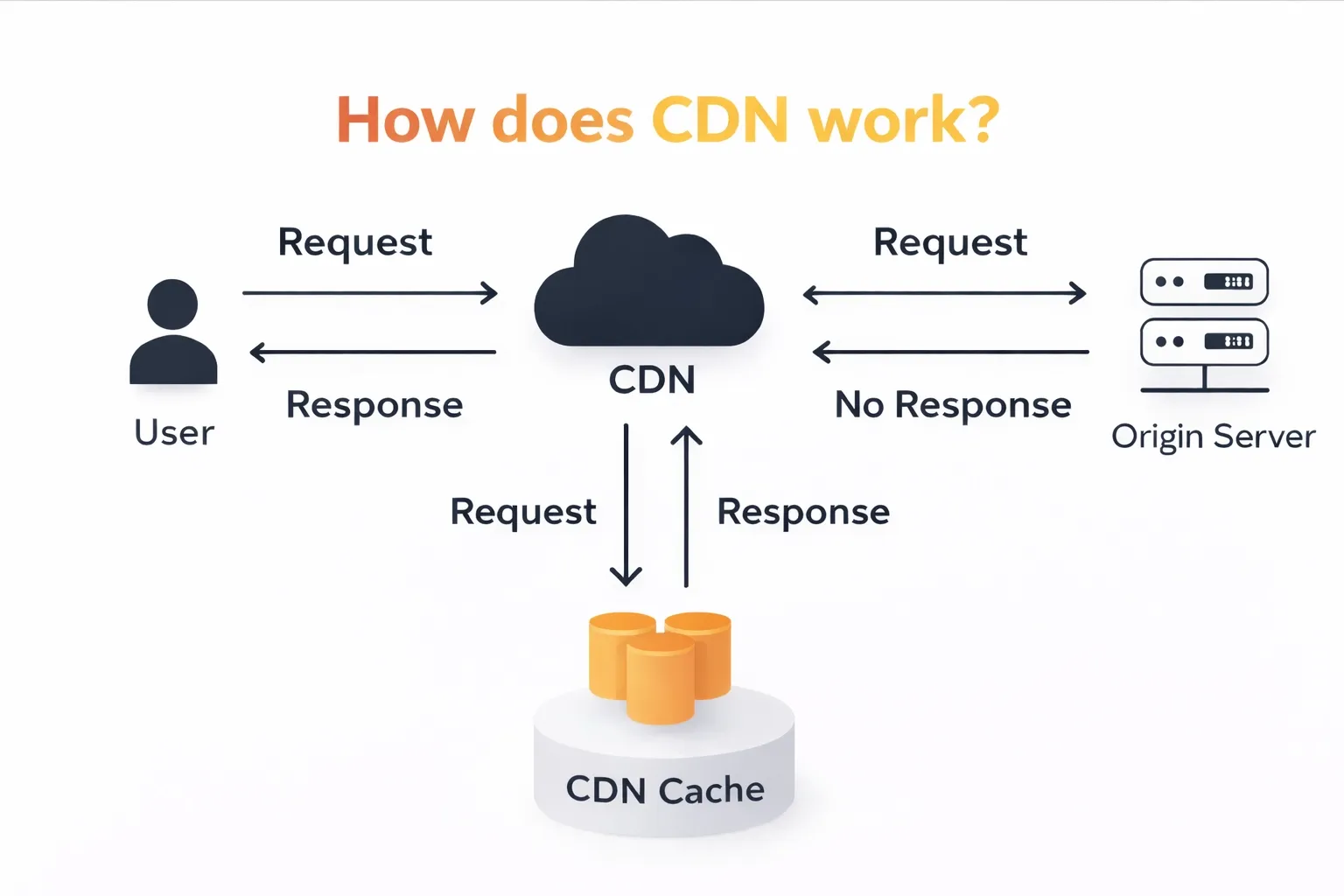
A CDN stores copies of your website’s static files, such as images, stylesheets, and scripts, on servers located closer to users around the world. Instead of every request going to your main server, many requests are served from nearby locations.
This image shows how a CDN serves cached content closer to users while protecting the origin server from every request:
Why it matters
As your audience grows across regions, distance becomes a performance problem. Requests that travel long distances take longer to load pages and put unnecessary load on the main server. A CDN reduces this delay by serving content closer to users and offloading most static traffic.
This keeps pages fast during traffic spikes and prevents the main server from becoming overloaded. Faster image and page delivery also reduces drop-offs during browsing and checkout.
How it’s implemented
- Use a CDN provider such as Cloudflare, Akamai, Fastly, or AWS CloudFront and route traffic through their network
- Configure caching rules so static assets are cached for long durations, while pages can be refreshed in the background
- Set clear cache headers to control how long content is stored
- Clear or update cached content through APIs when pages or assets change
Common mistake
Relying on default CDN settings without defining cache rules. This leads to low cache usage, repeated requests to the main server, and little improvement in real performance.
3. Caching Layers to Reduce Repeated Work Across the Stack
Caching stores frequently requested data closer to where it is used, so the system does not repeat the same expensive work for every request. This can happen at multiple levels, including the browser, CDN, application server, and database layer.
Why it matters
Without caching, every page view triggers fresh database queries, computations, and file reads. As traffic grows, this repeated work slows responses and overloads backend systems. Caching reduces this load by serving repeat requests from fast memory, allowing the website to stay responsive even when traffic increases sharply.
How it’s implemented
- Cache static assets in the browser and CDN using long-lived cache headers
- Use in-memory stores like Redis or Memcached at the application level to cache sessions, API responses, and computed data for short durations
- Define clear time limits for cached data so it refreshes automatically
- Invalidate or update cached content when underlying data changes using tags or event-based updates
Common mistake
Caching data without clear invalidation rules. When cached data is not refreshed correctly, users see outdated prices, incorrect inventory, or broken links, which erodes trust quickly.
4. Database Replication and Sharding to Handle Large Data Without Slowdowns
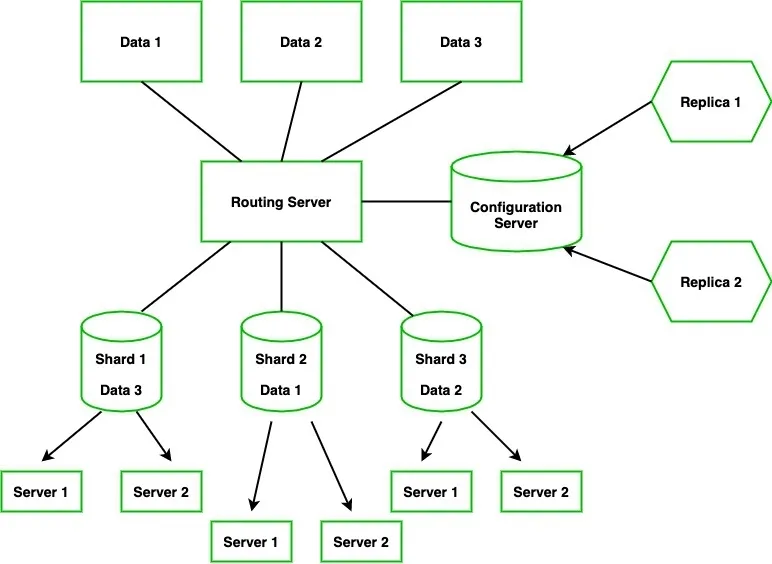
Replication makes read-only copies of your database, while sharding splits large tables across multiple databases based on keys like user ID or region. Together, they prevent a single database from being a performance bottleneck.
Below given visual represents how data is split into shards and replicated, so no single database or server becomes a bottleneck.
Why it matters
Most database traffic is read-heavy, like page views, searches, and reports. Replication allows these reads to go to copies without slowing down writes. Sharding ensures that as your data grows, no single database has to handle all the queries, preventing slowdowns and outages.
How it’s implemented
- Create read replicas (PostgreSQL, MySQL) for queries such as analytics or search. Route read requests to these replicas
- Shard large tables when single-database limits are reached (e.g., 100GB for MySQL). Use a consistent key, like user_id, to distribute data evenly
- Monitor replication lag and keep it under one second to avoid stale reads
Common mistake
Sharding too early. Implementing shards before they are needed adds operational complexity and increases the risk of errors without real performance gains.
5. Auto-Scaling Cloud Infrastructure to Match Capacity to Demand in Real Time
Auto-scaling automatically adjusts the number of servers in your environment based on real-time metrics such as CPU usage, memory, or incoming requests. This ensures your website has the right capacity for current traffic without manual intervention.
Why it matters
Websites experience unpredictable spikes in traffic, like during product launches or sales events. Auto-scaling handles sudden increases without crashes, while scaling down during quiet periods prevents unnecessary costs. Without it, fixed server counts either lead to downtime during peaks or wasted resources during low traffic.
How it’s implemented
- Use cloud or container tools like AWS Auto Scaling Groups, Google Autoscaler, or Kubernetes Horizontal Pod Autoscaler
- Define thresholds: for example, scale out when CPU usage exceeds 70% and scale in below 30%
- Set cooldown periods (e.g., 2 minutes) to avoid rapid fluctuations
- Name instances consistently (prod-web-1, prod-web-2) to make monitoring and logging easier
Common mistake
Keeping a fixed number of servers. This wastes money when traffic is low and risks crashes during unexpected spikes.
6. Microservices Architecture to Scale Components Independently
Microservices split a large application into smaller, independent services such as authentication, payments, or search. Each service runs on its own and communicates with others through APIs, allowing teams to develop, deploy, and scale components separately.
Why it matters
Different components of a system expand at different rates. For example, checkout might need to handle a sudden surge in traffic, while search must scale as content increases. Microservices let teams scale each part independently and work without blocking each other, preventing bottlenecks and system-wide slowdowns.
How it’s implemented
- Identify business domains and extract services (start with critical ones like authentication or billing)
- Use an API gateway (Kong, AWS API Gateway) to route requests to the correct service (e.g., /login → auth service)
- Containerize each service with Docker and manage deployments with Kubernetes
Common mistake
Migrating to microservices too early. Small teams can be overwhelmed by network overhead, operational complexity, and the need to manage multiple deployments.
7. Message Queues to Offload Slow Tasks to Keep the Site Fast
Message queues such as RabbitMQ, SQS, or Kafka move time-consuming tasks, like sending emails, processing images, or generating reports, out of the main web request. Background workers handle these tasks separately so the website can respond immediately to users.
Why it matters
Without queues, slow tasks block the main request. Users experience delays and the database or servers can become overloaded during traffic spikes. With queues, actions like "Order confirmed" happen instantly, even if sending an email takes several seconds, keeping the site fast and reliable under load.
How it’s implemented
- Send jobs to a queue whenever a task is triggered, for example, on checkout or form submission
- Background workers pull jobs from the queue and process them asynchronously
- Use dead letter queues for failed jobs and monitor queue length, keeping it under a target threshold, such as 100 jobs
- Implement a retry backoff to prevent repeated failures from overwhelming the system
Common mistake
Processing tasks synchronously. A single slow operation can delay responses for all users and risk overloading the database.
Best practices to build a scalable website
1. Design for Horizontal Scaling
Design your website so it can handle more traffic by adding extra servers instead of trying to make one server more powerful.
Why it matters
When your site traffic suddenly doubles, a horizontally scalable system automatically shares the load between multiple servers. This avoids downtime and ensures users still get fast responses, even during marketing campaigns or product launches.
👉 Explore traffic-ready layouts and scalable page structures in these SaaS landing page examples built for conversion and scale.
How to implement
- Set up several web servers behind load balancers like AWS ALB, NGINX, or HAProxy.
- Move files and session data into shared storage like Redis or Amazon S3 so all servers stay in sync.
- Configure auto-scaling rules in your cloud provider to add or remove servers based on traffic or CPU usage.
2. Implement Monitoring and Alerts
Use monitoring tools that track how your website performs and alert you before problems affect users.
Why it matters
Even a small issue, like an overloaded database or failing API, can slow down your site or stop transactions completely. Monitoring gives your team visibility so you can fix issues early and scale resources before performance drops.
How to implement
- Track metrics like CPU usage, memory, and page response times using tools such as Prometheus, Grafana, or Datadog.
- Set alerts for key conditions, for example, when latency exceeds 400 ms or database capacity reaches 80%.
- Create live dashboards so developers and marketers can quickly spot and investigate unusual trends.
3. Optimize Code and Queries
Write clean, efficient code and database queries that deliver results quickly without using unnecessary resources.
Why it matters
If your code or database queries are inefficient, no amount of infrastructure will make your site scale. Optimizing application logic makes your website faster and reduces server costs.
How to implement
- Use tools like New Relic or AppSignal to find which parts of your code slow down requests.
- Add proper indexes to frequently searched fields, use pagination, and avoid complex joins in SQL queries.
- Cache frequent results with Redis or Memcached so the system doesn’t re-query the database every time.
4. Use Stateless Applications
Build applications so that each server can handle any user request without relying on local memory or stored data.
Why it matters
Stateless architecture makes scaling effortless. If one server goes down or traffic grows suddenly, new instances can take over instantly, and users won’t lose their session or progress.
How to implement
- Store user sessions in a shared service like Redis or Memcached.
- Save user uploads, like images or PDFs, in cloud storage instead of a local drive.
- Offload time-consuming tasks, such as email sending or report generation, to background job workers using SQS or RabbitMQ.
5. Adopt CI/CD Pipelines
Automate testing and deployments so every change you make is consistent, verified, and repeatable.
Why it matters
Manual deployments cause downtime and inconsistencies between development and production. CI/CD ensures code is tested thoroughly and deployed safely, even by large teams.
How to implement
- Set up automation workflows in GitHub Actions, GitLab CI, or Jenkins to test every update automatically.
- Deploy to a staging environment first, verify builds, then release to production.
- Keep environment configurations consistent using Terraform or AWS CloudFormation.
6. Plan for Data Partitioning
As your user base and data grow, split your database into smaller, more manageable parts so queries remain fast.
Why it matters
One large database eventually becomes too slow and hard to back up. Partitioning separates data by type, region, or user range so each database only handles a portion of the total traffic, improving performance and reliability.
How to implement
- Start with horizontal partitioning by dividing data by regions, customer groups, or ID ranges.
- Use consistent hashing or range-based algorithms to distribute data evenly.
- Monitor performance and rebalance shards regularly as traffic patterns change.
7. Use Serverless Architectures
For parts of your website that run unpredictably or in short bursts, like image uploads or reports, use serverless computing instead of traditional hosting.
Why it matters
Serverless services automatically handle scaling without your intervention. You pay only for what you use, which makes it ideal for workloads that fluctuate daily.
How to implement
- Use AWS Lambda, Google Cloud Functions, or Cloud Run to run short functions when events trigger them.
- Use managed databases like DynamoDB or Firestore that scale automatically with demand.
- Combine serverless functions with events, such as file uploads or form submissions, to automate processes like resizing images or sending notifications.
How Tenet’s website design approach supports website scalability and long-term growth
Website scalability decides whether your site supports growth or slows it down. When traffic, features, and teams expand, weak foundations lead to slow pages, risky releases, and hidden performance losses. Scalable websites avoid these issues by using clear architecture, distributed systems, and performance-first design from the start.
At Tenet, we design websites that stay fast, stable, and easy to evolve as businesses grow. Our approach focuses on clean system separation, scalable infrastructure, and workflows that support continuous updates without breaking performance or SEO.
If you are planning for growth or feeling early signs of strain, a structured review of your website can help identify what needs to change before problems become costly. You can explore Tenet’s web design services to see how we help teams build websites that scale with confidence.
Need a high-converting website? Get a custom proposal from our team.
Need a high-converting website? Get a custom proposal from our team.


























Got an idea on your mind?
We’d love to hear about your brand, your visions, current challenges, even if you’re not sure what your next step is.
Let’s talk


