
How to Measure UX in Enterprise Applications (Step by Step)
 By
By Share

Share

Get a quick blog summary with



Measuring UX in enterprise apps means understanding how real work happens and where users lose time or confidence.
Enterprise tools support complex, high-volume tasks, so small issues don't slow entire teams.
The goal is to track friction early and improve workflows with evidence, not guesswork. This guide explains clear, practical steps for product teams to measure usability, identify hidden problems, and demonstrate how UX improvements drive better business outcomes.
Map the core workflows and measure task success.
Measuring UX in enterprise apps starts with understanding the workflows that matter most. These are the tasks users repeat many times a day, and that carry real business impact. Teams should map each step, define what a smooth experience looks like, and note the information users need at every stage.
Once the expected flow is clear, teams can measure how long these tasks take in real use. Changes in task time reveal where friction occurs, where users slow down, and whether a redesign speeds up or makes the workflow more predictable.
Track friction with behavioural data
Behavioural data shows moments when users diverge from the intended flow. Enterprise users often work fast and avoid reporting small problems. Instead, they build habits that hide their frustration. Behavioural signals reveal these hidden issues through repeated clicks, long pauses, failed form submissions, or backtracking.
These patterns highlight where the interface fails to align with how people think. They show where context is missing, labels are unclear, or steps feel confusing. Studying this behaviour helps teams understand the gap between the intended experience and real usage. Behavioural insights turn silent friction into something visible and actionable.
Watch real users in their real work environment.
Enterprise work rarely happens in a simple environment. Users switch between tools, follow strict procedures, and deal with interruptions. Many UX issues appear only when you observe real work. Analytics may show a task takes one minute, but field observations may reveal several minutes spent gathering details from emails or spreadsheets before starting.
These observations expose gaps that numbers alone cannot show. Users may write notes because key information is hidden or switch tabs because they do not trust the system data. They may also follow extra steps required by internal rules. Seeing these behaviours helps teams design flows that reflect real conditions, not ideal assumptions.
Use in-app micro feedback to identify confusing screens
In-app micro feedback captures user sentiment at the moment of action. Enterprise users often avoid long surveys, but they respond to quick questions placed after a task. These small prompts reveal how users felt during the flow. When a step is marked as confusing, it usually matches longer task times or higher error rates.
Over time, micro feedback shows which screens are smooth and which create stress. It also helps teams confirm whether a redesign improved clarity or introduced new friction. Because the feedback is immediate, it reflects real experience rather than memory.
Use two usability scores: SUS and CES.
SUS and CES give teams a long-term view of overall usability. While behavioural data shows detailed friction points, these scores show whether the system feels easier or harder to use. SUS measures usability. CES measures effort.
Teams track these scores routinely. Rising scores suggest clearer workflows while falling scores signal growing confusion. These scores help teams compare releases and detect issues early. They offer a stable way to measure usability across long development cycles.
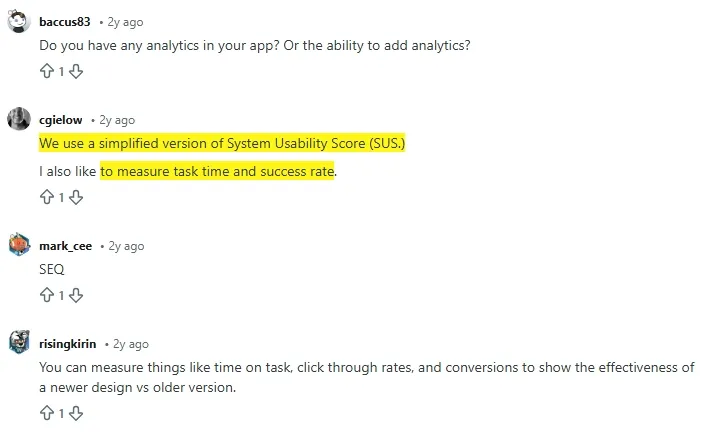
An expert on Reddit shared that they use SUS to measure task time and success rate to understand user struggles with the software.
Track adoption and repeat use for every new feature
A feature is valuable only if users return to it. Enterprise apps often contain features that look useful but do not support daily work. Tracking adoption reveals whether a feature fits naturally into the workflow.
Low repeat use suggests unclear value or poor discoverability. High repeat use shows the feature solves a real problem. Adoption patterns help teams focus on features that matter and identify those that need redesign or clearer placement.
Treat support tickets as UX signals, not support issues
Support tickets reveal where users feel blocked. When many people ask the same question, it means the interface does not match user expectations. These patterns highlight unclear wording, hidden actions, or confusing logic.
Reviewing support data helps teams catch issues early. Fixing these problems often reduces ticket volume and improves confidence. Support logs reveal friction that analytics may not.
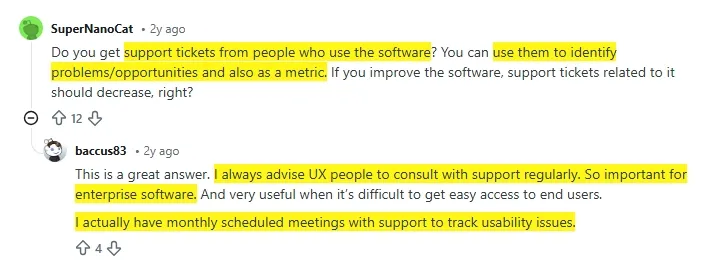
Experts on Reddit suggest that UX designers focus on user support tickets to improve software UX.
Link UX signals to business outcomes
UX work has a greater impact when it connects to business goals. Faster workflows reduce delays. Clearer interfaces reduce errors. Better guidance lowers support and training costs. When UX improvements are linked to metrics such as cycle time or throughput, leaders see value in measurable terms.
Create a consistent UX health model to track every release
A consistent UX model helps teams maintain quality across releases. When each release is measured using the same signals, trends become easier to see. This allows teams to spot issues early and understand which changes help or harm the experience.
A UX health model often includes task time, behavioural friction, adoption, usability scores, and support themes. When these signals stay stable or improve, UX quality remains strong. When they drop, teams know where to focus. This structure protects quality even when teams change.
💡 FURTHER UX RESOURCES:
- How is Enterprise UX Different from Other UX Domains?
- How to Build a Design System for Your Company?
UX Design Process: Create Better Digital Products

Tenet's approach to measuring UX for enterprise applications
Enterprise software supports complex tasks, so we track how people actually use the product and where work slows down, breaks, or feels unclear.
Start with real workflows: We first identify the core tasks users perform every day. These workflows carry business impact. We define what success looks like for each task and measure task time, completion rate, and errors. This shows where friction exists and whether changes improve speed and clarity.
Use behavior to find hidden friction: Enterprise users rarely report small issues. We rely on behavioral data like repeated clicks, backtracking, pauses, and failed actions. These signals reveal confusion, missing context, or poor labels that analytics alone cannot explain.
Observe users in real environments: We study how users work across tools, rules, and interruptions. This exposes gaps between system design and real processes. These insights help us design flows that match reality, not assumptions.
Collect in app micro feedback: Short in app questions after key actions help us capture user sentiment in the moment. This confirms which screens feel smooth and which cause stress or effort.
Track usability scores over time: We use SUS to track overall usability and CES to measure effort. These scores help us compare releases and spot early declines in experience quality.
Measure adoption and repeat use
A feature matters only if users return to it. We track feature adoption to see what fits naturally into daily work and what needs redesign or clearer value.
Treat support data as UX input: Repeated support questions signal UX gaps. We review tickets as experience data and fix issues that block confidence or understanding.
Link UX to business results: We connect UX improvements to outcomes like faster cycles, fewer errors, lower support load, and higher throughput. This makes UX impact visible to leadership.
Maintain a UX health model: Every release is measured using the same UX signals. This keeps quality consistent and helps teams act early when experience starts to decline.
If you want to measure and improve UX in a way that supports real enterprise work, Tenet can help. Our UX design services focus on clarity, usability, and business results, not assumptions.
Connect with our team to evaluate your product, uncover hidden friction, and build experiences that teams actually trust and use every day.
Simplify enterprise software with expert UX design services
Simplify enterprise software with expert UX design services
























Got an idea on your mind?
We’d love to hear about your brand, your visions, current challenges, even if you’re not sure what your next step is.
Let’s talk


