
5 Website Redesign Examples With Before and After Results
 By
By Share

Share
Get a quick blog summary with



Most websites lose traffic, leads, and sales because they look outdated, load slowly, or make users struggle to find what they need.
A redesign fixes these problems, but many brands still hesitate because they cannot picture what a successful redesign actually looks like. They want to see real-world examples, the exact changes made, and the measurable results that followed.
In this guide, you will see detailed website redesign examples that show exactly how brands improved usability, modernized their visual identity, fixed mobile issues, boosted conversions, and upgraded technical performance.
You will understand what changed, why it worked, and how each redesign delivered measurable improvements in engagement, leads, and revenue.
👉 Explore our website design services by country:
- Web design agency in India
- Web design agency in London, UK
- Web design agency
- Web design agency in Dubai
Why brands invest in website redesign?
1. Enhance User Experience and Usability
Websites that are confusing to navigate or slow to load cause frustration and make users leave. A redesign addresses these issues by organizing content clearly, simplifying menus, and improving page speed, making it easier for visitors to find information and complete important actions, like signing up, contacting support, or making a purchase.
Example: Slack redesigned its marketing site to improve how people navigate and interact with it. They restructured the menus, clarified the main calls-to-action, and improved loading times, making the site easier to use for both new and returning visitors.
👉 Learn how to fix the most common web design mistakes that drive visitors away.
2. Update Branding and Visual Identity
As companies grow or evolve, their website needs to reflect the current brand identity, messaging, and values. A redesign ensures that colors, typography, imagery, and tone are consistent across the site, which helps build trust and makes the website feel aligned with the company’s vision.
Example: The company formerly known as Dunkin’ refreshed its visual identity in 2019 by dropping “Donuts” from its name and simplifying its look to align with its broader focus beyond just donuts.
3. Improve Mobile Experience and Responsiveness
Today’s users often start, continue, and even finish their journeys on mobile devices, so a website that doesn’t perform well on phones or tablets risks losing potential customers. A redesign focused on mobile experience makes sure the site adapts to different screen sizes, loads quickly, and allows users to complete actions easily.
Example: The Australian education provider Open Colleges Australia redesigned its landing pages with a mobile‑first, responsive approach.
This includes simplifying the homepage, adding clear call‑to‑action buttons visible on smaller screens, and improving backend infrastructure to boost load speed by 27%.
4. Improve Conversions and Revenue
When visitors arrive on a website but leave without taking action, like signing up, buying or enquiring, it’s usually because the path to complete that action is unclear or too long. A redesign helps by shortening that path, placing clear prompts, and simplifying forms.
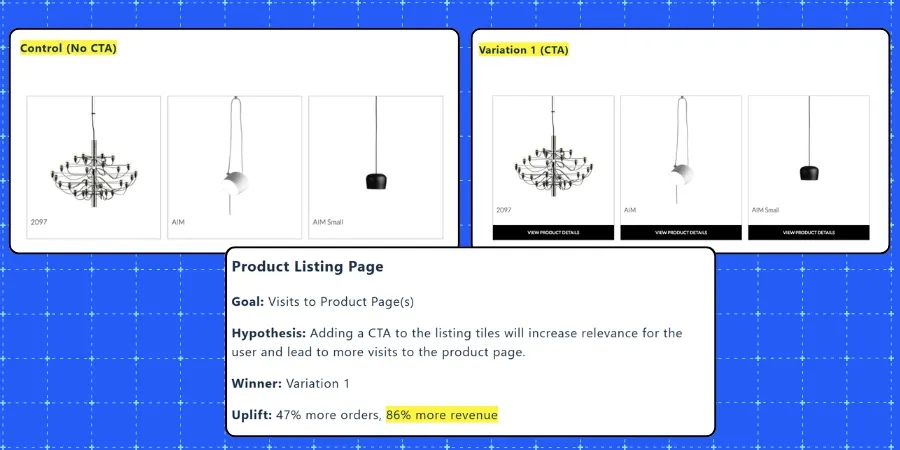
Example: On the site for FLOS USA, the redesign addressed low checkout rates by adding prominent “View Details” buttons on product listings, improving navigation to purchase, and making the experience more direct.
The result: orders increased by 47% and revenue rose by 86%.
5. Upgrade Technical Performance and SEO
When a website is slow to load, uses outdated code, or has poor search engine visibility, visitors often leave before engaging. A redesign addresses these issues by improving page speed, cleaning up code, updating URL structures, and optimizing for search engines.
6. Support New Features or Business Goals
As a business grows or changes strategy, its website must often introduce new functionalities or content flows to support those shifts. A redesign enables this by building in the required flexibility and structure from the start.
5 Best Website Redesign Examples (What Worked and the Results)
1. Rev.com
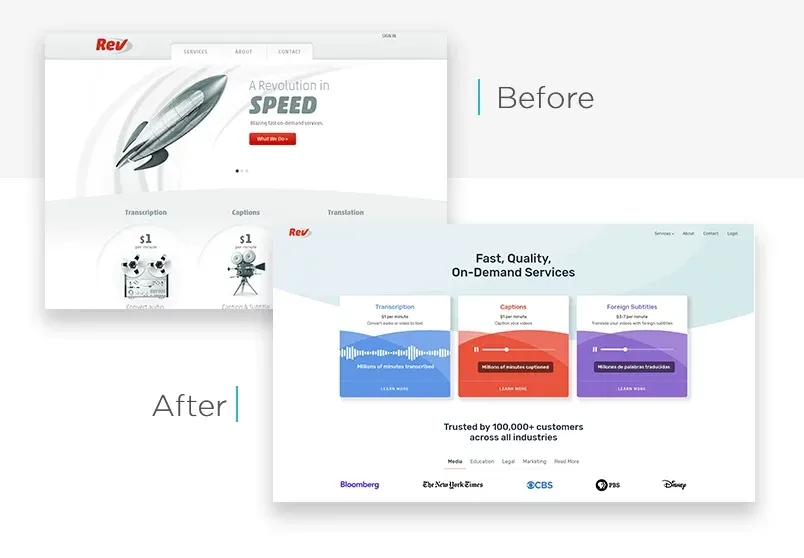
Rev.com replaced its old cluttered homepage, which featured a carousel and retro-style graphics, with a modern, clean design.
They removed the carousel and retro elements and introduced three clear service cards on the homepage, each with concise text, playful colors, and subtle animations highlighting the main offerings.
They simplified navigation, improved page loading speed, and made the site fully responsive for mobile and desktop devices.
What worked:
The transformation changed the site from a crowded, confusing experience to a cleaner, more focused design. Users now find it easier to understand Rev’s services and take action quickly due to clearer content hierarchy and better visual cues.
The updated design uses a lighter visual style and clearer calls-to-action, improving overall usability and engagement.
Major Changes:
- Removed the visual carousel and retro graphics
- Simplified site navigation and content layout
- Introduced visually engaging service cards with clear calls-to-action
- Improved site performance with faster loading times
- Implemented responsive design for all screen sizes
- Added subtle animations for better interaction without distraction
This before-and-after comparison demonstrates how Rev.com's redesign replaced outdated carousels and retro graphics with modern service cards
Result:
Following the redesign, Rev.com reported an 18% increase in conversion rate. The new design improved user engagement, reduced bounce rates, and clearly communicated the company's value, leading to more signups and business results.
2. Paint Supply
Paint Supply, a large e-commerce store specializing in paint and related products, chose an incremental website redesign approach. The redesign focused on improving product detail pages by adding new purchase options such as volume discounts, direct shipping, and family group shopping.
Navigation was simplified to make browsing thousands of items easier, the checkout process was streamlined, and site performance was enhanced through hosting infrastructure upgrades. They also prioritized security improvements to protect user privacy and build trust during purchases.
What worked:
The site transformed from a sprawling catalog that was hard to navigate into a user-friendly online store that grows with customer demand. Buyers gained access to clearer, detailed product information, smoother navigation, and a safe, quick checkout experience.
The enhanced site performance allowed it to handle rising traffic without sacrificing speed or responsiveness.
Major Changes:
- Expanded product detail pages with added buying options
- Simplified navigation and checkout processes
- Improved hosting infrastructure for speed and reliability
- Strengthened data privacy and transaction security features
Result:
The redesign led to continuous increases in organic and paid traffic, higher customer engagement, and growing sales volume. Paint Supply was able to respond quickly to market trends and customer feedback, maintaining a strong online presence through strategic updates.
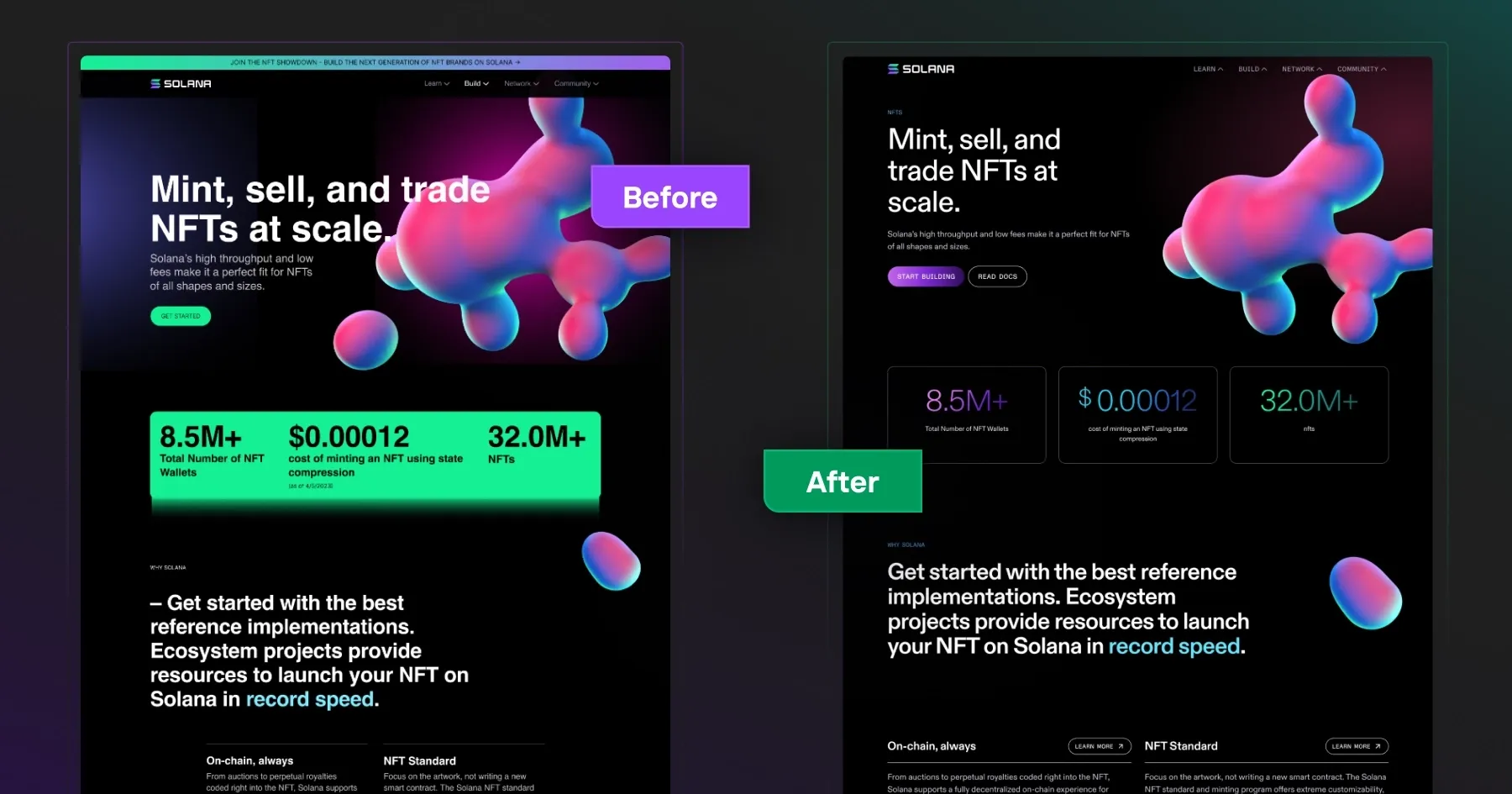
3. Solana
Solana, a blockchain-based SaaS platform, redesigned its website to unify its brand image and simplify the user experience. The previous site was built by multiple teams using different CMS systems, resulting in inconsistent design and scattered content.
The redesign consolidated all content into a single CMS, implemented a unified design system for consistency, and restructured key developer-focused pages to enhance ease of use.
What worked:
The website shifted from a patchwork layout to a cohesive experience with clear navigation paths and consistent branding. The redesign made it easier for developers and users to find relevant resources quickly, while the streamlined backend minimized publishing bottlenecks, empowering the marketing team.
Major Changes:
- Merged multiple CMS platforms into one unified system
- Created a consistent design language and components
- Simplified navigation and improved content layout for developers
- Reduced content publishing time through better workflows
This before-and-after image showcases Solana’s shift from disjointed multi-CMS pages to a unified, consistent platform that accelerated publishing and improved developer engagement.
Result:
Post-redesign, Solana shortened its content publishing cycle by 30%, decreased developer dependencies by 90%, and increased community engagement on the site. Site performance and reliability also improved, reinforcing their developer community’s trust.
4. Brixton Capital
Brixton Capital, a fintech investment firm, redesigned its website to improve clarity, professional appeal, and lead generation. The old site was generic and lacked focused messaging.
Their redesign introduced clearer content that specifically addressed client needs, improved mobile responsiveness, and streamlined lead capture through more prominent and persuasive calls-to-action.
What worked:
The website evolved from a standard finance firm site into a polished, purposeful platform that made critical information easy to find. The mobile-first redesign ensured accessibility, and the enhanced user journey increased potential client interactions and trust.
Major Changes:
- Refined content to be clear, concise, and targeted
- Implemented mobile-first responsive design
- Enhanced calls-to-action and lead capture forms
Result:
After the redesign, Brixton Capital experienced a 56.75% increase in overall site sessions, a 54.44% increase in event interactions (such as form submissions), and a notable rise in monthly lead generation.
5. Airbnb
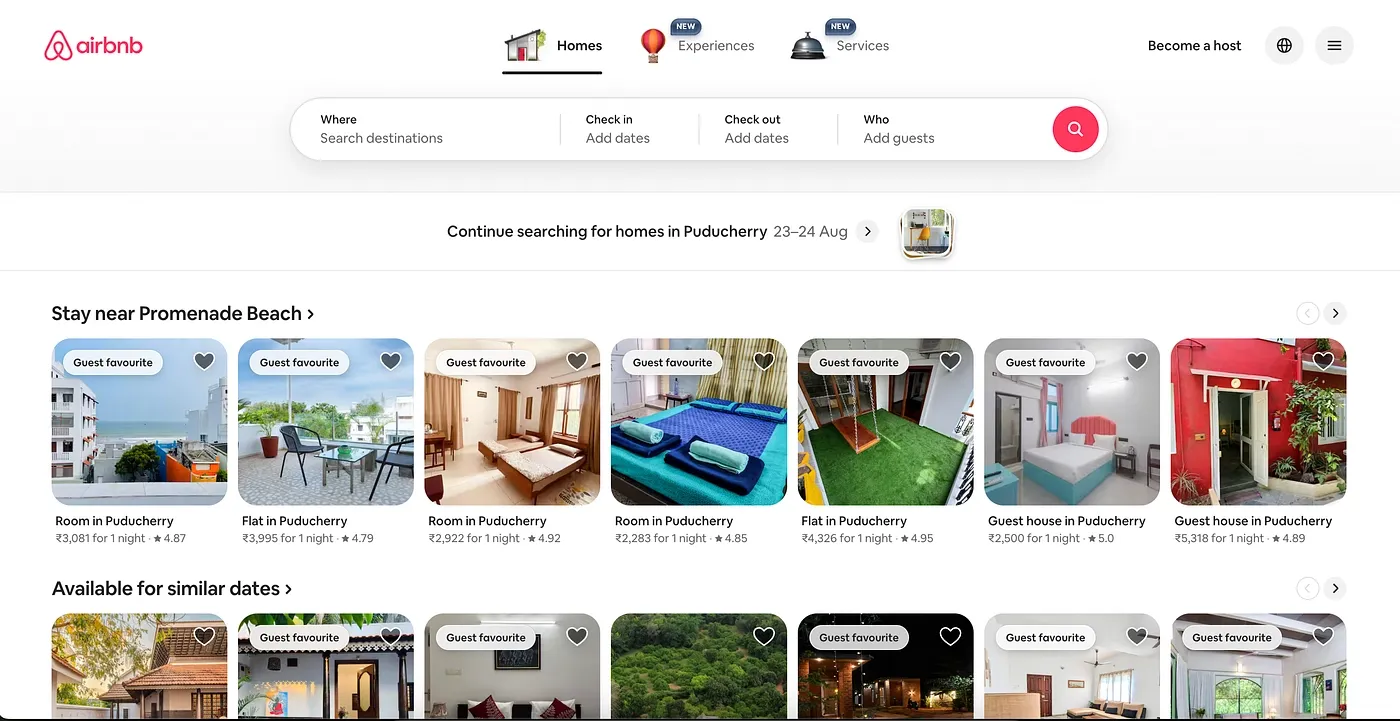
Airbnb redesigned its website to improve usability and search functionality, making it easier for travelers to find and book accommodations. They focused on simplifying the homepage and search experience by reducing clutter and highlighting key actions like entering a destination and selecting dates.
The redesign also introduced personalized recommendations and clearer visual cues to guide users through the booking process. The site was optimized for faster loading and made fully responsive for mobile and desktop users.
What worked:
The website changed from a busy, sometimes overwhelming interface to a cleaner, more inviting space. Users could browse listings and book stays more quickly and with less confusion. The improved search filters and personalized content helped users find suitable accommodations faster.
Major Changes:
- Simplified the homepage with a clear search bar and key actions upfront
- Enhanced search functionality with improved filters and personalized suggestions
- Improved site speed and mobile responsiveness
- Made booking steps more transparent and easier to complete
Here’s the screenshot of the Airbnb website after the redesign (which resulted in higher booking conversion rates):
Result:
After the redesign, Airbnb saw increased user engagement and a higher booking conversion rate, leading to sustained growth in global bookings and customer satisfaction.
What does a website redesign service include?
A website redesign is a comprehensive update of various aspects of your site to enhance its appearance, functionality, and alignment with your goals. It goes beyond just visual changes to address the structure and content based on user needs and business objectives.
Here are the main elements included in most website redesigns:
1. Discovery and Audit
The service begins with a full audit of your website to understand how it performs today. Teams review page speed, SEO health, Core Web Vitals, mobile responsiveness, and CMS performance. They study user behavior using heatmaps, session recordings, and feedback tools. These visuals clearly show where users click, where they struggle, and where they drop off, giving a real view of friction points.
The audit also includes a detailed competitor review. This covers layouts, navigation styles, content gaps, and feature differences. You usually receive visual reports, such as keyword performance charts, that highlight SEO gaps and growth opportunities.
All findings are documented in an audit report that becomes the foundation for the redesign.
Here’s how click heatmaps visually highlight user engagement and friction points across key page elements:
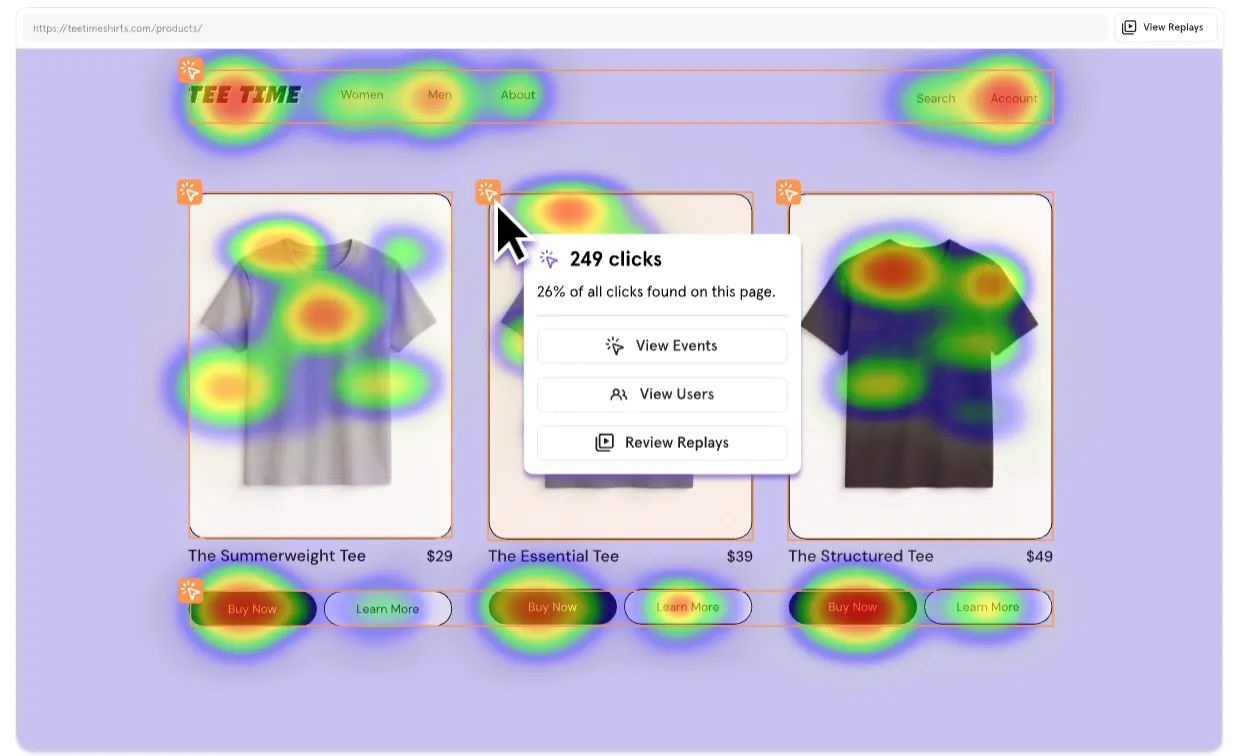
Together, these steps provide a complete picture of technical issues, user behavior, and market context, forming the foundation for strategy and redesign decisions.
2. Strategy & Goal Setting
This stage defines what the new website must achieve. The team sets clear goals and KPIs for conversions, engagement, and performance. Updated user personas help align the new design with real audience needs, and these are often presented as visual persona sheets so you can see user motivations, pain points, and behaviors at a glance.
Content is reviewed to decide what stays, what changes, and what needs to be created. An SEO plan outlines metadata, redirect mapping, and optimization tasks. Finally, you receive a full strategy roadmap that links business goals, user needs, and technical priorities.
3. Information Architecture & Wireframing
Your redesign includes a new sitemap that organizes all pages in a simple and logical way. This sitemap is delivered as a visual diagram that shows how users will move from the homepage to deeper pages.
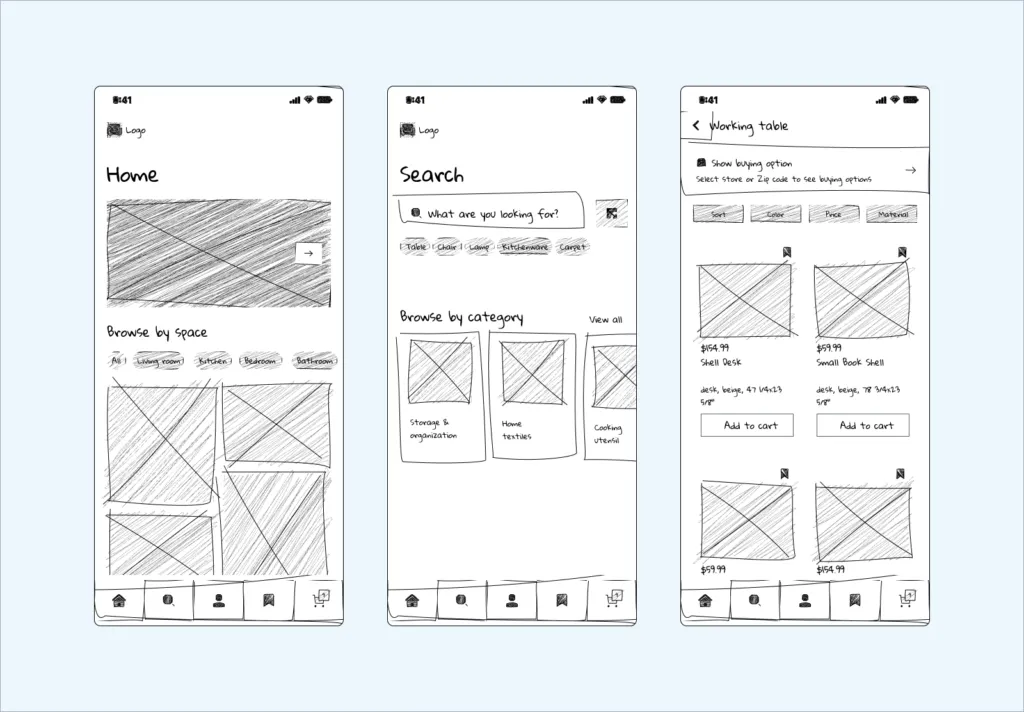
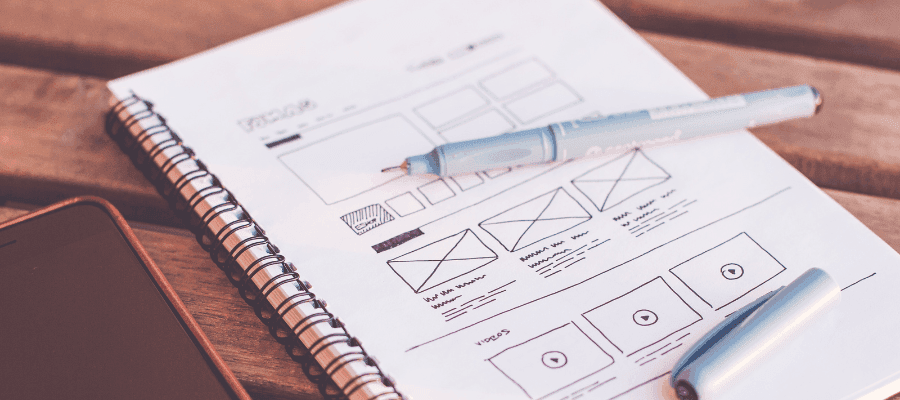
Wireframes are then created for key pages. These are grayscale layouts that show the placement of text blocks, buttons, forms, and navigation without any colors or images.
The wireframes help you understand the structure clearly before design begins. You also receive user flow diagrams that map each step of important actions like signups or purchases.
This visual showcases low-fidelity wireframes, allowing teams to validate page layout and navigation before finalizing visual design.
This phase lays the foundation for visual design and development, ensuring the redesign is both user-friendly and technically sound.
👉 Check out best practices for website navigation that keep users on your site.
4. Visual Design & Prototyping
After the structure is approved, the team works on the look and feel of the new site. You receive a style guide that defines your colors, typography, icons, imagery, and UI elements.
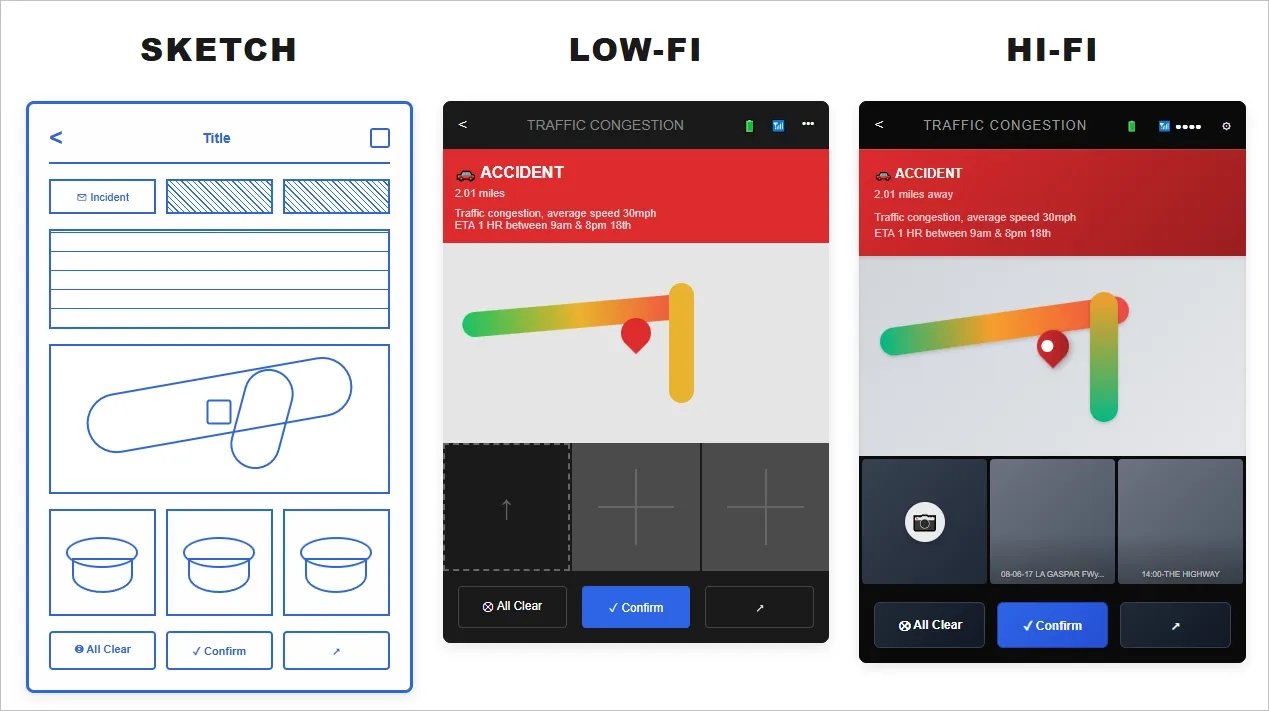
High-fidelity designs are created for all main pages. These designs show your brand applied in full detail. Many teams also share a visual comparison that shows the progress from sketches to wireframes to final mockups, so you can see how the design evolves.
A clickable prototype is then built in tools like Figma. This prototype lets you experience the website flow before development begins. A complete design system is delivered to ensure every page stays consistent.
The following picture shows the evolution from early sketches to low-fidelity and high-fidelity prototypes, illustrating how visual design becomes more refined through iteration.
👉 Stay current with what’s working in web design trends to keep your site fresh.
5. Development & Integrations
The approved designs are then developed into a real website. This includes CMS setup, clean front-end code, and mobile-first layouts. You also get performance improvements such as compressed images, minified files, and lazy loading.
Teams often show a visual example of the responsive layout to demonstrate how the site adapts to different screens.
Security features like SSL, firewalls, and privacy compliance are included. Your website is also connected with CRM tools, analytics platforms, marketing systems, or payment gateways as needed.
6. Testing & Quality Assurance
Before the website goes live, it goes through a complete testing phase to make sure every part of the site works as expected. The team tests the website on different browsers like Chrome, Safari, Firefox, and Edge, and on multiple devices such as desktops, tablets, and mobile phones. This helps confirm that the layout, design, and interactions look correct on all screen sizes.
Each interactive element is checked in detail. Forms are tested to ensure they submit data correctly. Buttons and links are reviewed to confirm they lead to the right pages. Navigation menus are tested to make sure users can move through the website without confusion. The team also checks animations, pop-ups, search bars, sliders, and any custom features.
Accessibility testing follows next. The team reviews the website against WCAG 2.1 guidelines to confirm that users with disabilities can access the content. This includes testing keyboard navigation, checking color contrast, reviewing alt text for images, and confirming screen reader compatibility.
SEO validation is also part of the quality check. The team reviews metadata, headings, internal links, redirects, structured data, and the XML sitemap. These checks help protect rankings and avoid search-related errors after launch.
👉 Check out our article to know the current web accessibility statistics and how it impacts user experience every day.
7. Launch & Post-Launch Optimization
The launch includes DNS updates, SSL verification, redirect setup, and deployment on the live server. Analytics tools like Google Analytics and Tag Manager are configured so you can track performance from day one.
After launch, the team monitors the site for speed, uptime, and technical issues. Support continues for fixes, updates, and small improvements to make sure the site stays stable.
⚒️ Free tools to help you with website redesign and optimization:
- Pick and test color values for your design. Helps you choose perfect site colors fast. Color Picker
- Extract all URLs from an XML sitemap for SEO review and audit. XML Sitemap Extractor
- Check HTTP response codes for any URL. Find errors and redirects quickly. HTTP Status Checker
- Create a favicon from your logo or image to use in browsers and tabs. Favicon Generator
- Keep image and video sizes in the correct ratio when resizing. Aspect Ratio Calculator
Plan your website redesign safely with Tenet
A website redesign isn’t just about new colors or layouts; it’s about solving real user problems and driving business results. At Tenet, we guide every project with a structured, research-driven approach that ensures purpose at every step.
We start by understanding your users and your current site’s performance, using analytics, heatmaps, and user interviews to uncover friction points and opportunities. This insight shapes a strategy that aligns design, content, and technical requirements with your business goals.
From there, we move into design and prototyping, creating wireframes and interactive models to test user flows and visual hierarchy before a single line of code is written. Once development begins, we ensure the site is responsive, fast, secure, and fully integrated with analytics and other essential tools.
Finally, the process doesn’t end at launch. We continuously monitor performance and user behavior, iterating to improve engagement, conversions, and overall experience.
If you’re considering a refresh, let’s explore how we can redesign and develop your website with purpose and precision, creating a site that not only looks great but delivers measurable results for your business.
Boost your brand and conversions — Claim your free web design quote
Boost your brand and conversions — Claim your free web design quote











Got an idea on your mind?
We’d love to hear about your brand, your visions, current challenges, even if you’re not sure what your next step is.
Let’s talk


