
Wireframe vs Prototype: When to Use Each in Product Design?
 By
By Share

Share
Get a quick blog summary with



Many usability issues happen because teams validate the wrong thing at the wrong stage. Wireframes get approved, but interactions remain untested.
Or teams jump straight to high-fidelity screens without locking structure and user flow. This leads to navigation issues, broken workflows, and late design changes during development.
Wireframes and prototypes solve different problems. Wireframes confirm layout, hierarchy, and flow. Prototypes test interactions, usability, and task completion.
In this guide, we explain what wireframes and prototypes are, how they differ in purpose and execution, and when to use each one.
What is a Wireframe?
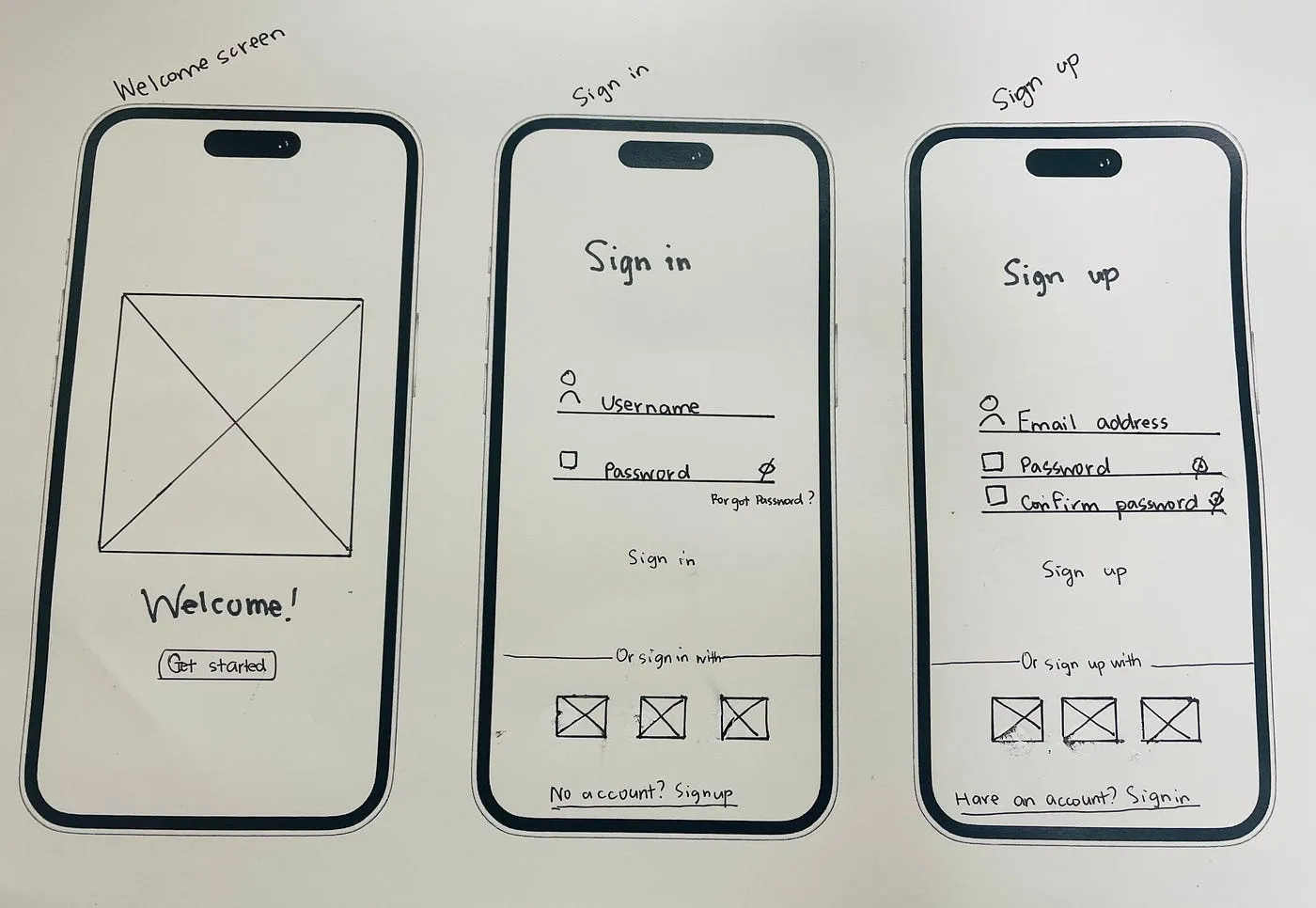
A wireframe is the fundamental blueprint of a digital product. It represents the structure, layout, and hierarchy of a webpage or app screen without diving into visual design elements like colors, fonts, or branding.
Essentially, it’s a visual skeleton that communicates where content and interactive elements belong and how users will navigate through the interface.
In the context of web design, wireframes serve multiple important roles:
- Clarifying functionality: Wireframes map out the placement of buttons, menus, forms, and other interactive elements to ensure users can complete key tasks efficiently.
- Facilitating collaboration: They provide a common reference for designers, developers, and stakeholders, making feedback precise and actionable before visual design complicates discussions.
- Reducing rework: By exposing gaps in user flow or content hierarchy early, wireframes prevent costly changes during later design or development stages.
Wireframes can vary in fidelity: from low-fidelity sketches on paper to high-fidelity layouts with annotations, depending on team maturity and project requirements.
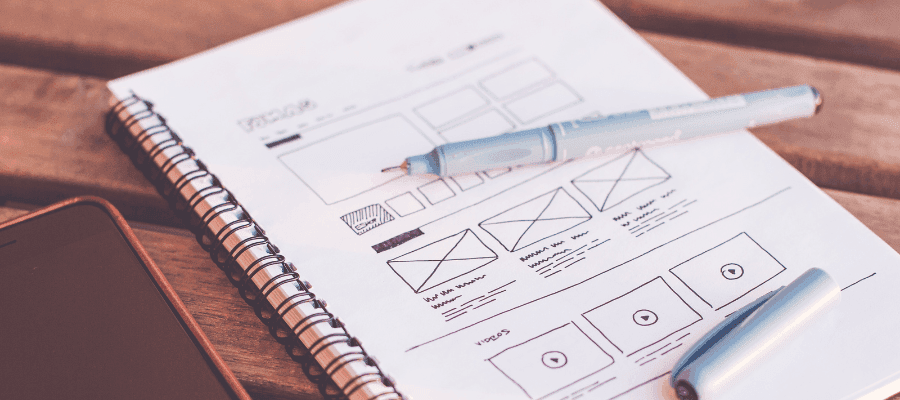
Here is a visual of what wireframing looks like:
💡Pro Tip: The next step after wireframing is prototyping, which can range from simple paper tests to fully coded MVPs. Choosing the right fidelity depends on your project goals, testing needs, and how early you want to validate user interactions.
What is a Prototype?
A prototype is a high-fidelity, interactive version of a digital product. Unlike wireframes, it includes visual design elements such as colors, fonts, branding, and realistic interactions, allowing teams to experience how the product will work before development begins.
Prototypes serve several essential purposes:
- Validate user interactions: Users can navigate, click, and interact with elements to simulate real-world usage.
- Test usability early: Identify friction points and confusing flows before investing in development.
- Communicate design intent: Stakeholders can see not only what the product looks like but also how it behaves.
- Bridge wireframes to development: Prototypes act as the intermediate step between structural planning (wireframes) and coding the final product.
Many teams mistake mockups for prototypes because both look finished. The difference is crucial:
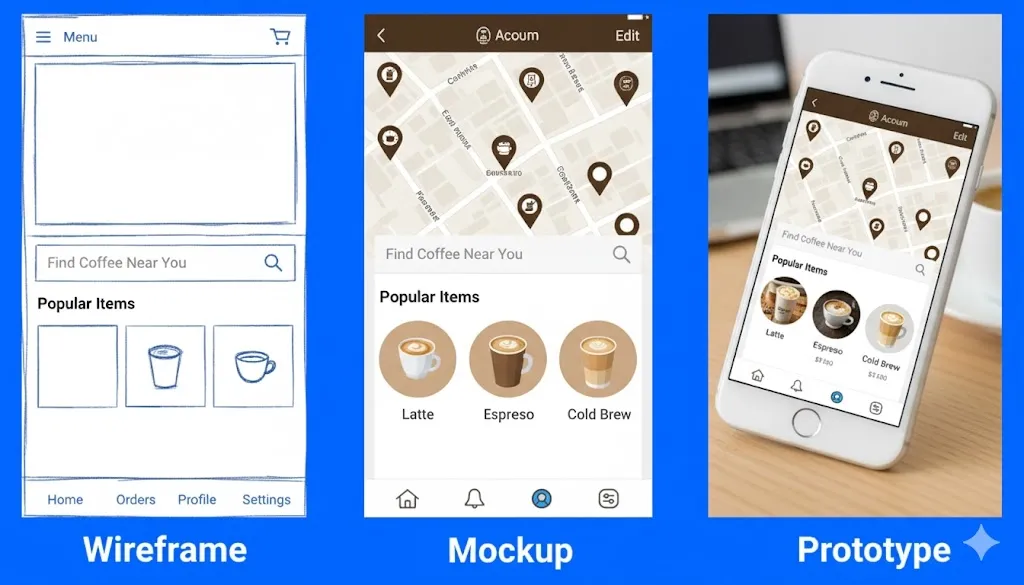
- Mockup: A static, high-fidelity design showing colors, typography, and branding. Looks real, but does not work.
- Prototype: A high-fidelity design that simulates user interactions. Looks real and works partially or fully.
This image shows wireframing, mockup, and prototype side by side:
💡Pro Tip: The fidelity of your prototype can range from clickable paper sketches to fully coded MVPs, depending on project goals, testing needs, and team maturity.
👉 Explore our UI UX design services by country:
- UI UX Design Agency In India
- UI UX Design Agency In London, UK
- UI UX Design Services In the USA
- UI UX Design Agency In Dubai
Understanding the Design Stages
Designing a digital product is a step-by-step process that moves from concept to a fully functional product. This flow ensures each stage builds on the previous one, catching issues early and saving time and money during development. The typical workflow follows this order:
Wireframe → Mockup → Prototype → Development
Each stage has a distinct purpose and builds on the previous one to reduce errors, save time, and ensure a seamless user experience.
Wireframes lay the foundation, defining the structure, hierarchy, and user flow of a page or screen. At this stage, the focus is on what goes where rather than how it looks, making it quick to create and easy to iterate on based on feedback.
Mockups then take this structure and transform it into a static, high-fidelity visual design, showing colors, fonts, branding, and final UI elements. Mockups are static (no interaction), but they help stakeholders visualize the product and approve the visual direction before development begins.
Prototypes bring these designs to life, creating interactive, testable versions. Users can click, scroll, and navigate to simulate real-world behavior, helping teams identify friction points and validate usability before expensive development begins.
Finally, the development stage translates these designs into an actual product. By this stage, the design has been tested, refined, and approved, reducing miscommunication and costly rework.
Key differences between Wireframe vs Prototype
1. Wireframes show structure only, while prototypes show the final visual look
Wireframes are intentionally low-fidelity, focusing on the basic structure of a page or screen. They use simple lines, boxes, and grayscale placeholders to represent content and components. The goal is to communicate layout and hierarchy without distractions from visual design.
Whereas, Prototypes are high-fidelity representations, incorporating colors, typography, imagery, and brand elements. They closely resemble the finished product, helping teams and stakeholders visualize the final experience.
2. Wireframes stay static, while prototypes allow real interaction
Wireframes are static and non-interactive. They outline layout and user flow but do not allow clicks, navigation, or any interactive behavior.
On the other hand, Prototypes introduce interactivity, allowing users to click buttons, navigate screens, trigger animations, and experience workflows as they would in the final product. This makes prototypes ideal for usability testing.
3. Wireframes validate layout, while prototypes validate user experience
Wireframes focus on structural feedback, validating layout, information hierarchy, and basic navigation. They answer the question: “Where should elements go, and how will users move through them?”
However, Prototypes focus on user experience testing. They help teams gather insights on functionality, interaction patterns, and overall usability before development begins, reducing costly post-development fixes.
4. Wireframes cost less and move faster, while prototypes need more effort
Wireframes are quick and inexpensive to produce. Their simplicity allows rapid iteration and experimentation without significant resource investment.
Prototypes, on the other hand, require more time and resources, including visual design work, interactive logic, and testing. This upfront effort helps identify issues early, saving costs and effort during development.
5. Wireframes help early team alignment, while prototypes help stakeholder approval
Wireframes help product managers, designers, and engineers agree on information architecture, screen hierarchy, and feature placement early in the process. They support fast reviews, requirement clarification, and scope control before the visual design or development effort begins.
Prototypes support decision validation and approval. Their realistic visuals and interactive flows allow stakeholders, business teams, and test users to evaluate usability, task completion, and interaction logic. This feedback helps confirm design choices, reduce ambiguity, and lower the risk of late stage changes.
6. Wireframes use simple tools, while prototypes need advanced design tools
Wireframes are simple by nature, so the tools stay simple too. Designers can sketch them on paper, draw them on a whiteboard, or use basic design software. The focus is on speed and clarity, not perfection. Prototypes are more detailed and interactive, so they need stronger tools. Designers use tools like Figma, Sketch, or Adobe XD to connect screens, add clicks, and show animations. These tools help teams experience how the product will actually work before development starts.
👉 Find the best AI Tools for UX Research (Tested & Compared)
When to use a Wireframe?
1. Early Project Discovery and Planning
Wireframes are the first visual tool to use when starting a new project or feature. During the discovery phase, teams need to establish the overall structure and user flow before investing time in visual design or development.
Wireframes answer critical questions:
- Where will the main navigation sit?
- How should content be organized?
- What path will users follow through the interface?
At this stage, the focus is on structural problem-solving rather than aesthetics. Using wireframes early helps prevent costly rework later, when layout decisions would be harder to change.
2. Testing Information Architecture
The organization of content and features directly impacts usability. Wireframes allow teams to experiment with multiple layout options quickly, comparing navigation structures, content hierarchies, and page layouts without the overhead of visual design.
They also help validate whether content blocks are grouped logically and whether user flows make sense. Testing these decisions early ensures that users can find information efficiently and prevents architectural issues from becoming embedded in the final product.
3. Gaining Stakeholder Alignment
Clients and stakeholders often have differing expectations. Wireframes provide a neutral and objective view of the product’s structure, making it easier to align everyone on core functionality.
By stripping away aesthetics, discussions focus on how the interface works rather than subjective design preferences. This early alignment prevents scenarios where stakeholders approve visual designs only to later realize they fundamentally disagree on layout or navigation.
4. Rapid Iteration and Feedback
Change is inevitable in design projects. Wireframes are designed for speed and flexibility; adjusting a layout structure takes hours rather than days.
This allows teams to try multiple approaches, gather feedback, refine, and retest quickly. Iterative adjustments at this stage improve the final design because decisions are grounded in real feedback rather than assumptions.
5. Identifying Usability Issues
Before creating high-fidelity mockups or handing off to developers, wireframes let teams test whether users can accomplish key tasks. Can users find the search function? Are calls-to-action clear? Is navigation intuitive?
Testing with wireframes uncovers friction points early, when fixes are low-cost and fast to implement. Discovering usability problems after development is significantly more expensive.
6. Bridging Research and Visual Design
Research and discovery uncover user needs, pain points, and business requirements. Wireframes translate these insights into a structured blueprint that informs visual design.
This bridge ensures that the final product is user-centered, reducing guesswork and helping designers create interfaces grounded in research rather than intuition alone.
7. Facilitating Developer Communication
Developers need a clear understanding of page structure, component placement, and user flows before writing code. Wireframes serve as a technical reference, reducing misunderstandings between design and development teams.
They help developers estimate effort, identify technical constraints, and clarify ambiguous elements early. Clear wireframes result in fewer surprises, less rework, and a smoother development process.
When to use a Prototype?
1. Validating User Experience and Interactions
Prototypes are most effective when the focus shifts from structure to user experience and interactive functionality. Unlike wireframes, prototypes allow users to click through screens, trigger interactions, and experience workflows as they would in the final product.
This is crucial for testing whether buttons, menus, forms, and animations behave as expected. Early feedback from prototype testing can reveal interaction issues or confusing flows that would be difficult to detect in static wireframes.
2. High-Fidelity Stakeholder Presentations
Prototypes provide a realistic representation of the final product, including branding, typography, and visual design. When presenting to stakeholders, prototypes make it easier for non-designers to visualize the end product and provide meaningful feedback.
This increases confidence in design decisions, supports buy-in, and reduces the likelihood of last-minute changes after development begins.
3. Testing Functionality Before Development
Prototypes allow teams to simulate core functionality without writing code. Interactive forms, navigation flows, and dynamic elements can be tested to ensure usability and technical feasibility.
This early functional testing identifies potential issues before development, reducing expensive fixes later. For example, developers can better estimate effort and spot constraints while interacting with the prototype, not just reading documentation.
4. User Testing and Usability Studies
Prototypes are essential for realistic user testing, where participants can interact with the product as they would in production. Usability tests with prototypes help answer questions such as:
- Can users complete key tasks efficiently?
- Are workflows intuitive and frictionless?
- Does the interface support user goals effectively?
Testing at the prototype stage ensures the product meets user expectations and uncovers issues that wireframes cannot reveal.
5. Iterating on Visual Design and Microinteractions
High-fidelity prototypes allow teams to refine visual details, animations, and microinteractions. Testing these elements in context ensures that the visual language, feedback cues, and motion design support usability rather than distract from it.
This level of refinement is particularly important for products where brand experience and polished interactions directly impact user engagement.
6. Bridging Design and Development Handoff
Prototypes serve as a comprehensive reference for developers. Unlike wireframes, they include both structure and interactive behavior, making it clear how components should function and respond to user actions.
This reduces misinterpretation, improves accuracy during implementation, and minimizes iterations between design and development teams.
7. Supporting Product Decisions and MVP Validation
For startups or new features, prototypes can act as a testing ground for minimum viable products (MVPs). By simulating functionality and workflows, teams can validate assumptions, gather feedback, and make informed product decisions before investing in full-scale development.
👀 Check out these valuable resources to enhance your understanding of UX and digital product design:
- UX design process step-by-step guide
- Digital product design process essentials
- UI/UX design cost factors and insights
- Enterprise UX design best practices
How Wireframes and Prototypes Work Together
Wireframes and prototypes are distinct yet complementary tools in the product design process. While wireframes focus on structure and layout, prototypes emphasize interactivity and user experience. Using both in a coordinated workflow ensures efficient design iteration, better usability, and smoother handoffs.
1. Project Discovery & Information Architecture: Wireframes
Wireframes are low-fidelity visual guides that map out the layout, content placement, and navigation hierarchy. They act as blueprints for both the design and development teams, highlighting where key elements, such as menus, buttons, forms, and content sections should appear.
At this stage, the focus is purely structural. Decisions about spacing, grouping of elements, and the sequence of user interactions are made without any concern for visual styling, like colors or fonts.
For example, in a mobile app, a wireframe will determine whether primary navigation should be bottom-aligned, how screens are linked, and how information flows from onboarding to main features.
Wireframes are also annotated with functional notes to guide developers and designers, specifying interactions like collapsible sections, dynamic content placeholders, or conditional behavior. This level of detail ensures that everyone understands the intended structure before moving to design execution.
2. Wireframe Validation & Early Usability Testing
Before high-fidelity design begins, wireframes are tested to validate information architecture and basic user flows. Designers often create clickable wireframes or walkthrough simulations to observe how users navigate through the interface.
This testing helps answer critical questions: Can users find the features they need? Does the page layout support logical workflows? Are call-to-actions positioned effectively?
Because wireframes are simple and inexpensive to modify, feedback can be incorporated quickly. Early validation at this stage reduces costly rework later, ensuring that structural and navigational decisions are sound.
3. Visual & Interaction Design: High-Fidelity Prototypes
After wireframes are approved, prototypes are developed to translate structure into interactive, high-fidelity experiences. Prototypes integrate visual design elements such as typography, color schemes, and branding, while also embedding interactivity like button clicks, form validation, conditional navigation, and animation.
For example, a prototype for a booking platform might simulate entering user details, checking availability, confirming a reservation, and triggering error messages for invalid inputs. Tools like Figma, Adobe XD, or Axure allow designers to create these realistic simulations, including linking multiple screens and adding dynamic content to mimic real usage.
4. Prototype Usability Testing & Analytics
High-fidelity prototypes undergo detailed usability testing with real users or stakeholder teams. This testing examines not just navigation but also interaction patterns, task completion, and potential friction points.
Recording tools can track metrics such as time to complete tasks, error rates, and hesitation points. Observations from these sessions inform refinements to both interaction design and technical feasibility, ensuring the product behaves as intended once built.
Prototypes also serve as a visual reference for stakeholders, demonstrating the product experience in a near-real context, which helps align expectations and gather actionable feedback before development.
5. Developer Handoff & Documentation
The final handoff includes both wireframes and prototypes, providing developers with comprehensive guidance. Wireframes communicate the structural layout and functional requirements, while prototypes clarify interactions, transitions, and edge-case behavior.
Detailed annotations, linked screens, and style guides ensure consistency and reduce ambiguity during implementation.
By combining structural wireframes with interactive prototypes, the development team receives a clear, actionable roadmap, minimizing errors, accelerating coding, and ensuring that the final product aligns with design intent.
Our Design Approach for Digital Products: Wireframes into Winning Prototypes
At Tenet, we focus on moving from wireframes to prototypes in a structured way so that both the layout and interactions are clear before development starts.
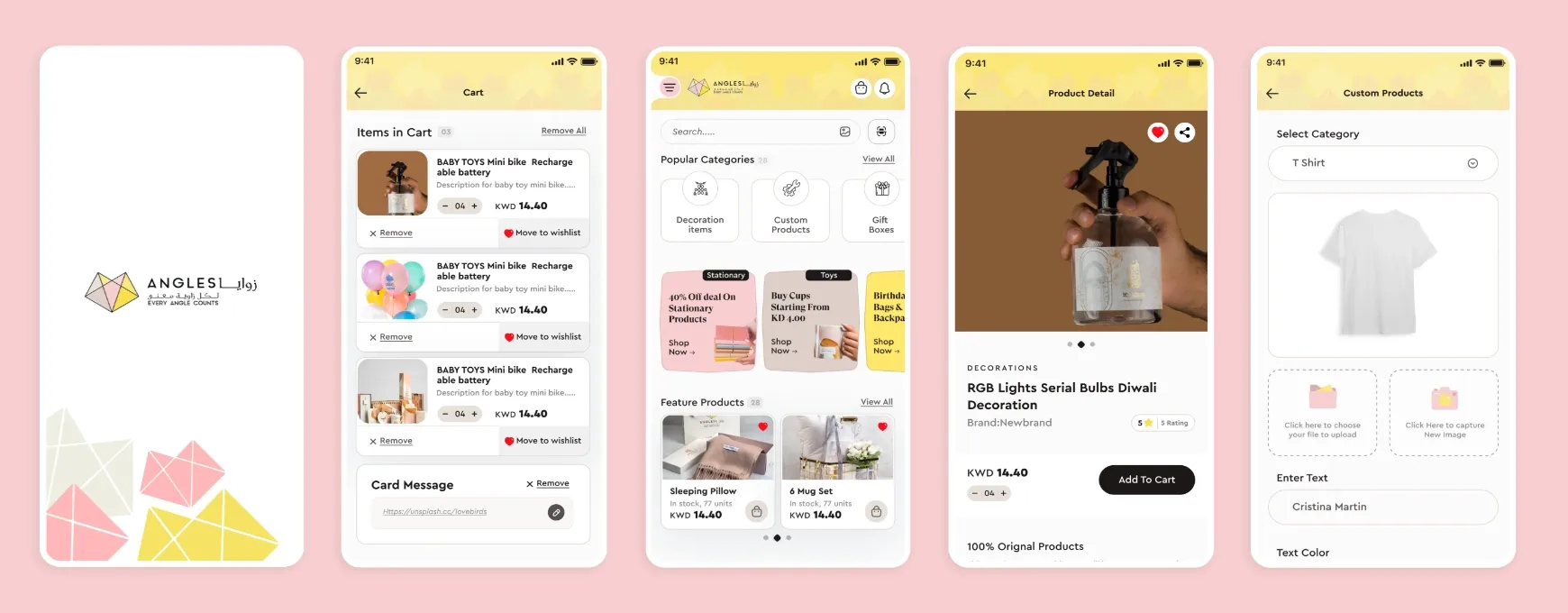
For Angles, Kuwait, we first created wireframes to map out navigation, product categories, and checkout flows. This helped the team identify potential issues early and make sure the structure made sense.
This visual showcases the wireframing done for Angles by Tenet:
Once the wireframes were approved, we built high-fidelity prototypes with brand colors, typography, and interactive elements. Testing these prototypes highlighted minor usability issues, which we fixed before handing the designs to developers. Wireframes provided the structure, and prototypes showed how users would interact with the product.
The outcome was a smoother digital experience for Angles’ customers, with fewer issues during development and a product that matched the intended design.
If you’re planning a new app or website, starting with a clear wireframe and prototype can save time and prevent problems later. Learn more about our process.
Design your app right from day one with our UI UX experts
Design your app right from day one with our UI UX experts












Got an idea on your mind?
We’d love to hear about your brand, your visions, current challenges, even if you’re not sure what your next step is.
Let’s talk


